Data Domain DD6400: Adding Replacement Disk on DD6400
Résumé: This article serves as reference for how to add a replacement disk on a DD6400 model.
Cet article concerne
Cet article ne concerne pas
Cet article n’est associé à aucun produit spécifique.
Toutes les versions du produit ne sont pas identifiées dans cet article.
Instructions
Other Data Domain products with a replacement disk showing unknown "U" can be "disk unfail" to make it spare. Storage pool products like DD6400 only accept "storage add" command to add a new disk into the system.
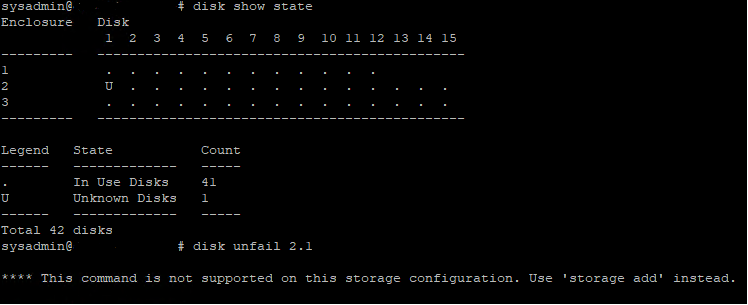
Figure 1: Data Domain CLI - Disk Show State, Disk Unfail
Figure 1: Data Domain CLI - Disk Show State, Disk Unfail
- Below is the CLI command to add a replacement operating system (1.1 and 1.2) or Data Disk into the DD6400.
- Run the storage add force disk command to add a replacement disk to the system, where disk is the number of the replacement disk
# storage add force disk 2.1

The 'storage add force' command will make the disk available to the
        filesystem. Any existing data on this will be lost.
        Are you sure? (yes|no) [no]: yes

Checking storage requirements...done
Adding disk 2.1 to the system...done

Updating system information...done

Disk 2.1 successfully added to the system
- Use the following command to check that the Data Domain system recognizes the disk drive. In the command display, the Disk State should be spare or reconstructing.
# disk show state

Enclosure   Disk
             1  2  3  4  5  6  7  8  9  10 11 12 13 14 15
---------   ----------------------------------------------
1            .  .  .  .  .  .  .  .  .  .  .  .
2            v  .  .  .  .  .  .  .  .  .  .  .  .  .  .
---------   ----------------------------------------------

Legend   State             Count
------   ---------------   -----
.        In Use Disks      26
v        Available Disks   1
------   ---------------   -----
Total 27 disks

Estimated total time remaining for reconstruction (minutes) 874
- Below is the CLI commands to add a replacement disk into the DD6400 cache tier (1.3 and 1.4).
- Run the storage add disk 1.<n> command to add the disk back to the Cache Tier, where <n> is the number of the disk from the hardware failure alert message.
- Run the filesys expand command to set the new cache disk as in-use.
Produits concernés
DD6400 ApplianceProduits
Data DomainPropriétés de l’article
Numéro d’article: 000214343
Type d’article: How To
Dernière modification: 18 mai 2026
Version: 5
Trouvez des réponses à vos questions auprès d’autres utilisateurs Dell
Services de support
Vérifiez si votre appareil est couvert par les services de support.