AppSync: Uploading .xml license file in UI receives error: Adding the license failed due to "Invalid license file"
Résumé: Uploading .xml license file in UI receives error: Adding the license failed due to "Invalid license file".
Cet article concerne
Cet article ne concerne pas
Cet article n’est associé à aucun produit spécifique.
Toutes les versions du produit ne sont pas identifiées dans cet article.
Symptômes
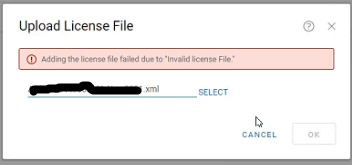
In AppSync UI, when uploading .xml license in Settings > License > Upload, receive an error:
Adding the license failed due to "Invalid license file"
Cause
The first scenario seen was the entire <lockingID> section was missing from the license file.
There should be a lockingID section like the following:
<LockingIds>

	<LockingId>

		<LockingIdCode>HOSTID</LockingIdCode>

		<LockingIdValue>value</LockingIdValue>

	</LockingId>

</LockingIds>
The second scenario seen was the LockingIdCode being inappropriately found to be XIOD like so:
<LockingId>

	<LockingIdCode>XIOID</LockingIdCode>
When it should be HOSTID
<LockingId>

	<LockingIdCode>HOSTID</LockingIdCode>
Résolution
The internal licensing generation mechanism is updated to ensure the Locking ID section is populated.
A new license is needed. Obtain a new license from the licensing team.
Informations supplémentaires
AppSync 4.2 and later supports XML type licenses.
Produits concernés
AppSyncPropriétés de l’article
Numéro d’article: 000193800
Type d’article: Solution
Dernière modification: 10 Sep 2025
Version: 4
Trouvez des réponses à vos questions auprès d’autres utilisateurs Dell
Services de support
Vérifiez si votre appareil est couvert par les services de support.