NetWorker message "workflow Server backup missed" when Server Protection Policy workflows run
Résumé: The daemon.log logs a message "workflow Server backup missed" when the Server Protection Policy workflows run.
Cet article concerne
Cet article ne concerne pas
Cet article n’est associé à aucun produit spécifique.
Toutes les versions du produit ne sont pas identifiées dans cet article.
Symptômes
- The
daemon.rawlogs a message "workflow Server backup missed" when the Server Protection Policy workflows run.- Linux:
/nsr/logs/daemon.raw - Windows (Default):
C:\Program Files\EMC NetWorker\nsr\logs\daemon.raw - NetWorker: How to use nsr_render_log to render .raw log files
- Linux:
- The Server backup workflow completes without errors.
- The rest of the workflows under Server Protection Policy complete without errors.
- There is no corrupted policy resource in the
nsrdb\dbgfolder.- Linux:
/nsr/res/nsrdb/dbg - Windows (Default):
C:\Program Files\EMC NetWorker\nsr\res\nsrdb\dbg
- Linux:
- The Server Protection Policy workflows start twice in a day.
Cause
There are two identical (duplicate) Server Protection Policies. The duplicate is not visible from the NetWorker Management Console (NMC), but can be displayed with a nsradmin query.
Résolution
Delete the duplicate policies in nsrdb with the nsradmin command in offline mode.
- Before making any changes, create a copy of the
nsrdbfolder:
Linux: /nsr/res/nsrdb
Windows: C\Program Files\EMC NetWorker\nsr\res\nsrdb
- Stop the NetWorker service on the NetWorker server.
Linux:
Windows:
systemctl stop networker
Windows:
net stop nsrd
- At the command-line run:
nsradmin -d <full path to>nsrdb
- At the
nsradminprompt, type "visual." Choose the "Select" Command. Press Enter.
Press the arrow key until the NSR Protection Policy is highlighted. Press Enter.
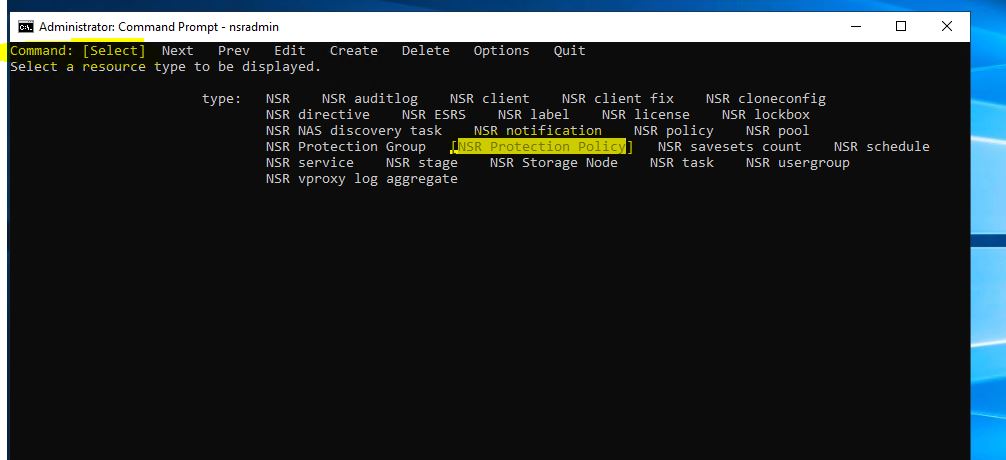
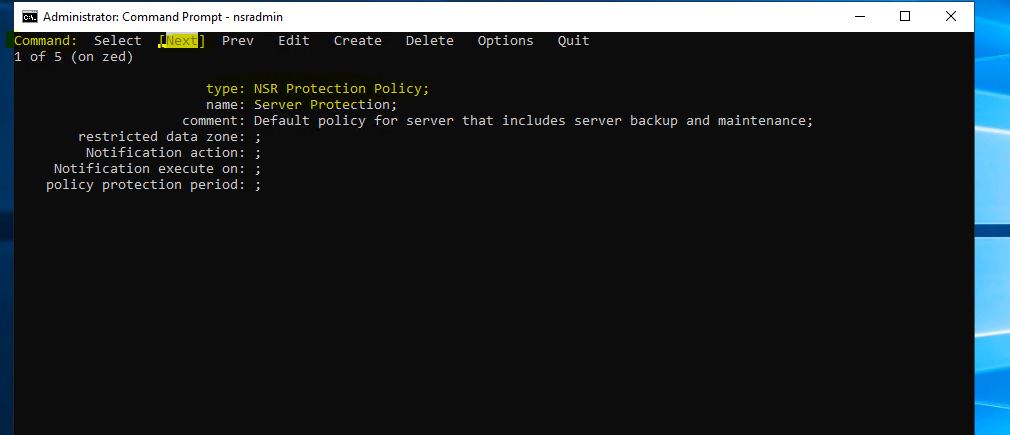
- Use the Next option to identify the duplicate Server Protection Resource.
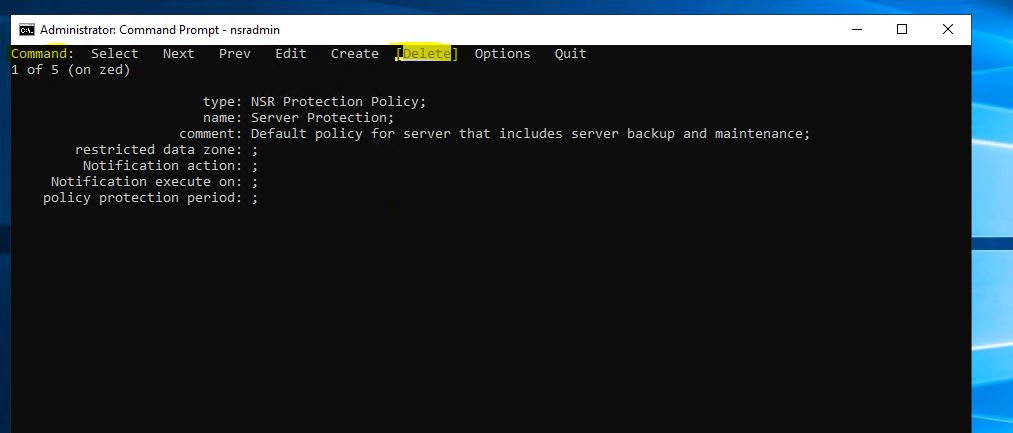
- Use the keyboard arrow keys to highlight Delete, then press Enter.
- Press the arrow key to highlight Quit and press Enter to exit from the
nsradminprompt. - Start the NetWorker service.
Linux:
Windows:
systemctl start networker
Windows:
net start nsrd
NOTE: If any issues are observed, stop NetWorker services and revert to the
nsrdb copy created in step 1. Then start services again.
Produits concernés
NetWorkerProduits
NetWorker FamilyPropriétés de l’article
Numéro d’article: 000219404
Type d’article: Solution
Dernière modification: 10 Mar 2026
Version: 3
Trouvez des réponses à vos questions auprès d’autres utilisateurs Dell
Services de support
Vérifiez si votre appareil est couvert par les services de support.