NVP vProxy:FLR 浏览失败,并显示错误“未在帐户名称和安全 ID 之间完成映射”(Windows)
Summary: Windows 虚拟机 (VM) 的 NetWorker VMware Protection (NVP) 文件级还原 (FLR) 装载成功。将本地作系统帐户指定为 FLR 装载用户 .\username.。装载作成功;但是,浏览作失败:“无法将'.\xxxx'指定为'c:\Program Files (x86)\EMC\vProxy FLR Agent\tmp\xxxxxxxxx'的所有者:帐户名称和安全 ID 之间没有映射。 ...
This article applies to
This article does not apply to
This article is not tied to any specific product.
Not all product versions are identified in this article.
Symptoms
在使用 NetWorker VMware Protection (NVP) 执行 Windows 虚拟机 (VM) 文件级恢复 (FLR) 期间,FLR 装载成功,但显示以下错误: FLR 目标虚拟机上的“C:\Program Files (x86)\EMC\vProxy FLR Agent\logs\vflragentd\vflragentd-agent.log”报告类似的错误。
2025-10-14T12:55:17-04:00 INFO:   AppAgent #7: Application agent operation: FLR browse_files
2025-10-14T12:55:17-04:00 ERROR:  AppAgent #7: Unable to assign '.\Administrator' as the owner of 'C:\Program Files (x86)\EMC\vProxy FLR Agent\tmp\2521662446': No mapping between account names and security IDs was done.
2025-10-14T12:58:28-04:00 TRACE:  Discovering partitions and file systems (not under 'C:\Program Files (x86)\EMC\vProxy FLR Agent\flr\mountpoints')
2025-10-14T12:58:28-04:00 TRACE:  Discovered 3 partitions.
无法从恢复向导浏览 FLR:

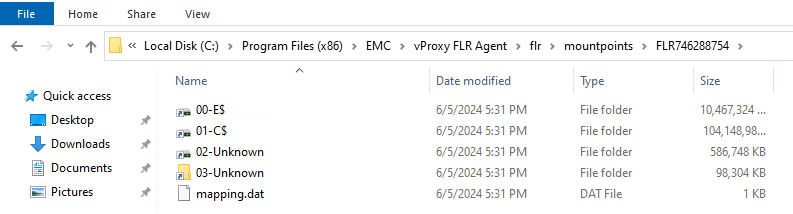
在虚拟机上,您可以访问“C:\Program Files (x86)\EMC\vProxy FLR Agent\flr\mountpoints\”下的 FLR 装载点。
Cause
在装载作期间,使用 .\Username 指定装载用户。
提醒:使用意图
.\username 是以本地用户帐户而不是域用户帐户身份登录。这样做可以区分可能同时具有域帐户和本地帐户的用户名。例如,“管理员”。装载期间使用的逻辑允许用户成功登录,但浏览权限未正确应用。
Resolution
您可以从 FLR 装载点(C:\Program Files (x86)\EMC\vProxy FLR Agent\flr\mountpoints\:
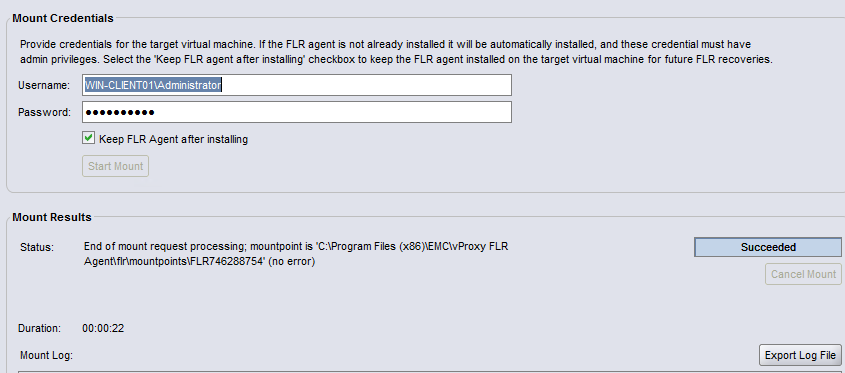
要使用 NetWorker 恢复向导,请关闭当前 FLR 作业并重新启动 FLR。指定用户时,请勿在用户名前输入 .\。
如果要指定本地管理员帐户,请输入 HOSTNAME\Administrator。例如:
Affected Products
NetWorkerProducts
NetWorker FamilyArticle Properties
Article Number: 000192996
Article Type: Solution
Last Modified: 14 Oct 2025
Version: 2
Find answers to your questions from other Dell users
Support Services
Check if your device is covered by Support Services.