Come determinare se Windows Hello utilizza ControlVault per il lettore di impronte digitali
Riepilogo: Come determinare se Windows Hello utilizza ControlVault per il lettore di impronte digitali
Questo articolo si applica a
Questo articolo non si applica a
Questo articolo non è legato a un prodotto specifico.
Non tutte le versioni del prodotto sono identificate in questo articolo.
Istruzioni
- Per prima cosa, determinare se il sistema dispone di ControlVault utilizzando la procedura descritta in Come stabilire se il sistema dispone di ControlVault
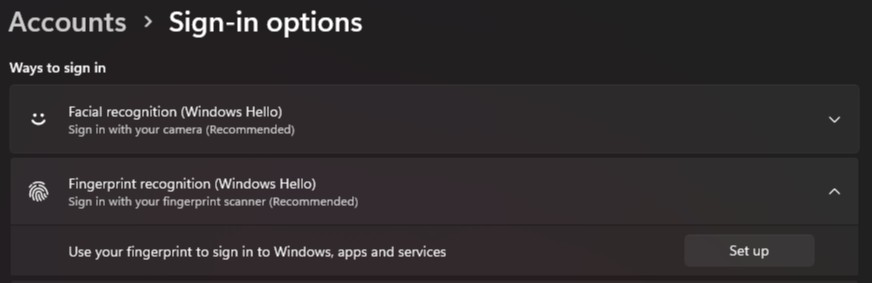
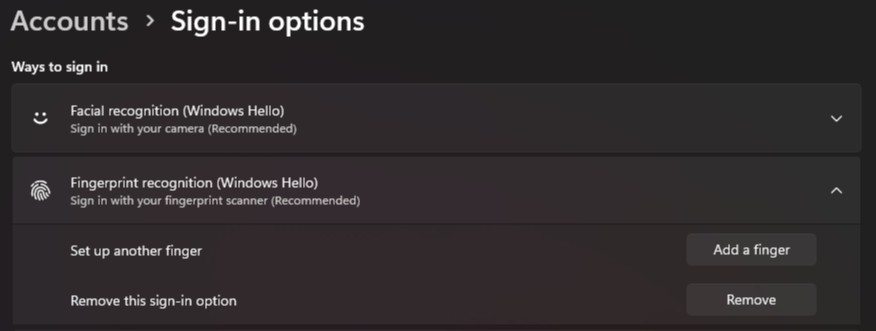
- Avvia Impostazioni in Windows, fai clic su Account, quindi fai clic su Opzioni di accesso
- In Riconoscimento delle impronte digitali (Windows Hello) se viene visualizzato il pulsante "Configura ", il dispositivo non contiene informazioni sulle impronte digitali registrate
- In Riconoscimento delle impronte digitali (Windows Hello) se viene visualizzato il pulsante "Aggiungi un dito", nel dispositivo sono registrate le informazioni sulle impronte digitali
Prodotti interessati
Dell Pro Max 14 MC14250, Dell Pro Max 16 MC16250, Dell Pro 13 Plus PB13250, Dell Pro 14 Plus PB14250, Dell Pro 16 Plus PB16250, Dell Pro Rugged 13 RA13250, Dell Pro Rugged 14 RB14250, Latitude 7030 Rugged Extreme Tablet, Latitude 7200 2-in-1
, Latitude 7210 2-in-1, Latitude 7220EX Rugged Extreme Tablet, Latitude 7220 Rugged Extreme Tablet, Latitude 7230 Rugged Extreme Tablet, Latitude 5300 2-in-1, Latitude 5300, Latitude 5310 2-in-1, Latitude 5310, Latitude 5320, Latitude 5330, Latitude 5340, Latitude 5350, Latitude 7300, Latitude 7310, Latitude 7320, Latitude 7320 Detachable, Latitude 7330, Latitude 7330 Rugged Extreme, Latitude 7340, Latitude 7350, Latitude 7350 Detachable, Latitude 9330, Latitude 5400, Latitude 5401, Latitude 5410, Latitude 5411, Latitude 5421, Latitude 5430 Rugged, Latitude 5431, Latitude 5440, Latitude 5450, Latitude 7400 2-in-1, Latitude 7400, Latitude 7410, Latitude 7420, Latitude 7430, Latitude 7440, Latitude 7450, Latitude 9410, Latitude 9420, Latitude 9430, Latitude 9440 2-in-1, Latitude 9450 2-in-1, Latitude 5500, Latitude 5501, Latitude 5510, Latitude 5511, Latitude 5520, Latitude 5521, Latitude 5530, Latitude 5531, Latitude 5540, Latitude 5550, Latitude 7520, Latitude 7530, Latitude 9510, Latitude 9520, Latitude 7640, Latitude 7650, Latitude 5420, Latitude 5430, Precision 3470, Precision 3480, Precision 3490, Precision 5470, Precision 5480, Precision 5490, Precision 3540, Precision 3541, Precision 3550, Precision 3551, Precision 3560, Precision 3561, Precision 3570, Precision 3571, Precision 3580, Precision 3581, Precision 3590, Mobile Precision 3591, Precision 7540, Precision 7550, Precision 7560, Precision 5680, Mobile Precision 5690, Precision 7670, Precision 7680, Precision 7740, Precision 7750, Precision 7760, Precision 7770, Precision 7780
...
Proprietà dell'articolo
Numero articolo: 000353977
Tipo di articolo: How To
Ultima modifica: 07 ago 2025
Versione: 1
Trova risposta alle tue domande dagli altri utenti Dell
Support Services
Verifica che il dispositivo sia coperto dai Servizi di supporto.