Dell Unity: Serial Number for CTA-VE Support Cases
요약: This article shows how to find the Dell Unity Serial Number (SN) when looking for CTA Virtual Edition (VE) support, since CTA VE, when implemented with Unity, has no SN to open a case with, instead the Unity SN is used. ...
이 문서는 다음에 적용됩니다.
이 문서는 다음에 적용되지 않습니다.
이 문서는 특정 제품과 관련이 없습니다.
모든 제품 버전이 이 문서에 나와 있는 것은 아닙니다.
지침
When attempting to locate the serial number on a CTA-VE (Cloud Tiering Appliance Virtual Edition) system for case creation, the following command may return no output:
cta:~ # rffm getEmcSerialNumber
Since CTA-VE does not provide a serial number through this command, obtain the serial number of the associated Dell Unity system using one of the following methods:
- UEMCLI
- SSH
- Unisphere
Use the Unity system serial number when opening a support case with CTA support.
UEMCLI
18:13:59 service@FNM00XXXXXXspa:~/user# uemcli -d localhost -u admin -securePassword -noHeader /sys/general show
Password:
1:    System name           = FNM00XXXXXX
      Model                 = Unity 400F
      Product serial number = FNM00XXXXXX
      Auto failback         = on
      Health state          = OK (5)
18:14:25 service@FNM00XXXXXX spa:~/user# uemcli /sys/general show
Storage system address: 127.0.0.1
Storage system port: 443
HTTPS connection

1:    System name           = FNM00XXXXXX
      Model                 = Unity 400F
      Product serial number = FNM00XXXXXX
      Auto failback         = on
      Health state          = OK (5)
SSH
18:19:23 service@FNM00XXXXXX spa:~/user# svc_diag
======== Now executing basic state ========
* System Serial Number is: FNM00XXXXXX
* System Model Number is: Unity 400F
* System Friendly Host Name is: FNM00XXXXXX
* Current Software version: c4dev_PIE_8792R-5.4.0.0.5.095-GNOSIS_RETAIL
* Unisphere IP address(es): 10.245.XX.XXX fe80::260:1600:XXXX:XXX
* SSH Enabled: true
* FIPS mode: Disabled
* Boot Mode: Normal Mode
* Post Faults:  0x0000
* Backend Faults:       0x0000
* Boot Faults:  0x0000
* Rescue Reason:        0x0000
* Rescue reason for code 0x0000 - No faults detected.
* SP Service Hint Code: <None>
UNISPHERE (UI)
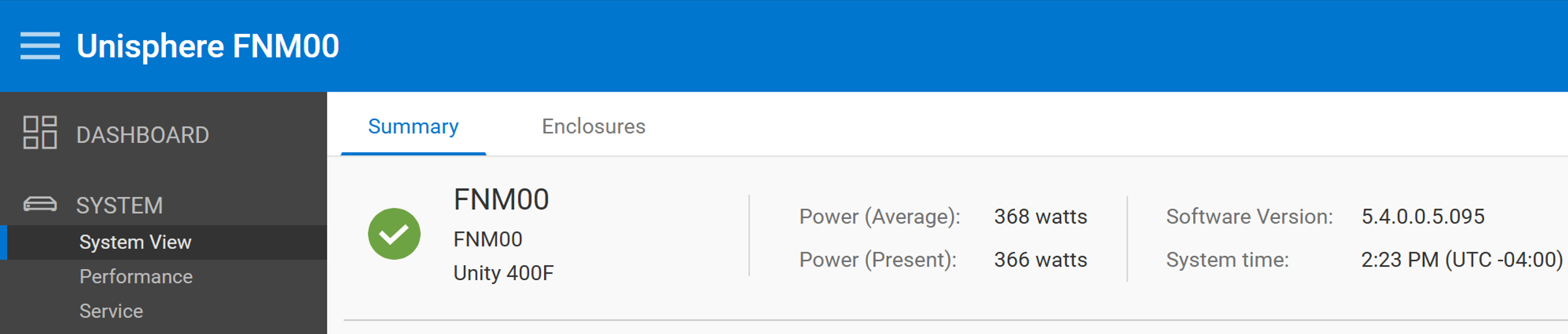
In Unisphere, log in with an administrator account and navigate to Dashboard > System > System View > Summary to view the system summary information.
추가 정보
CTA provides cloud integration for Dell Unity systems by transferring file and block data to and from cloud storage, helping optimize on-premises storage utilization. CTA is supported with all Dell Unity platforms, including All-Flash, Hybrid, and Dell Unity VSA PE systems. It is included with Dell Unity at no additional cost and does not require a separate license.
CTA Feature Support with Dell Unity
CTA supports the following features when integrated with a Dell Unity system:
- File Tiering
- Block Snapshot Archiving
- Repository Migration
- File Migration
- Encryption and Compression
Note: The source system must be a Dell Unity system.
Feature Requirements
File Tiering
- Dell Unity OE 4.1.x or later
- CTA 11.0 or later
Block Snapshot Archiving
- Dell Unity OE 4.2.x or later
- CTA 12.0 or later
File Migration
- Dell Unity OE 4.2.x or later
- CTA 12.0 SP1 or later
Repository Migration, Encryption, and Compression
- Supported when used with a compatible Dell Unity system and CTA deployment.
For more information, see:
- For more details, review Manual: CTA and CTA/VE 13.2 Interoperability Matrix.
- CTA Documentation available at Support for Cloud Tiering Appliance | Documentation | Dell US.
해당 제품
Dell Unity 300, Dell EMC Unity 300F, Dell EMC Unity 350F, Dell EMC Unity XT 380, Dell EMC Unity XT 380F, Dell EMC Unity 400, Dell EMC Unity 400F, Dell EMC Unity 450F, Dell EMC Unity XT 480, Dell EMC Unity XT 480F, Dell EMC Unity 500F
, Dell EMC Unity 550F, Dell EMC Unity 600, Dell EMC Unity 600F, Dell EMC Unity 650F, Dell EMC Unity XT 680, Dell EMC Unity XT 680F, Dell EMC Unity XT 880F, Dell EMC Unity Family |Dell EMC Unity All Flash, Dell EMC Unity Family, Dell EMC Unity Hybrid, Dell EMC UnityVSA Professional Edition/Unity Cloud Edition
...
문서 속성
문서 번호: 000022645
문서 유형: How To
마지막 수정 시간: 15 7월 2026
버전: 10
다른 Dell 사용자에게 질문에 대한 답변 찾기
지원 서비스
디바이스에 지원 서비스가 적용되는지 확인하십시오.