Data Domain - Joining a Data Domain System to a Windows Domain
요약: This article provides instructions on: Verifying Mode=Active Directory Joining a Data Domain system to a Windows Domain Verifying that DNS is configured properly.
이 문서는 다음에 적용됩니다.
이 문서는 다음에 적용되지 않습니다.
이 문서는 특정 제품과 관련이 없습니다.
모든 제품 버전이 이 문서에 나와 있는 것은 아닙니다.
증상
Joining a Data Domain System to a Windows Domain
SUMMARY
This article provides instructions on:
- Verifying Mode=Active Directory
- Joining a Data Domain system to a Windows Domain
- Verifying that DNS is configured properly
APPLIES TO
-
All Data Domain systems
- All Releases
원인
None
해결
INSTRUCTION
Verify that DNS is configured properly (Forward and Reverse Lookup)
NOTE: You can also perform this function form the Data Domain system with the below command:
net lookup {<ipaddr> | <hostname>}
- Issue the following commands from any windows client which is part of AD:
-
C:\nslookup <IP address of DC> IP address to name resolution and will show FQDN of the host.
C:\nslookup <realm> will provide all the domain controller hostname assigned to IP addresses.
C:\nslookup <Data Domain systemFQDNhostname> will provide IP of the Data Domain system.
C:\nslookup <IP of Data Domain system> provides IP to name address.
-
For DD OS versions 4.8 and above:
cifs troubleshooting domaininfo
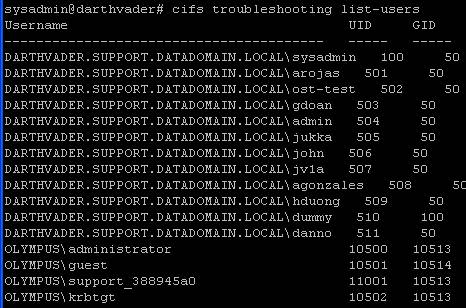
- Verify which authentication mode the restorer is in by entering at a command prompt:
cifs show config
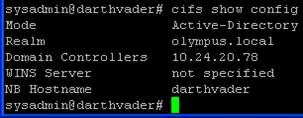
- Users from the domain will be listed by their domain\username and their UID, and GID should be a value of 10000 or greater.
- Once the status is confirmed to be enabled:
Example:
cifs set authentication active-directory <realm> (I.P. address of KDC server)
cifs set authentication active-directory Olympus.local 10.24.20.78
- After entering the set authentication active-directory command, you will be prompted for the admin username and password. Note: User Name only is required, do not prefix with domain\.
- Output of the above command will state that the Data Domain system has joined the Active directory successfully
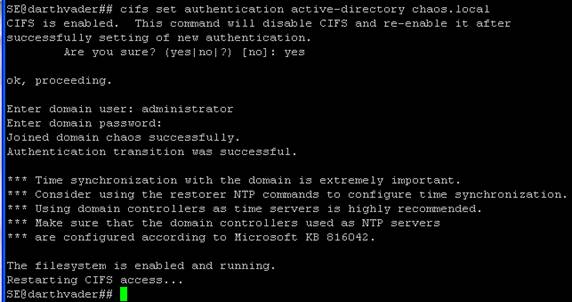
- If the Data Domain system is already in Active-Directory Authentication mode, and you want to re-join AD, it can help to put the Restorer in Workgroup mode. At the command prompt, enter workgroup mode by:
cifs set authentication workgroup workgroup
- Then issue the following commands:
cifs disable
cifs enable
- Check the status of CIFS by entering:
cifs status
추가 정보
해당 제품
Data Domain제품
Data Domain문서 속성
문서 번호: 000043696
문서 유형: Solution
마지막 수정 시간: 28 7월 2026
버전: 8
다른 Dell 사용자에게 질문에 대한 답변 찾기
지원 서비스
디바이스에 지원 서비스가 적용되는지 확인하십시오.