Dell Unity: Hervatten replicatie geeft volledige synchronisatie aan na failover met synchronisatie
요약: In Dell Unity OE 5.0.x wordt in het bevestigingsbericht Hervatten dat wordt weergegeven na een failover met synchronisatiebewerking ten onrechte aangegeven dat een volledige synchronisatie wordt gestart voor alle geselecteerde replicatiesessies. Dit is alleen een probleem met berichten in de gebruikersinterface en heeft geen invloed op het daadwerkelijke replicatiegedrag. Dell Unity Development heeft het probleem geïdentificeerd en er is een oplossing gepland voor Dell Unity OE 5.1, waarbij het samenvattingsbericht Hervatten de replicatiebewerking die wordt uitgevoerd correct weergeeft. ...
이 문서는 다음에 적용됩니다.
이 문서는 다음에 적용되지 않습니다.
이 문서는 특정 제품과 관련이 없습니다.
모든 제품 버전이 이 문서에 나와 있는 것은 아닙니다.
증상
In Dell Unity OE 5.0.x geeft de optie Hervatten voor een replicatiesessie na het uitvoeren van een failover met synchronisatie een bevestigingsbericht weer waarin staat dat een volledige synchronisatie zal worden gestart voor alle betrokken replicatiesessies.
Dit bericht is geïntroduceerd als een nieuwe functie in Unity OE 5.0.x om gebruikers te informeren over het verwachte synchronisatiegedrag. Hoewel het bericht aangeeft dat een volledige synchronisatie zal plaatsvinden, heeft Dell Unity Development dit gedrag geïdentificeerd en corrigeert het in een toekomstige release.
Dit bericht kan worden weergegeven op elke Dell Unity array waarop Unity OE 5.0.x wordt uitgevoerd bij het hervatten van replicatie na een failover met synchronisatiebewerking .
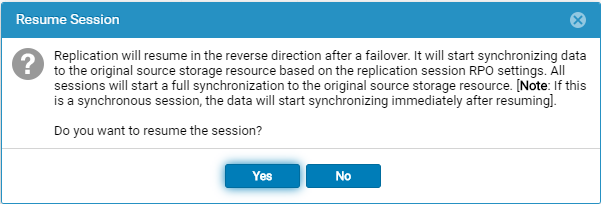
Het volgende bericht wordt weergegeven wanneer de optie Hervatten wordt geselecteerd na een failover met synchronisatiebewerking :
Replication will resume in the reverse direction after a failover. It will start synchronizing data to the original source storage resource based on the replication session RPO settings. All sessions will start a full synchronization to the original source storage resource. [Note: If this is a synchronous session, the data will start synchronizing immediately after resuming].

Do you want to resume the session?
원인
Het samenvattingsbericht Hervatten is onjuist. Na het uitvoeren van een failover met synchronisatie, geeft het bevestigingsbericht dat wordt weergegeven bij het selecteren van Hervatten aan dat een volledige synchronisatie wordt geïnitieerd voor alle replicatiesessies. Dit bericht geeft echter niet nauwkeurig het werkelijke replicatiegedrag weer.
Het probleem is beperkt tot het bericht in de gebruikersinterface en geeft niet aan dat er een volledige synchronisatie zal plaatsvinden. Dell Unity Development heeft dit geïdentificeerd als een probleem in Unity OE 5.0.x en werkt aan een correctie.
해결
Het samenvattingsbericht voor hervatten is onjuist en zal worden gecorrigeerd in een toekomstige Unity OE-release.
Het bericht geeft momenteel aan dat een volledige synchronisatie zal worden geïnitieerd voor alle replicatiesessies. Dit is alleen een weergaveprobleem en weerspiegelt niet de daadwerkelijke replicatiebewerking die zal worden uitgevoerd.
Een oplossing voor dit probleem is gepland om te worden opgenomen in Dell Unity OE 5.1. Tot die tijd kunnen gebruikers veilig het onjuiste volledige synchronisatiebericht negeren dat wordt weergegeven in Unity OE 5.0.x.
De juiste berichten moeten zijn:
Failback Confirmation Message
Failback will perform a synchronization from the destination storage resource to the source storage resource, block access to the destination storage resource to allow it to be used for replication, and change the source storage resource access to read/write mode. Replication will then resume. The synchronization could be either delta or full synchronization depending on the replicated snapshots. This operation will be lengthy if a full synchronization is needed during failback.
When the failback operation is complete, you can then connect your hosts to the source storage resource.
Note: Before you begin, you should block writes to the destination storage resource because it will be placed in read-only mode.
Bevestiging hervatten bij failover
Replication will resume in the reverse direction after a failover. It will start synchronizing data to the original source storage resource based on the replication session RPO settings.
All sessions will start a synchronization to the original source storage resource. The synchronization could be either delta or full synchronization depending on the replicated snapshots.
Note: If this is a synchronous session, the data will start synchronizing immediately after resuming. Do you want to resume the session?
해당 제품
Dell Unity 300, Dell EMC Unity 300F, Dell EMC Unity 400, Dell EMC Unity 400F, Dell EMC Unity 450F, Dell EMC Unity 500, Dell EMC Unity 550F, Dell EMC Unity 600, Dell EMC Unity 600F, Dell EMC Unity 650F, Dell EMC Unity Family제품
Dell EMC Unity XT 380, Dell EMC Unity XT 380F, Dell EMC Unity XT 480, Dell EMC Unity XT 480F, Dell EMC Unity XT 680, Dell EMC Unity XT 680F, Dell EMC Unity XT 880, Dell EMC Unity XT 880F, Dell EMC Unity Family |Dell EMC Unity All Flash
, Dell EMC Unity Family, Dell EMC Unity Hybrid, Dell EMC UnityVSA Professional Edition/Unity Cloud Edition
...
문서 속성
문서 번호: 000063277
문서 유형: Solution
마지막 수정 시간: 16 7월 2026
버전: 8
다른 Dell 사용자에게 질문에 대한 답변 찾기
지원 서비스
디바이스에 지원 서비스가 적용되는지 확인하십시오.