How to Identify the Dell Encryption Enterprise or Dell Encryption Personal Version
요약: Learn how to identify the version of Dell Encryption Enterprise or Dell Encryption Personal by following these instructions.
이 문서는 다음에 적용됩니다.
이 문서는 다음에 적용되지 않습니다.
이 문서는 특정 제품과 관련이 없습니다.
모든 제품 버전이 이 문서에 나와 있는 것은 아닙니다.
지침
Knowing the version of Dell Encryption Enterprise (formerly Dell Data Protection Enterprise Edition) or Dell Encryption Personal (formerly Dell Data Protection Personal Edition) allows users to:
- Identify known issues
- Determine UI differences
- Understand workflow changes
- Verify system requirements
Affected Products:
- Dell Encryption Enterprise
- Dell Encryption Personal
- Dell Data Protection Enterprise Edition
- Dell Data Protection Personal Edition
Affected Operating Systems:
- Windows
Versioning can be determined either through the product user interface (UI) or through the product Installer. Click the appropriate tab for more information.
UI
Note: Dell Encryption Enterprise or Dell Encryption Personal must be installed before identifying the version through the UI.
- Log in to the Windows computer.
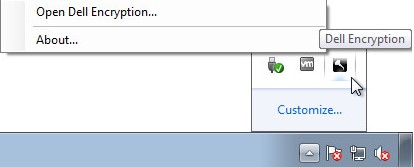
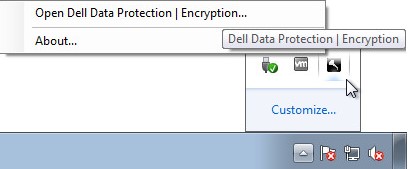
- In the Windows System Tray, right-click the Dell Encryption (formerly Dell Data Protection | Encryption) icon and then select Open Dell Encryption or Open Dell Data Protection | Encryption.
- The following image shows the Dell Encryption option.
- The following image shows the Dell Data Protection Encryption option.
- The following image shows the Dell Encryption option.
- In the product UI, click the question mark icon and then record the version number shown after About Version. The first three numbers are the most important digits to record. In the example, 8.15.0 are the first three numbers.
 Note: The version of your client may differ from the above screenshot.
Installer
Note: For information about downloading the installer, reference How to Download Dell Encryption Enterprise or Dell Encryption Personal.
- Right-click the <INSTALLER> and then select Properties.
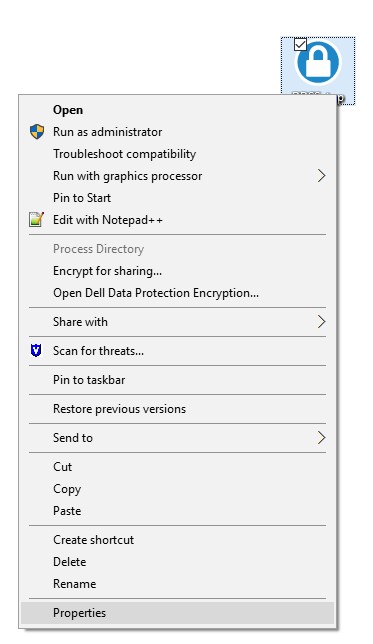 Note: <INSTALLER> =
- Dell Encryption Enterprise =
DDSSetup.exe - Dell Encryption Personal =
DDSSetup.exe - Dell Data Protection Enterprise Edition =
DDPSetup.exe - Dell Data Protection Personal Edition =
DDPSetup.exe
- Dell Encryption Enterprise =
- Click the Details tab.

- Record the Product version. The first three numbers are the most important digits to record. In the example image, 8.15.0 are the first three numbers.
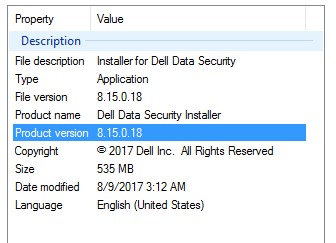 Note: The version of your client may differ from the above screenshot.
해당 제품
Dell Encryption문서 속성
문서 번호: 000124591
문서 유형: How To
마지막 수정 시간: 15 7월 2026
버전: 13
다른 Dell 사용자에게 질문에 대한 답변 찾기
지원 서비스
디바이스에 지원 서비스가 적용되는지 확인하십시오.