Dirty Shutdown Resulting Performance Counter in AWCC to Display Abnormally in Alienware Area-51m
요약: Learn about the performance counter that displays abnormally in Alienware Command Center due to a dirty shutdown on the Alienware Area-51m.
이 문서는 다음에 적용됩니다.
이 문서는 다음에 적용되지 않습니다.
이 문서는 특정 제품과 관련이 없습니다.
모든 제품 버전이 이 문서에 나와 있는 것은 아닙니다.
증상
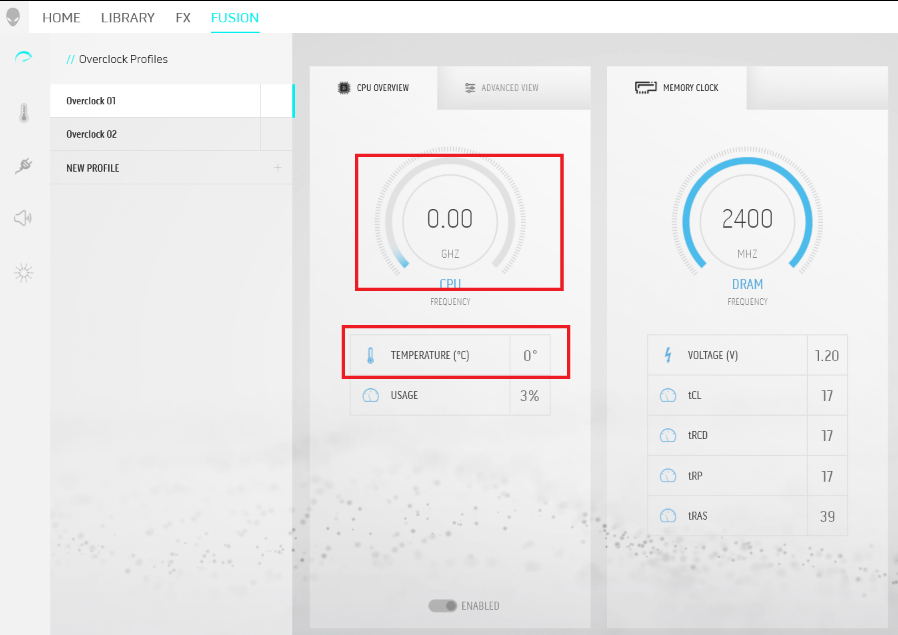
The performance counter occasionally displays as 0 value after performing a dirty (force) shutdown action on their Alienware Area-51.
원인
Force shutdown causes the registry to corrupt and results in the counter to display abnormally.
해결
Follow the steps below to rebuild the registry.
Caution: If done incorrectly, modifying the Windows registry can lead to data loss or operating system corruption. Dell Technologies recommends that you back up data before proceeding with any Windows Registry edit. It is also recommended that a full backup of the Windows registry is made before starting the edit. See Windows registry information for advanced users for additional information.
for additional information.
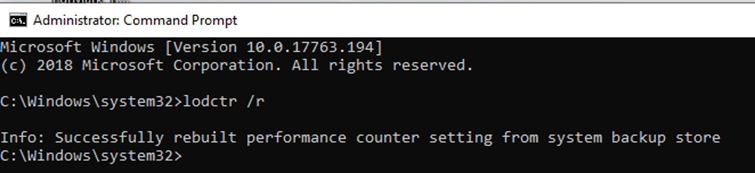
- Run the Command Prompt with Admin’s Privilege by right-click CMD and select Run as Administrator.
- Go to C:\Windows\System32 folder and type lodctr /r, press Enter key to perform the command.
- The performance counter setting rebuilds itself. Quit CMD after the rebuild progress is completed.
- Restart the computer and relaunch the Alienware Command Center again (AWCC).
- Check on the value, and now it is back to normal.
해당 제품
Alienware Area-51m문서 속성
문서 번호: 000128426
문서 유형: Solution
마지막 수정 시간: 19 4월 2026
버전: 9
다른 Dell 사용자에게 질문에 대한 답변 찾기
지원 서비스
디바이스에 지원 서비스가 적용되는지 확인하십시오.