VirtualBox Fails to Mount USB Devices When Dell Encryption Enterprise is Installed
요약: When Dell Encryption Enterprise (formerly Dell Data Protection | Enterprise Edition) is Installed VirtualBox Fails to Mount USB Devices.
이 문서는 다음에 적용됩니다.
이 문서는 다음에 적용되지 않습니다.
이 문서는 특정 제품과 관련이 없습니다.
모든 제품 버전이 이 문서에 나와 있는 것은 아닙니다.
증상
Affected Products:
- Dell Encryption Enterprise
- Dell Data Protection | Enterprise Edition
Affected Versions:
- v11.0 and Earlier
Installing Dell Encryption Enterprise on the same base operating system as VirtualBox, causes VirtualBox to fail to mount the USB devices onto its Virtual Machines.
원인
When Dell Encryption Enterprise is installed on an endpoint, a specific filter driver is added to the computer to manage the USB devices. This filter driver causes VirtualBox to fail to mount the USB devices with an error like the below one:

해결
If not using Dell Encryption External Media to encrypt the USB devices, it is possible to manually remove the added filter driver from the registry following the steps below:
- Login into the endpoint with an administrative account
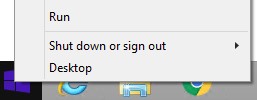
- Right-click the Windows start menu and then click Run.
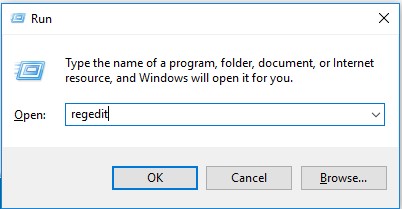
- In the Run UI, type regedit and then press OK. This opens the Registry Editor.
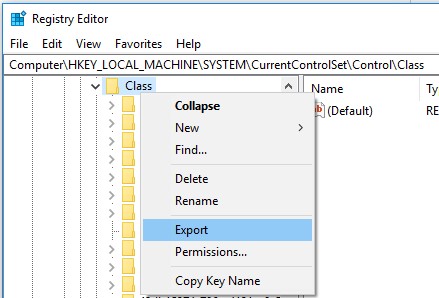
- Expand the path
HKLM\system\currentcontrolset\control\classand export a backup.
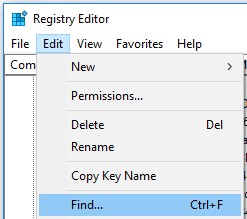
- Search for all the entries of
CmgPCSinHKLM\system\currentcontrolset\control\class: Edit-> Find.
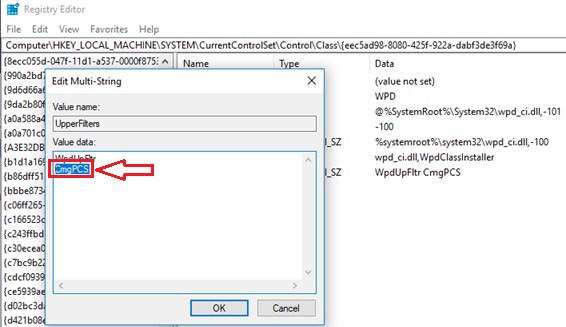
- Delete all the
CmgPCSentries from UpperFilters and LowerFilters registry values.Warning: DO NOT DELETE THE WHOLE UpperFilters and LowerFilters KEYs as this results in an unusable computer at reboot and it is not possible to recover it.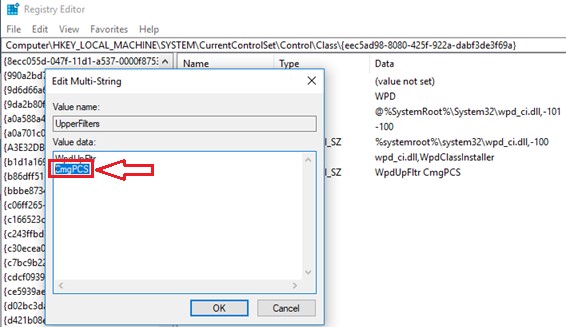
- Download
Sysinternals Autoruns64from Microsoft https://docs.microsoft.com/en-us/sysinternals/downloads/.
- Open
Autoruns64> Drivers and look forCmgPCSand delete the entry.
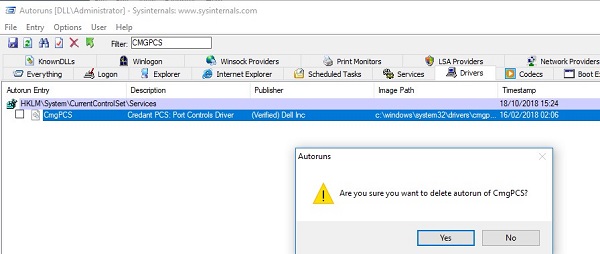
- Reboot the endpoint.
해당 제품
Dell Encryption문서 속성
문서 번호: 000129605
문서 유형: Solution
마지막 수정 시간: 29 6월 2026
버전: 12
다른 Dell 사용자에게 질문에 대한 답변 찾기
지원 서비스
디바이스에 지원 서비스가 적용되는지 확인하십시오.