Dell Data Security Server 프런트엔드 버전을 식별하는 방법
요약: Dell Data Security(이전 Dell Data Protection) 서버 프런트엔드의 버전을 식별하는 단계별 지침을 알아보십시오.
이 문서는 다음에 적용됩니다.
이 문서는 다음에 적용되지 않습니다.
이 문서는 특정 제품과 관련이 없습니다.
모든 제품 버전이 이 문서에 나와 있는 것은 아닙니다.
지침
Dell Data Security(이전 Dell Data Protection) 서버 프런트엔드의 버전을 알면 관리자가 다음을 수행할 수 있습니다.
- 알려진 문제 식별
- 워크플로 변경 이해
- 시스템 요구 사항 확인
영향을 받는 제품:
- Dell Security Management Server
- Dell Data Protection | Enterprise Edition Server
영향을 받는 운영 체제:
- Windows
참고: 이 문서에서는 Dell Security Management Server 또는 Dell Security Management Server Virtual의 프런트엔드 서버 버전을 확인합니다. 백엔드 버전을 확인하려면 Dell Data Security Server 버전을 식별하는 방법을 참조하십시오.
다음을 통해 버전 관리를 할 수 있습니다.
- 설치 프로그램
- Windows UI(사용자 인터페이스)
자세한 내용을 확인하려면 해당 프로세스를 클릭하십시오.
설치 프로그램
- Security Management Server .zip의 압축을 풉니다.
- Dell 컴퓨터용
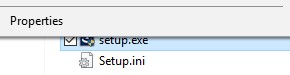
[LOCATION]\Security Management Server\x64.참고:[LOCATION]= 압축을 푼 .zip 파일의 위치 - 오른쪽 클릭하고
setup.exe을 클릭한 다음 속성을 선택합니다.
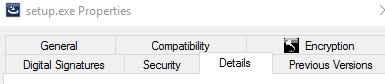
- Details 탭을 클릭합니다.
- Product version을 기록합니다. 이 예에서 제품 버전은 9.9.2입니다.
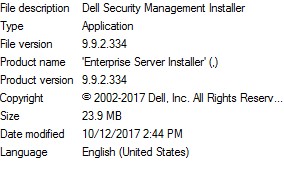 참고: 파일 버전이 위의 스크린샷과 다를 수 있습니다.
Windows
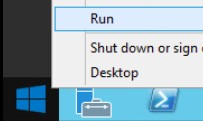
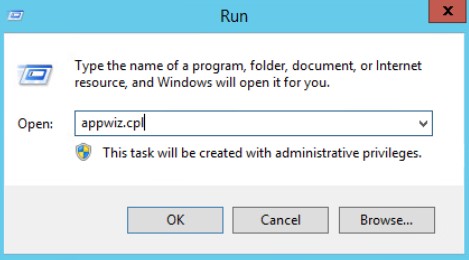
- 관리자로 Windows 시작 메뉴를 오른쪽 클릭한 다음 Run을 클릭합니다.
- Run UI에서
appwiz.cpl입력한 다음 OK를 누릅니다.
- 프로그램 및 기능에서 Dell Security Management Server x64를 찾습니다.
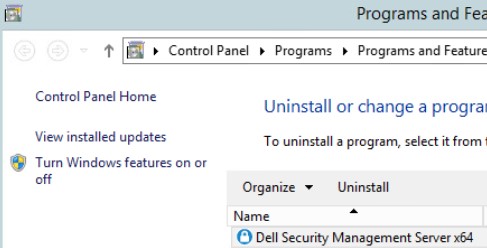 참고: 일부 서버 버전에서는 Dell Security Management Server 대신 Dell Enterprise Server가 표시될 수 있습니다.
 - Version을 기록합니다. 이 예에서 제품 버전은 10.2.3입니다.
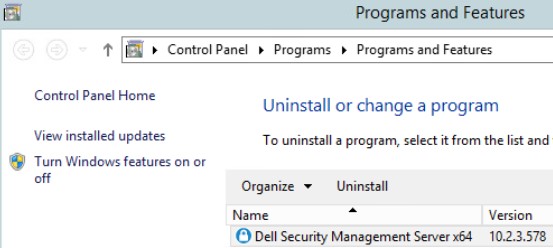 참고: 버전은 위의 스크린샷과 다를 수 있습니다.
지원 부서에 문의하려면 Dell Data Security 국제 지원 전화번호를 참조하십시오.
온라인으로 기술 지원 요청을 생성하려면 TechDirect로 이동하십시오.
추가 정보 및 리소스를 보려면 Dell 보안 커뮤니티 포럼에 참여하십시오.
추가 정보
비디오
해당 제품
Dell Encryption문서 속성
문서 번호: 000130588
문서 유형: How To
마지막 수정 시간: 19 4월 2026
버전: 11
다른 Dell 사용자에게 질문에 대한 답변 찾기
지원 서비스
디바이스에 지원 서비스가 적용되는지 확인하십시오.