Isilon: Using Powershell with Platform API - Creating Objects and RAN
요약: This article explains how to use Powershell with the OneFS Platform API to create objects and RAN.
이 문서는 다음에 적용됩니다.
이 문서는 다음에 적용되지 않습니다.
이 문서는 특정 제품과 관련이 없습니다.
모든 제품 버전이 이 문서에 나와 있는 것은 아닙니다.
증상
Not required
원인
Not required
해결
Introduction to JSON
The PAPI uses JSON as the data-interchange format and it's critical to understand how to leverage it to use PAPI to create, modify, or delete resources. You can learn more about JSON at www.json.org but the key principle is that it is complete independent programming language and is built on two structures:- A collection of name/value pairs
- An ordered list of values
Example output from getting a system object would look like this:
{
"<object>": {
"<property>": <value>,
...
}
To know what JSON text we need to POST to create an object, look at the PAPI self documentation by sending the following request:
GET /platform/1/quota/quotas?describe
Here is the relevant Powershell code:
#Get PAPI self documentation for quotas
$resource = "/platform/1/quota/quotas?describe"
$uri = $baseurl + $resource
$ISIObject = Invoke-RestMethod -Uri $uri -Headers $headers -Method Get
$ISIObject
The example output below outlines what you need to POST to create a new quota. Pay attention to the required properties since they may not be the same properties required for the corresponding isi command.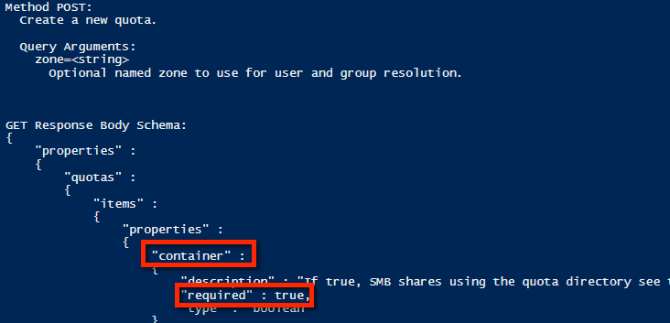
Using the example properties, the following is an example JSON string that can be used to create a directory hard quota:
$QuotaObject = @"
{"type":"directory","include_snapshots": false,"container": true, "path": /ifs/home/user1", "enforced": true, "thresholds": {"hard":10000000},"thresholds_include_overhead": false}
"@
With the JSON string completed, all that's left is to build the Invoke-RestMethod parameters and submit. In the example code below, the JSON string is the body of the POST and that the content type is application/json:
$headers = @{"Authorization"="Basic $($EncodedPassword)"}
$uri = $baseurl + $resource
$ISIObject = Invoke-RestMethod -Uri $uri -Headers $headers -Body $QuotaObject -ContentType "application/json; charset=utf-8" -Method POST
Write-Host " Resulting Quota ID: " $ISIObject.id
$uri = $baseurl + $resource
$ISIObject = Invoke-RestMethod -Uri $uri -Headers $headers -Body $QuotaObject -ContentType "application/json; charset=utf-8" -Method POST
Write-Host " Resulting Quota ID: " $ISIObject.id
Putting It All Together
Using an example, let's assume your environment has many home directories for users under a single parent directory, (example: /ifs/home) and you want to set directory quotas for each of these home directories. Use the Isilon RESTful Access to the Namespace (RAN) API to get the paths to each user home directory. The following code will get the subdirectories of a specified path and then set a directory quota on each subdirectory:
# Get subdirectories of path specified
$resource = '/namespace/' + $path
$uri = $baseurl + $resource
$ISIObject = Invoke-RestMethod -Uri $uri -Headers $headers -Method Get
#Loop through each directory and set the quota
ForEach($folder in $ISIObject.children) {
#Create quota
$resource ="/platform/1/quota/quotas"
Write-Host "Setting a $quotasize byte quota on $quotapath"
$QuotaObject = @"
{"type":"directory","include_snapshots": false,"container": true, "path": "$quotapath", "enforced": true, "thresholds": {"hard":$quotasize},"thresholds_include_overhead": false}
"@
$headers = @{"Authorization"="Basic $($EncodedPassword)"}
$uri = $baseurl + $resource
$ISIObject2 = Invoke-RestMethod -Uri $uri -Headers $headers -Body $QuotaObject -ContentType "application/json; charset=utf-8" -Method POST
Write-Host " Resulting Quota ID: " $ISIObject2.id
}
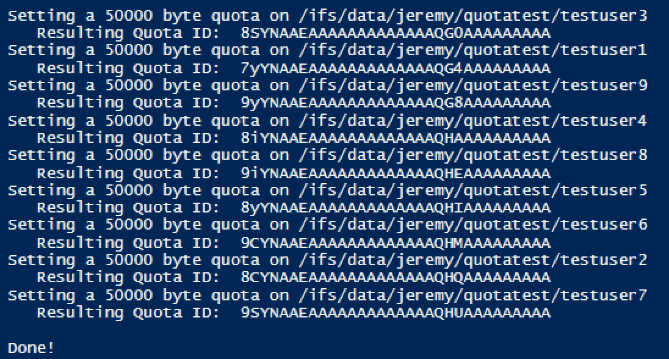
Here is the output from running the script attached to this post:
해당 제품
Isilon, PowerScale OneFS, Isilon Platform API문서 속성
문서 번호: 000132770
문서 유형: Solution
마지막 수정 시간: 30 1월 2026
버전: 6
다른 Dell 사용자에게 질문에 대한 답변 찾기
지원 서비스
디바이스에 지원 서비스가 적용되는지 확인하십시오.