Find the BitLocker Key Identifier for a Drive Protected by Dell Encryption BitLocker Manager
요약: This article provides information about locating a BitLocker key identifier for a drive protected by Dell Encryption BitLocker Manager.
이 문서는 다음에 적용됩니다.
이 문서는 다음에 적용되지 않습니다.
이 문서는 특정 제품과 관련이 없습니다.
모든 제품 버전이 이 문서에 나와 있는 것은 아닙니다.
지침
Affected Products:
- Dell Security Management Server Enterprise
- Dell Security Management Server Virtual
Affected Versions:
- v10.2.13 and Later
Note: This can be used to obtain a BitLocker recovery password or key package from the Dell Data Security management server recovery portal.
From the BitLocker recovery screen
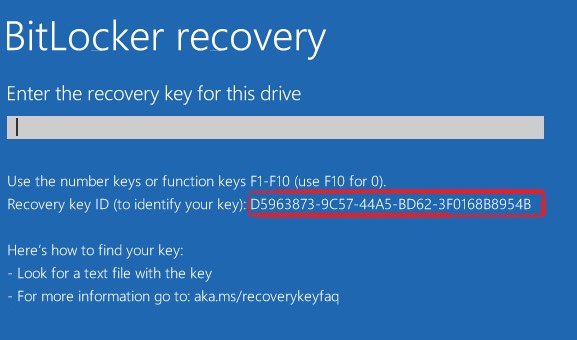
If your computer is booting to the BitLocker recovery screen, the key identifier is in the highlighted area of the following image.
From within Windows
To locate the key identifier for a drive, partition, or removable drive follow the steps below.
- From the start menu, search for CMD then right-click Command Prompt and click run as administrator.
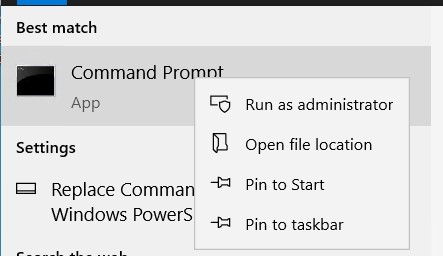
- From the administrator command prompt type
manage-bde -protectors -get <drive letter>:where <drive letter> is the drive letter for the BitLocker protected drive that you want to recover.
 Note: The ID under a numerical password (this is the key identifier for the drive).
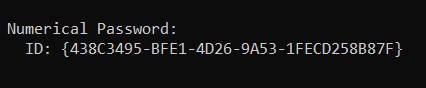 Note: The command above can be run from the recovery image in the event you are unable to log in to windows.
- To download the recovery image, go to the Drivers & Downloads page for Dell Encryption: https://www.dell.com/support/home/product-support/product/dell-data-protection-encryption/drivers
For assistance with retrieving a BitLocker recovery password, or key package using the BitLocker key identifier follow:
- How to Retrieve a BitLocker Recovery Password or Key Package Using the Dell Data Security Recovery Portal
- How to Unlock Bitlocker When It Stops Accepting Recovery Keys
- How to Locate the BitLocker Recovery Key in Your Microsoft Account
- BitLocker is Prompting for a Recovery Key, and You Cannot Locate the Key
해당 제품
Dell Encryption문서 속성
문서 번호: 000180649
문서 유형: How To
마지막 수정 시간: 01 7월 2026
버전: 22
다른 Dell 사용자에게 질문에 대한 답변 찾기
지원 서비스
디바이스에 지원 서비스가 적용되는지 확인하십시오.