Dell Security Management Server Fails to Export the Reports
요약: This article discusses the cause and the resolution of the Dell Security Management Server failing to export a managed report with a generic error in the Remote Console.
이 문서는 다음에 적용됩니다.
이 문서는 다음에 적용되지 않습니다.
이 문서는 특정 제품과 관련이 없습니다.
모든 제품 버전이 이 문서에 나와 있는 것은 아닙니다.
증상
Affected Products:
- Dell Security Management Server
Affected Versions:
- v10.x and Earlier
Affected Operating Systems:
- Windows
On the Dell Security Management Server, it is possible to generate and export different managed reports, by going to Reporting > Manage Reports:

To export a report, it is sufficient to select Export File and choose the format Excel or CSV:

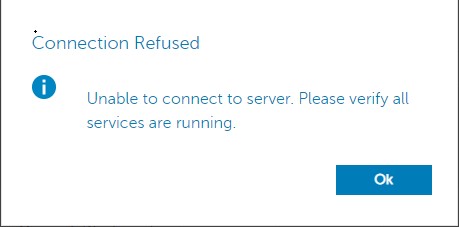
Caution: Due to the size of the report and the number of endpoints, it is possible that while waiting for the report to be exported, after sixty seconds, the Dell Security Management Console will throw the error below and the export will fail:
Checking the Security Server Service logs in c:\Program Files\*** an error similar to the one below is reported at the time of the failure:
2020-12-07 12:07:56,350 ERROR com.dell.ddps.webui.controllers.ReportController [qtp1551039242-71115] - Timeout in webservice controller java.lang.IllegalStateException: WRITER
2020-12-07 12:07:56,351 ERROR com.dell.ddps.webui.controllers.ReportController [qtp1551039242-71115] - ServiceException thrown in webservice controller com.dell.ddps.webui.controllers.BaseWebUiController$LocalizedServiceException: The service did not respond in a timely manner.
2020-12-07 12:07:56,352 WARN org.springframework.web.servlet.mvc.method.annotation.ExceptionHandlerExceptionResolver [qtp1551039242-71115] - Failed to invoke @ExceptionHandler method: public java.lang.Object com.dell.ddps.webui.controllers.BaseWebUiController.handleException(javax.servlet.http.HttpServletRequest,javax.servlet.http.HttpServletResponse,java.lang.Exception,java.util.Locale) java.lang.IllegalStateException: WRITER
2020-12-07 12:07:56,353 WARN org.eclipse.jetty.server.HttpChannel [qtp1551039242-71115] - /webui/exportToExcel javax.servlet.ServletException: org.springframework.web.util.NestedServletException: Request processing failed; nested exception is java.lang.IllegalStateException: WRITER
원인
The Denial of Service (DoS) filter terminates the server connection after 60 seconds.
해결
To increase the DoS filter threshold, follow the below steps:
- Using notepad, open the
webdefault.xml, located inC:\Program Files\Dell\Enterprise Edition\Security Server\confby default, and update theMaxRequestMsandmaxIdleTrackerMstimeouts from 60000 to 300000:
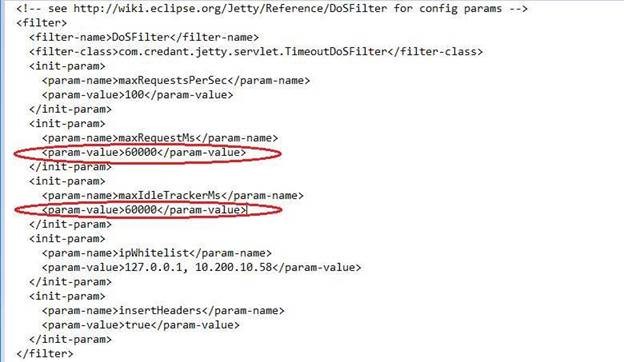
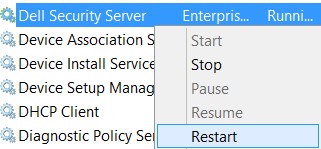
- After the values have been changed from 60000 to 300000, save the file and restart the Security Server Service. To restart the Security Server Service, follow the steps below:
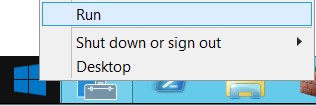
- Right click Start and select Run:
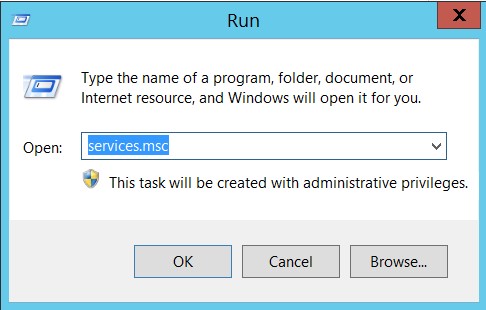
- In the Run dialog window type
services.msc, and press Enter or click OK:
- Right click the Dell Security Server Service and select Restart:
해당 제품
Dell Encryption문서 속성
문서 번호: 000184829
문서 유형: Solution
마지막 수정 시간: 17 7월 2026
버전: 11
다른 Dell 사용자에게 질문에 대한 답변 찾기
지원 서비스
디바이스에 지원 서비스가 적용되는지 확인하십시오.