Dell Unity: Unable to Renew or Remove VASA Certificate Due to Long Chain
요약: There are many reasons for not being able to renew or remove a VASA certificate. This article covers only the attempt to renew or remove when the Certificate Validation fails due to "Certificate Chain too long". ...
이 문서는 다음에 적용됩니다.
이 문서는 다음에 적용되지 않습니다.
이 문서는 특정 제품과 관련이 없습니다.
모든 제품 버전이 이 문서에 나와 있는 것은 아닙니다.
증상
When attempting to renew the VASA Certificate from vSphere, the following error occurs:
"The provider certificate is invalid. It is either empty, malformed, or expired, not yet valid, revoked, or fails host name verification."
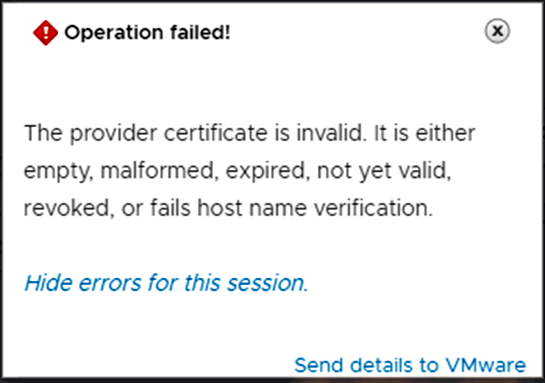
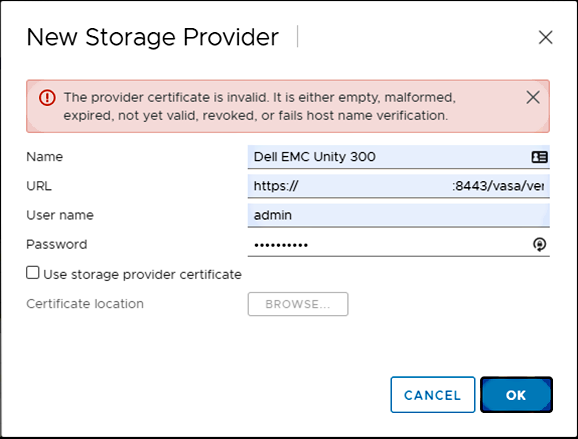
Issue is not resolved using the following Dell articles:
- Dell article 000049556: Dell Unity: Unable to Use Unity as VASA Storage Provider due to Certificate Error
- Dell article 000022509: Dell Unity: How to Manually Renew a Unity Management SSL Certificate
- Dell article 000037959: Dell Unity: VASA Certificate Has Expired
When attempting to remove the certificate from the Unity array, using UEMCLI, either:
- The output is successful, but the certificate remains in system.
- The output fails with error: "
The certificate does not exist. (Error Code:0x6000940)"
Example of both points:
service@spb~# uemcli -no -u admin -p  /sys/cert -id vasa_http-vc1-servercert-1 delete
Operation completed successfully.

service@spb~# uemcli -no -u admin -p  /sys/cert show
1: ID = vasa_http-vc1-cacert-1
Type = CA
Service = VASA_HTTP
Certificate ID = vasa_http-vc1-cacert-1

service@spb~# uemcli -no -u admin -p  /sys/cert -id vasa_http-vc1-servercert-1 delete
Operation failed. Error code: 0x6000940
The certificate does not exist. (Error Code:0x6000940)

service@spb~# uemcli -no -u admin -p  /sys/cert show
1: ID = vasa_http-vc1-cacert-1
Type = CA
Service = VASA_HTTP
Certificate ID = vasa_http-vc1-cacert-1
원인
For this particular issue, it was found that the certificate chain was too long. The maximum stipulated SSL Verification Depth on Unity OE 5.0.6 and earlier versions is 1, and this particular certificate had a Depth of 3.
해결
RESOLUTION
Upgrade to Unity OE 5.1.x.
For more details about Unity OE releases, refer to article Dell Unity OE Matrix.
WORKAROUND
- Technical Support changing the
SSL Verify Depthvalue. - Technical Support deleting all certificates listed on the array.
- Technical Support restarting Management Services (this does not disrupt production).
- Unity Administrator adding Unity as VASA storage provider on vSphere.
To have this workaround applied to your Unity array, contact Dell Technical Support and reference this article ID 000185269.
해당 제품
Dell Unity 300, Dell EMC Unity 300F, Dell EMC Unity 350F, Dell EMC Unity 400, Dell EMC Unity 400F, Dell EMC Unity 450F, Dell EMC Unity 500, Dell EMC Unity 500F, Dell EMC Unity 550F, Dell EMC Unity 600제품
Dell EMC Unity XT 380, Dell EMC Unity XT 380F, Dell EMC Unity XT 480, Dell EMC Unity XT 480F, Dell EMC Unity 600F, Dell EMC Unity 650F, Dell EMC Unity XT 680, Dell EMC Unity XT 680F, Dell EMC Unity XT 880, Dell EMC Unity XT 880F
, Dell EMC Unity Family |Dell EMC Unity All Flash, Dell EMC Unity Family, Dell EMC Unity Hybrid
...
문서 속성
문서 번호: 000185269
문서 유형: Solution
마지막 수정 시간: 15 7월 2026
버전: 7
다른 Dell 사용자에게 질문에 대한 답변 찾기
지원 서비스
디바이스에 지원 서비스가 적용되는지 확인하십시오.