Dell Unity: Kan VASA-certificaat niet vernieuwen of verwijderen vanwege lange keten
요약: Er zijn veel redenen waarom het niet mogelijk is om een VASA-certificaat te verlengen of te verwijderen. Dit artikel behandelt alleen de poging om het certificaat te verlengen of te verwijderen wanneer de certificaatvalidatie mislukt omdat de certificaatketen te lang is. ...
이 문서는 다음에 적용됩니다.
이 문서는 다음에 적용되지 않습니다.
이 문서는 특정 제품과 관련이 없습니다.
모든 제품 버전이 이 문서에 나와 있는 것은 아닙니다.
증상
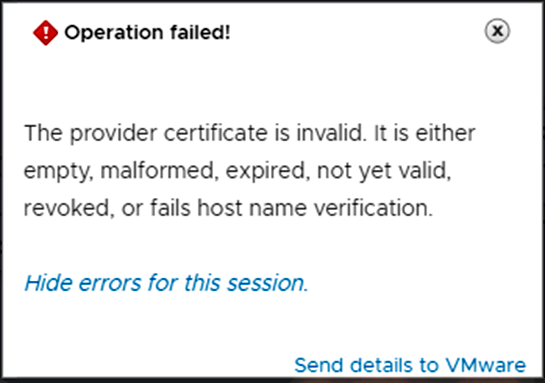
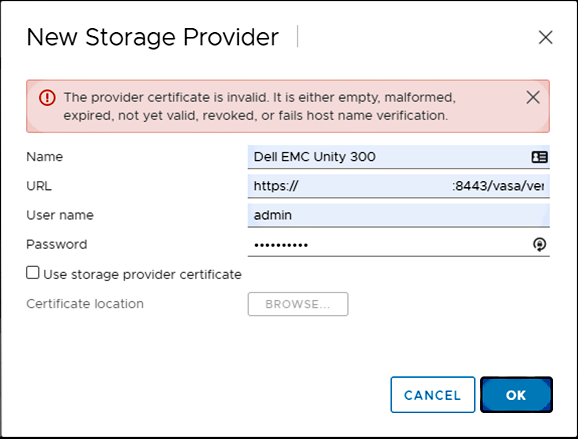
Bij een poging om het VASA-certificaat van vSphere te vernieuwen, treedt de volgende fout op:
"The provider certificate is invalid. It is either empty, malformed, or expired, not yet valid, revoked, or fails host name verification."
Het probleem kan niet worden opgelost met behulp van de volgende Dell artikelen:
- Dell artikel 000049556: Dell Unity: Kan Unity niet gebruiken als VASA-storageprovider vanwege certificaatfout
- Dell artikel 000022509: Dell Unity: Een Unity Management SSL-certificaat handmatig vernieuwen
- Dell artikel 000037959: Dell Unity: VASA-certificaat is verlopen
Wanneer u probeert het certificaat uit de Unity-array te verwijderen, gebruikt u UEMCLI, ofwel:
- De uitvoer is geslaagd, maar het certificaat blijft in het systeem.
- De uitvoer mislukt met fout: "
The certificate does not exist. (Error Code:0x6000940)"
Voorbeeld van beide punten:
service@spb~# uemcli -no -u admin -p  /sys/cert -id vasa_http-vc1-servercert-1 delete
Operation completed successfully.

service@spb~# uemcli -no -u admin -p  /sys/cert show
1: ID = vasa_http-vc1-cacert-1
Type = CA
Service = VASA_HTTP
Certificate ID = vasa_http-vc1-cacert-1

service@spb~# uemcli -no -u admin -p  /sys/cert -id vasa_http-vc1-servercert-1 delete
Operation failed. Error code: 0x6000940
The certificate does not exist. (Error Code:0x6000940)

service@spb~# uemcli -no -u admin -p  /sys/cert show
1: ID = vasa_http-vc1-cacert-1
Type = CA
Service = VASA_HTTP
Certificate ID = vasa_http-vc1-cacert-1
원인
Voor dit specifieke probleem bleek de certificaatketen te lang te zijn. Het maximum dat is vastgesteld SSL Verification Depth op Unity OE 5.0.6 en eerdere versies is 1, en dit specifieke certificaat had een diepte van 3.
해결
OPLOSSING
Upgrade naar Unity OE 5.1.x.
Raadpleeg het artikel Dell Unity OE Matrix voor meer informatie over Unity OE-releases.
TIJDELIJKE OPLOSSING
- Technische support voor het wijzigen van de
SSL Verify DepthWaarde. - Technische support voor het verwijderen van alle certificaten die op de array staan vermeld.
- Technische support voor het opnieuw starten van Management Services (dit onderbreekt de productie niet).
- Unity administrator voegt Unity toe als VASA-storageprovider op vSphere.
Als u deze tijdelijke oplossing wilt toepassen op uw Unity array, neemt u contact op met Dell Technische Support en raadpleegt u de 000185269 van dit artikel.
해당 제품
Dell Unity 300, Dell EMC Unity 300F, Dell EMC Unity 350F, Dell EMC Unity 400, Dell EMC Unity 400F, Dell EMC Unity 450F, Dell EMC Unity 500, Dell EMC Unity 500F, Dell EMC Unity 550F, Dell EMC Unity 600제품
Dell EMC Unity XT 380, Dell EMC Unity XT 380F, Dell EMC Unity XT 480, Dell EMC Unity XT 480F, Dell EMC Unity 600F, Dell EMC Unity 650F, Dell EMC Unity XT 680, Dell EMC Unity XT 680F, Dell EMC Unity XT 880, Dell EMC Unity XT 880F
, Dell EMC Unity Family |Dell EMC Unity All Flash, Dell EMC Unity Family, Dell EMC Unity Hybrid
...
문서 속성
문서 번호: 000185269
문서 유형: Solution
마지막 수정 시간: 15 7월 2026
버전: 7
다른 Dell 사용자에게 질문에 대한 답변 찾기
지원 서비스
디바이스에 지원 서비스가 적용되는지 확인하십시오.