VxRail: Failed to Enable Remote Connectivity with ERROR VXR034018
요약: Cluster reports VXR034018 or VXR034020 alarms and enablement failure. Possible causes are unreachable esrs3 servers, wrong SCG port (9443), bad credentials, or no response from Secure Remote Services. ...
이 문서는 다음에 적용됩니다.
이 문서는 다음에 적용되지 않습니다.
이 문서는 특정 제품과 관련이 없습니다.
모든 제품 버전이 이 문서에 나와 있는 것은 아닙니다.
증상
Symptom 1:
After upgrading VxRail 8.x to 9.1.x, the following alarms are observed in vCenter:
VXR034018 – Failed to enable Remote ConnectivityVXR034020 – Remote Connectivity Lost
For details on the cause and the available resolution steps, refer to the following article: VxRail: The connection to Dell Support system is lost after upgrading VxRail 8.x to 9.1.000
Symptom 2:
When enabling connectivity, the error below displays:
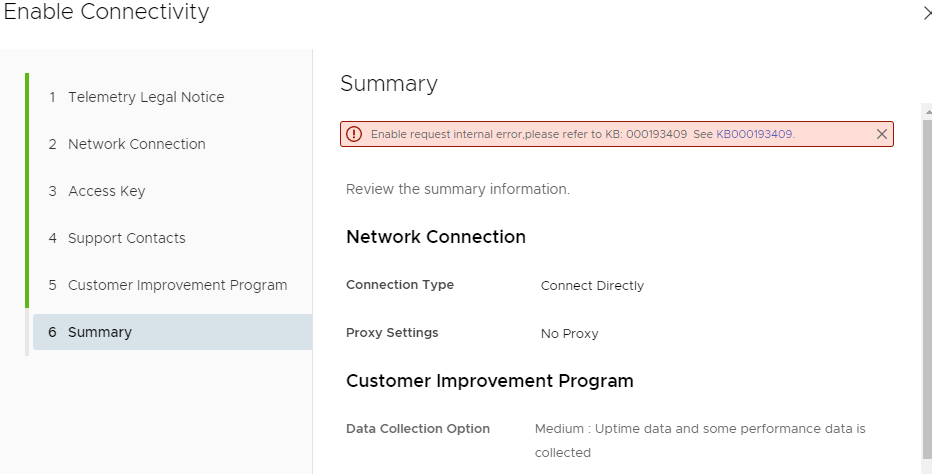
Figure 1. Enable Connectivity Request
The detail error log can be found in /var/log/microservice_log/short.term.log, or in the micro service log directly.
If VxRail Manager is running at version 7.0.350, it is at Vxm# docker service logs func_rcs-service
If VxRail Manager is running at versions 7.0.370 and later, it is at Vxm# kubectl logs $(kubectl get pods -o=name | grep rcs)
원인
Many issues can cause the failure of connectivity enablement:
- Network issue between VxRail Manager and Dell Enterprise servers through ports 443 and 8443:
esrs3-core.emc.com
esrs3-coredr.emc.com
- Wrong Secure Connect Gateway (SCG) server port number input, the port number should be 9443:
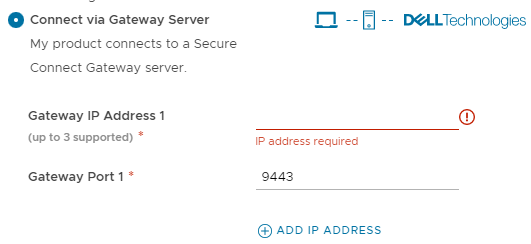
Figure 2. Port 9443
- Access key and pin are already used.
- Invalid Access Key and Pin
- Universal key is expired, or node PSNT is not registered in Dell backend.
- The universal key is not a valid JSON format, from
short.term.log:
2023-02-09 03:45:05,333" microservice.rcs-service "2023-02-09T03:45:05.308340848Z stderr F json.decoder.JSONDecodeError: Expecting property name enclosed in double quotes: line 1 column 2 (char 1)"
- No response received from Secure Remote Services, from
short.term.log:
2022-08-24-16:56:57 microservice.dell-ese "8 2022-08-24 16:56:57,881 CP Server Thread-5 DEBUG DellESE.ese.srs.srswebapi LN:1164 Calls universal device key api"
2022-08-24-16:56:58 microservice.dell-ese "8 2022-08-24 16:56:58,295 CP Server Thread-5 DEBUG urllib3.connectionpool LN: 939 Starting new HTTPS connection (1): esrs3-coredr.emc.com:443"
2022-08-24-16:56:58 microservice.dell-ese "8 2022-08-24 16:56:58,612 CP Server Thread-5 WARNING ESE.CherryPy LN:1138 Web exception during getUniversalKey api call: No response received from SRS"
2022-08-24-16:56:58 microservice.rcs-service "2022-08-24 16:56:58,614 [INFO] <ThreadPoolExecutor-0_3:140391562225408> ese_service.py generate_universal_key_by_pin() (359): Generate universal key response:500,{""message"": ""Web exception during getUniversalKey api call: No response received from SRS"", ""statusCode"": 500, ""backendResponse"": {}, ""status"": ""fail""}"
2022-08-24-16:56:58 microservice.api-gateway "169.254.171.104 - - 2022-08-24T16:56:58+00:00 ""POST /rest/vxm/internal/dell-ese/v1/ese/getUniversalKey HTTP/1.1"" 500 151 """" ""python-requests/2.24.0"" """""
2022-08-24-16:56:58 microservice.dell-ese "Back-end web error: Calls universal device key api Status: 500 - "
해결
For Issue 1:
If the connection type is Connect Directly, VxRail Manager needs access to esrs3-coredr.emc.com and esrs3-core.emc.com. Run this command from VxRail Manager:
ping  esrs3-coredr.emc.com
Or:
curl -gvk https://esrs3-coredr.emc.com
If the connection type is Connect using Gateway Server, see article VxRail: Next-Generation Connectivity with VxRail 7.0.350 and Later for more information.
For issue 2:
Use port number 9443 as SCG gateway port and ensure port 5700 is accessible from VxRail Manager.
For issue 3 and 4:
From Generate Access key (log in is required to access this link), generate a new access key and PIN.
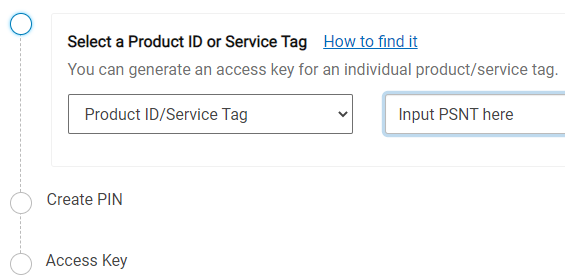
Figure 3. Generate Access Key
For issue 5, issue 6, and issue 7: Contact Dell Support for assistance and quote this article ID.
추가 정보
- Exclude the failure factors such as network issue-proxy server, unique connectivity key legitimacy issue. Check the remote connector service login:
/var/log/microservice_log/short.term.log or /home/mystic/ese/var/log/ESE.log. - ESE supports two scenarios; connect backend directly or use the SCG gateway. If an issue occurred in the gateway, RSE can check the related login.
해당 제품
VxRail문서 속성
문서 번호: 000193409
문서 유형: Solution
마지막 수정 시간: 24 7월 2026
버전: 16
다른 Dell 사용자에게 질문에 대한 답변 찾기
지원 서비스
디바이스에 지원 서비스가 적용되는지 확인하십시오.