The Second Monitor Does Not Display After Unplug or Plug the DP Cable in Daisy Chain Mode
요약: This article provides information about the display issue in Daisy Chain Mode.
이 문서는 다음에 적용됩니다.
이 문서는 다음에 적용되지 않습니다.
이 문서는 특정 제품과 관련이 없습니다.
모든 제품 버전이 이 문서에 나와 있는 것은 아닙니다.
증상
The monitor occasionally does not light up with video after unplugging or unplugging the DP cable that is connected to Dock.
원인
Time communication issue between Dock and monitor.
해결
- For single Monitor,
- Ensure that the MST option of monitor is set to Off.
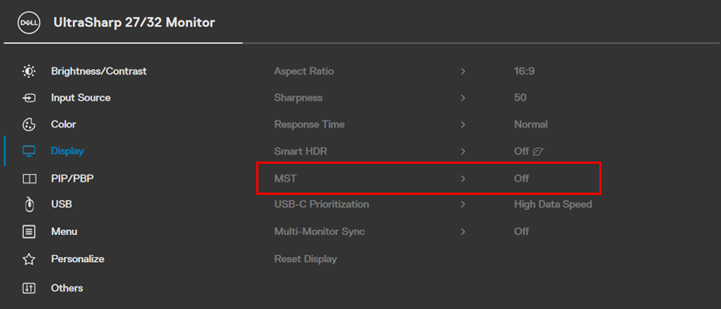
MST OFF
- For Multi-Monitor
- Set the MST option of each monitor to "Off" (same as above)
- Connect each monitor directly to the Dock’s DP port or HDMI port.
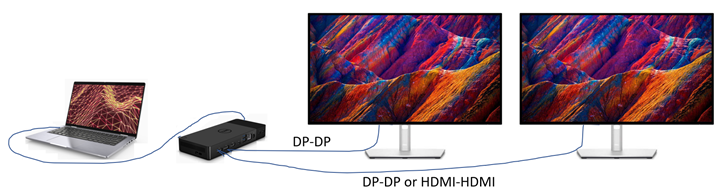
Multi-Monitor Connection
If the customer still prefers to daisy chain second monitor to first monitor (MST = On), set Monitor1 "Auto Select" to Off.
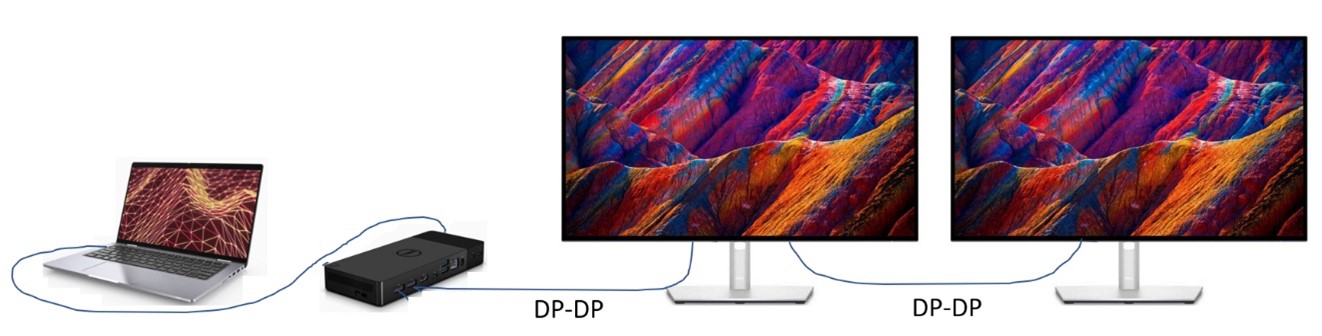
two monitor connection
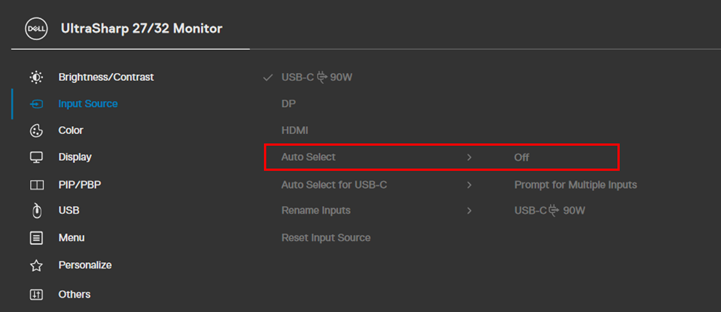
Auto select off.
해당 제품
Dell 24 Video Conferencing Monitor C2422HE, Dell P2422HE, Dell P2223HC, Dell P2423DE, Dell P2723DE, Dell P3223DE, Dell U2723QE, Dell U3223QZ, Dell Thunderbolt Dock – WD22TB4문서 속성
문서 번호: 000204691
문서 유형: Solution
마지막 수정 시간: 01 7월 2026
버전: 7
다른 Dell 사용자에게 질문에 대한 답변 찾기
지원 서비스
디바이스에 지원 서비스가 적용되는지 확인하십시오.