RecoverPoint for VM: 기존 클러스터에 vRPA를 더 추가하지 못함. 오류 "구축 후 구성 VRPA를 실행할 수 없습니다.
요약: 기존 클러스터에 vRPA를 더 추가할 수 없고 "구축 후 구성 VRPA를 실행할 수 없습니다" 오류가 표시됩니다.
이 문서는 다음에 적용됩니다.
이 문서는 다음에 적용되지 않습니다.
이 문서는 특정 제품과 관련이 없습니다.
모든 제품 버전이 이 문서에 나와 있는 것은 아닙니다.
증상
기존 클러스터에 vRPA를 더 추가하는 작업이 실패하고 다음 오류가 표시됩니다.
could not execute post deploy config VRPAs.
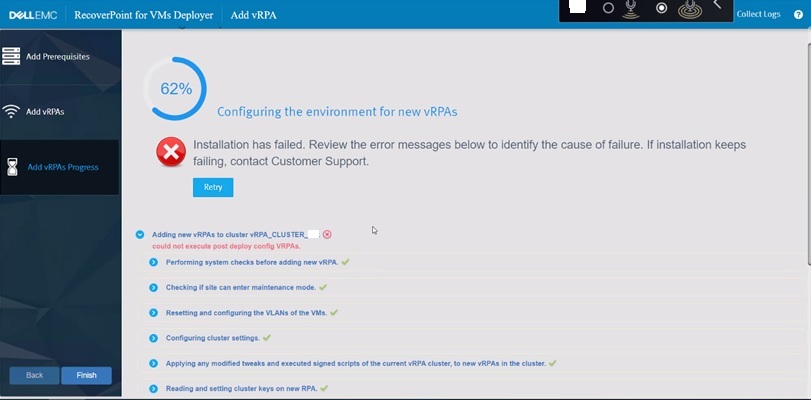
그림 1: vRPA 추가 시 RecoverPoint 실패
RecoverPoint 로그:
2022-12-07 06:31:10,455 [pool-7-thread-1] (BaseAction.java:42) ERROR - CreateAndAttachIOFilterDeviceAction Failed.
com.emc.recoverpoint.connectors.actions.infra.ActionFailedException: Failed to find JAM PBM profile
추가되는 새 vRPA의 설치 로그:
2022-09-13 04:29:11,312 [pool-7-thread-1] (GetJirafPolicyAction.java:40) WARN  - Failed to find JIRAF PBM profile for cluster ClusterUID(id=xxxxxxxxxxxxxxx)
2022-09-13 04:29:11,314 [pool-7-thread-1] (ExecutePostDeployConfigVRPAsCommand.java:85) ERROR - Failed to create RP device for vm: VmUuid(super=Uuid(uuid=aaaaaaaa-bbbb-ffff-eeee-ddddddddd), vcUuid=VcUuid(super=Uuid(uuid=eeeeee-cccc-rrrr-ssss-ffffffffff)))
2022-09-13 04:29:11,314 [CommandWorker-2] (Command.java:88) ERROR - Command#run() ServerException errorType[EXCEPTION] errorMessage[Exception. Failed executing CreateAndAttachRPDeviceAction.] failure UID: aaaaaaaa-bbbb-cccc-dddd-eeeeeeeeeee
:
2022-09-08 05:03:07,734 [pool-7-thread-1] (BasePBMCommand.java:33) DEBUG - Executing PBM Command: PbmRetrieveContentCommand BasePBMCommand(super=com.emc.recoverpoint.connectors.vi.infra.pbm.PbmRetrieveContentCommand@a50a0887, pbmProxy=com.emc.recoverpoint.connectors.vi.infra.PBMProxy@db413f60)
2022-09-08 05:03:07,774 [pool-7-thread-1] (BasePBMCommand.java:39) DEBUG - Finished executing PBM Command: PbmRetrieveContentCommand with return value: [com.vmware.pbm.PbmCapabilityProfile@ed9ba2b4,
:
2022-09-08 05:03:07,774 [pool-7-thread-1] (GetJirafPolicyAction.java:40) WARN  - Failed to find JIRAF PBM profile for cluster ClusterUID(id=xxxxxxxxxxxxxxxxxxxx)
2022-09-08 05:03:07,774 [pool-7-thread-1] (BaseAction.java:74) DEBUG - Action finished: GetJirafPolicyAction result: null
2022-09-08 05:03:07,776 [pool-7-thread-1] (BaseAction.java:42) ERROR - CreateAndAttachIOFilterDeviceAction Failed.
ClusterLogic 사이트 제어 vRPA에서 로그:
2022/09/13 04:29:11.498 [pool-13-thread-783] (GeneralUtils.java:75) ERROR - could not execute post deploy config VRPAs.
com.emc.recoverpoint.cluster_logic.inner_model.exception.RpaAdapterException: Exception. Failed executing CreateAndAttachRPDeviceAction.
        at com.emc.recoverpoint.cluster_logic.cl_rpa_adapter_core.calls.BaseRpaCall.logAndThrow(BaseRpaCall.java:53)
        at com.emc.recoverpoint.cluster_logic.cl_rpa_adapter_core.calls.BaseRpaCall.call(BaseRpaCall.java:39)
        at com.emc.recoverpoint.cluster_logic.cl_rpa_adapter_core.RpaAdapterImpl.executePostDeployConfigVRPAs(RpaAdapterImpl.java:182)
        at com.emc.recoverpoint.deployment.task.ExposeVirtualRepositoryAndConfigVirtualRPATask.perform(ExposeVirtualRepositoryAndConfigVirtualRPATask.java:87)
        at com.emc.recoverpoint.deployment.task.ExposeVirtualRepositoryAndConfigVirtualRPATask.perform(ExposeVirtualRepositoryAndConfigVirtualRPATask.java:28)
        at com.emc.recoverpoint.utils.javainfra.status.tasks.Task.executeSync(Task.java:91)
        at com.emc.recoverpoint.utils.javainfra.status.tasks.Task.call(Task.java:142)
        at java.util.concurrent.FutureTask.run(FutureTask.java:266)
        at java.util.concurrent.ThreadPoolExecutor.runWorker(ThreadPoolExecutor.java:1149)
        at java.util.concurrent.ThreadPoolExecutor$Worker.run(ThreadPoolExecutor.java:624)
        at java.lang.Thread.run(Thread.java:823)
Caused by: java.lang.RuntimeException: Exception. Failed executing CreateAndAttachRPDeviceAction.
        at com.emc.recoverpoint.cluster_logic.proxy.BaseInstallationServerAdapter.getResultFromTransaction(BaseInstallationServerAdapter.java:318)
        at com.emc.recoverpoint.cluster_logic.proxy.BaseInstallationServerAdapter.getTransactionResult(BaseInstallationServerAdapter.java:244)
        at com.emc.recoverpoint.cluster_logic.proxy.BaseInstallationServerAdapter.getTransactionResult(BaseInstallationServerAdapter.java:185)
        at com.emc.recoverpoint.cluster_logic.proxy.BaseInstallationServerAdapter.getTransactionResult(BaseInstallationServerAdapter.java:181)
        at com.emc.recoverpoint.cluster_logic.proxy.InstallationServerClientImpl.executePostDeployConfigVRPAs(InstallationServerClientImpl.java:405)
        at com.emc.recoverpoint.cluster_logic.cl_rpa_adapter_core.calls.ExecutePostDeployConfigVRPAsCall.innerCall(ExecutePostDeployConfigVRPAsCall.java:24)
        at com.emc.recoverpoint.cluster_logic.cl_rpa_adapter_core.calls.ExecutePostDeployConfigVRPAsCall.innerCall(ExecutePostDeployConfigVRPAsCall.java:12)
        at com.emc.recoverpoint.cluster_logic.cl_rpa_adapter_core.calls.BaseRpaCall.call(BaseRpaCall.java:37)
        ... 9 more
2022/09/13 04:29:11.498 [pool-13-thread-783] (Task.java:116) DEBUG - ExposeVirtualRepositoryAndConfigVirtualRPATask: task: Exposing repository volume to vRPA 3.old status is: RUNNING, setting status to ERROR.
2022/09/13 04:29:11.498 [pool-13-thread-783] (Task.java:98) ERROR - ExposeVirtualRepositoryAndConfigVirtualRPATask :Task failed: Exposing repository volume to vRPA 3.
원인
의 RecoverPoint 클러스터 ID
RecoverPoint_JCD 스토리지 정책이 삭제되었거나 잘못된 값으로 변경되었습니다. 이 값을 임의로 변경해서는 안 됩니다.해결
해결 방법:
에서 올바른 RecoverPoint 클러스터 ID 값을 업데이트합니다. RecoverPoint_JCD 스토리지 정책
단계:
- vSphere Client에서 정책 및 프로파일로 이동합니다
- 왼쪽의 목록에서 VM Storage Policies 를 선택합니다.
- 오른쪽 창에서
RecoverPoint_JCD_xxxxxxxxxxx - EDIT를 클릭하여 Edit VM Storage Policy 화면을 표시합니다.
- 3-호스트 기반 서비스 옆의 클릭
- 오른쪽에서 복제 탭을 클릭합니다.
- RecoverPoint 클러스터 옆에 있는 필드에 올바른 값을 입력합니다
- 다음을 클릭하여 완료합니다.
원래 RecoverPoint 클러스터 ID 값을 더 이상 사용할 수 없는 경우 Dell 지원 또는 서비스 담당자에게 지원을 요청하십시오. 이 Dell 문서 ID를 참조하십시오.
해당 제품
RecoverPoint for Virtual Machines제품
VxRail, RecoverPoint문서 속성
문서 번호: 000207399
문서 유형: Solution
마지막 수정 시간: 16 4월 2026
버전: 6
다른 Dell 사용자에게 질문에 대한 답변 찾기
지원 서비스
디바이스에 지원 서비스가 적용되는지 확인하십시오.