PowerProtect Data Manager: 파일 시스템 에이전트 백업을 수동으로 마운트하는 방법
요약: 이 문서에서는 ddfsrc 명령을 사용하여 PowerProtect Data Manager 파일 시스템 에이전트 백업을 수동으로 마운트하는 방법에 대해 설명합니다.
이 문서는 다음에 적용됩니다.
이 문서는 다음에 적용되지 않습니다.
이 문서는 특정 제품과 관련이 없습니다.
모든 제품 버전이 이 문서에 나와 있는 것은 아닙니다.
지침
PowerProtect Data Manager FileSystem 에이전트 백업의 복원 문제를 해결하는 동안 PowerProtect Data Manager UI에서 FLR 복원을 수행할 수 없는 경우 응답이 실패하거나 중지되어 사용자가 명령을 사용하여 백업 마운트를 수동으로 시도하고 다음 단계를 수행할 수 있습니다.
데이터를 복원해야 하는 소스 클라이언트에서 실행하기 위한 명령:
로컬 백업 쿼리:
데이터를 복원해야 하는 소스 클라이언트에서 실행하기 위한 명령:
- 데이터를 복원하려는 위치에서 소스 서버에 연결합니다.
- 다음 명령을 사용하여 로컬 또는 원격으로 저장된 백업 관련 정보를 쿼리합니다.
ddfsadmin
팁: 생성된 새 파일에서 요청된 데이터를 수집할 수 있도록 각 명령의 출력을 .txt 파일로 리디렉션하는 것이 좋습니다. 또한 이러한 파일은 수행된 문제 해결 단계의 일부로 SR에 첨부되어야 합니다.
Lockbox 정보 쿼리:
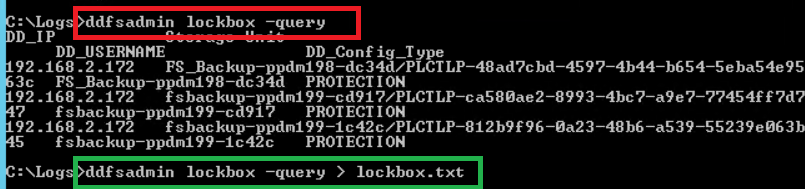
다음 명령을 실행하여 기존 Data Domain IP 또는 이름, 백업에 사용되는 스토리지 유닛 및 DDBoost 사용자를 식별합니다.
다음 명령을 실행하여 기존 Data Domain IP 또는 이름, 백업에 사용되는 스토리지 유닛 및 DDBoost 사용자를 식별합니다.
ddfsadmin lockbox -query
그림 1: 명령 ddfsadmin Lockbox -query에 대한 결과 스크린샷
명령 옵션:
ddfsadmin

usage: ddfsadmin backup [options]
   query -help: to print the help.
   query -local [-v=] [-t=[h = hour,d = days,w = weeks,m = months]: query the local record file for listing backups.
   query -remote -d= -s= -u= [-p=
- ] [-c=] [-v=] [-t=[h = hour,d = days,w = weeks,m = months]: query the record file on PowerProtect DD System for listing backups. Example: ddfsadmin backup query -local -v="C:\\" -t=5d
로컬 백업 쿼리:
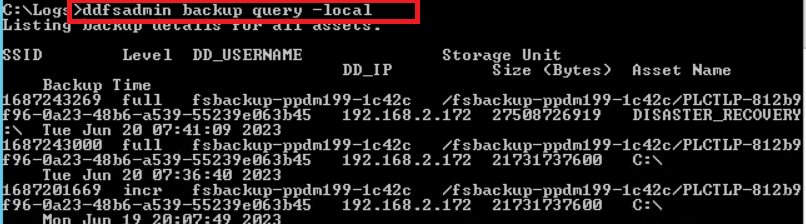
다음 명령을 실행하여 로컬 DB에 저장된 이 클라이언트에 대한 기존 백업 목록을 가져옵니다.
이러한 백업은 로컬에서 보고된 백업이며 Data Domain 자체에서 보고한 백업과 다를 수 있습니다. 기존 백업 중 일부가 Data Domain 측에서 올바르게 만료되고 제거되었지만 로컬 데이터베이스가 아직 업데이트되지 않았으므로 다음 명령을 참조하십시오.

복원이 수행되는 호스트에서 실행하는 명령:
복원이 수행된 호스트에서 다음 명령을 실행해야 합니다.
ddfsrc를 사용하여 선택한 백업을 수동으로 마운트합니다
.다음 명령을 사용하여 명령이 실행되는 호스트에 백업을 수동으로 마운트하여 기본적으로 폴더 아래에 있는 마운트 지점을 통해 백업을 사용할 수 있고 탐색할 수 있습니다.

이러한 백업은 로컬에서 보고된 백업이며 Data Domain 자체에서 보고한 백업과 다를 수 있습니다. 기존 백업 중 일부가 Data Domain 측에서 올바르게 만료되고 제거되었지만 로컬 데이터베이스가 아직 업데이트되지 않았으므로 다음 명령을 참조하십시오.
ddfsadmin backup query -local
그림 2: ddfsadmin 백업 쿼리 명령의 결과 스크린샷 -local
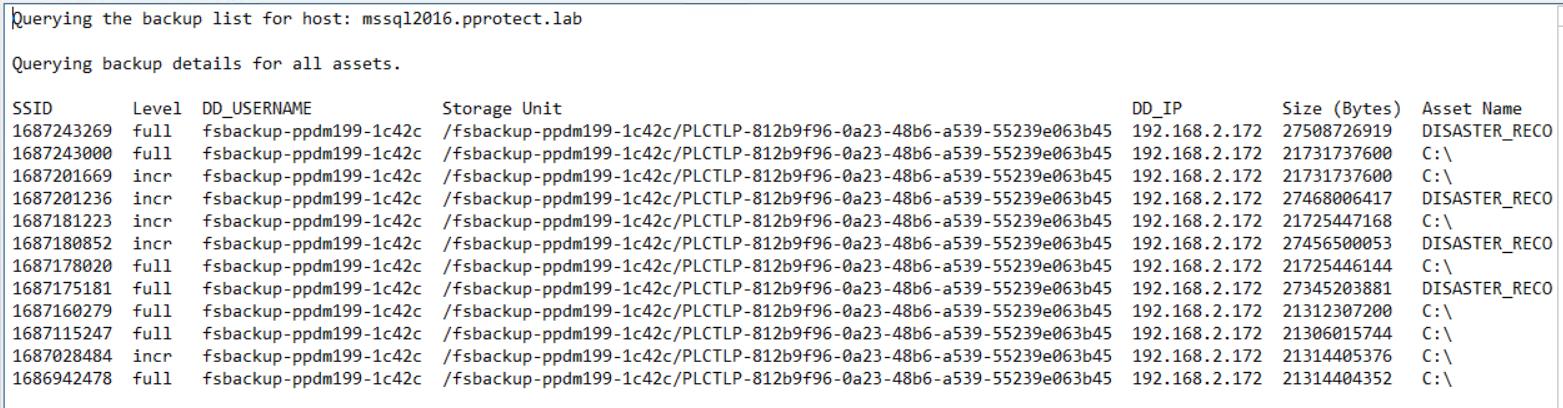
파일은 localbck.txt입니다(이전 명령의 출력을 리디렉션하여 생성할 수 있는 파일입니다.)
ddfsadmin backup query -local > localbck.txt.
그림 3: 모든 자산에 대한 백업 세부 정보 스크린샷
원격 백업 쿼리:
다음 명령을 실행하여 지정된 스토리지 유닛 아래에 Data Domain에 저장된 이 클라이언트의 기존 백업 목록을 가져옵니다.
다음 명령을 실행하여 지정된 스토리지 유닛 아래에 Data Domain에 저장된 이 클라이언트의 기존 백업 목록을 가져옵니다.
ddfsadmin backup query -remote -d=DD_name_IP -s=SU_name -u=DDBoost_user
예제
이전에 수집한 Lockbox.txt 명령의 출력을 사용하여 다음을 수행합니다.
ddfsadmin backup query -remote -d=192.168.2.172 -s=/fsbackup-ppdm199-1c42c/PLCTLP-812b9f96-0a23-48b6-a539-55239e063b45 -u=fsbackup-ppdm199-1c42c
그림 4: ddfsadmin 백업 쿼리 명령 -remote에 대한 결과 스크린샷
복원이 수행되는 호스트에서 실행하는 명령:
복원이 수행된 호스트에서 다음 명령을 실행해야 합니다.
- 클라이언트 A에서 클라이언트 A를 복구하려면 클라이언트 A에서 명령을 실행합니다.
- 클라이언트 B에서 클라이언트 A를 복구하려면 클라이언트 B에서 명령을 실행하고 ddfsrc -c clientA가 정의되어 있는지 확인합니다.
ddfsrc를 사용하여 선택한 백업을 수동으로 마운트합니다
.다음 명령을 사용하여 명령이 실행되는 호스트에 백업을 수동으로 마운트하여 기본적으로 폴더 아래에 있는 마운트 지점을 통해 백업을 사용할 수 있고 탐색할 수 있습니다.
DPSAPPS_install_dir/fsagent/tmp/BBB
ddfsrc command options
   Usage: ddfsrc [OPTION]... STRING
      STRING can be a file path string, key=value string, or a flag string.

   -c
      Specifies the client index name, such as a hostname or clustername.

   -d
      Specifies the destination directory into which files are recovered. Combined with -I, specifies the file level recovery.

   -h  [=]
      DFA_SI_DD_HOST=hostname         Data target hostname is mandatory.
      DFA_SI_DD_USER=username         Data target username is mandatory.
      DFA_SI_DEVICE_PATH=device_path         A device path is mandatory.
      DFA_SI_DD_LOCKBOX_PATH=lockbox_path     If credentials were not added in the default lockbox path, a lockbox path is mandatory. Default lockbox path is C:\Program Files\DPSAPPS\fsagent\lockbox.
      DDBOOST_COMPRESSED_RESTORE=TRUE|FALSE     Specifies whether to compress the data transfer. The TRUE setting specifies the compressed data transfer. The default value is FALSE.

   -i  [nNoOrRyY]
      N or n                     Specifies to discard (do not overwrite) identical files during recovery.
      O or o                     Specifies to overwrite, but if the file is locked, not overwrite at reboot.
      R or r                     Specifies to rename if the recovered file is identical.
      Y or y                     Specifies to overwrite and replace at reboot if file is locked.

   -I
      Specifies the file from which to extract the restored file names. Combined with -d, specifies the file level recovery.
   -r
      Specifies the target directory into which files are recovered, such as local disk C:\ or D:\, directory E:\restore_directory on Windows, or directory /restore_directory on Linux.

   -S
      Specifies the backup ID that will be used to perform recovery.

   -g
      Specifies to discard upward folder hierarchy during file level recovery.
ddfsrc mount/unmount command syntax

ddfsrc -c source_client_from_which_backup_will_be_restored -S backup_id/SSID -h DFA_SI_DD_HOST=DD_name/IP -h DFA_SI_DD_USER=DDBoostUser DFA_SI_DEVICE_PATH=Storage_Unit -k mount/unmount
예제
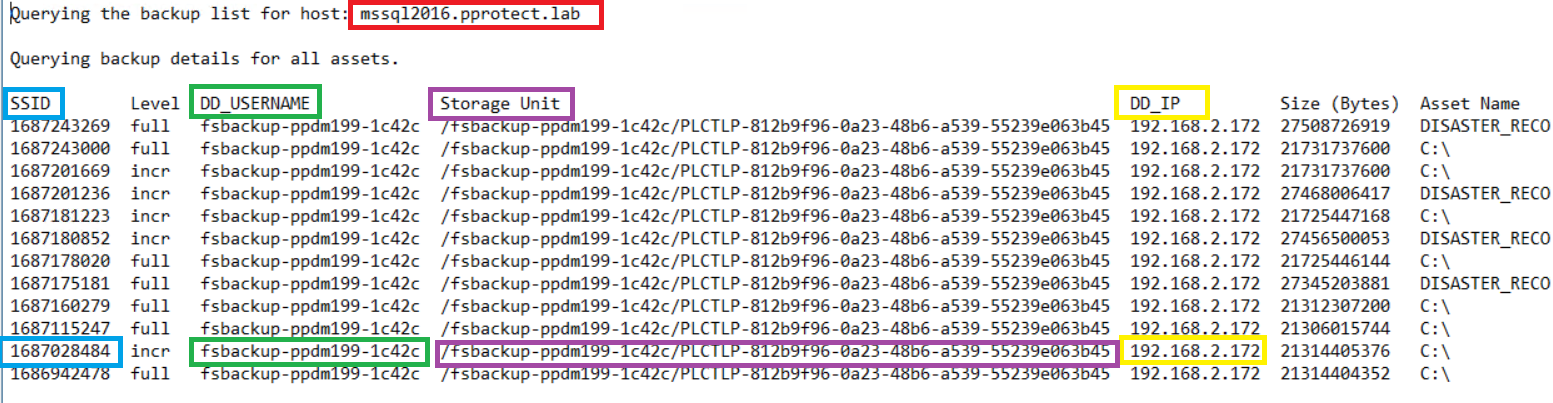
ddfsadmin 명령 쿼리와 함께 이전에 수집한 정보 사용:
그림 5: ddfsadmin 명령 쿼리에 대한 세부 정보 스크린샷
ddfsrc -c MSSQL2016.pprotect.lab -S 1687028484 -h DFA_SI_DD_HOST=192.168.2.172 -h DFA_SI_DD_USER=fsbackup-ppdm199-1c42c -h DFA_SI_DEVICE_PATH=/fsbackup-ppdm199-1c42c/PLCTLP-812b9f96-0a23-48b6-a539-55239e063b45 -k mount
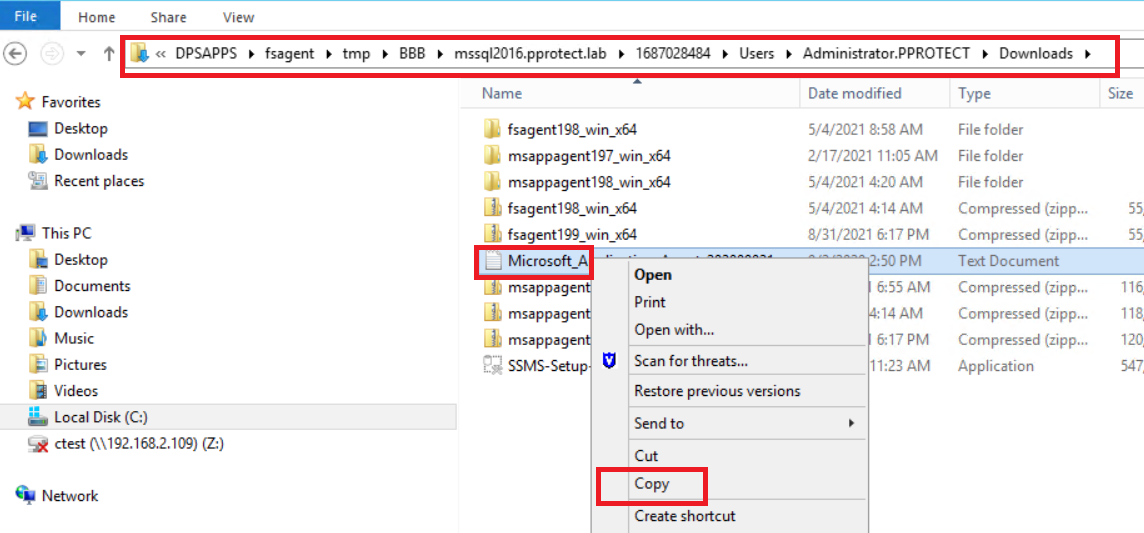
위의 명령은 기본 마운트 경로 폴더에서 선택한 증분 백업을 마운트합니다. 그러면 일반 파일 탐색기를 사용하여 액세스할 수 있습니다.
그림 6: 파일 주소
그림 7: 스크린샷 파일 주소 위치
마운트된 백업에서 선택한 복원 경로로 파일 또는 폴더를 수동으로 복사할 수 있습니다.
팁: 위의 명령은 -D [0-9] 플래그를 ddfsrc -D9 명령에 추가하여 파일 시스템 백업 마운트 문제를 디버깅하는 데에도 사용할 수 있습니다.
작업이 완료되면 -k 마운트 해제와 동일한 명령을 실행하여 백업을 마운트 해제해야 합니다.
ddfsrc -c MSSQL2016.pprotect.lab -S 1687028484 -h DFA_SI_DD_HOST=192.168.2.172 -h DFA_SI_DD_USER=fsbackup-ppdm199-1c42c -h DFA_SI_DEVICE_PATH=/fsbackup-ppdm199-1c42c/PLCTLP-812b9f96-0a23-48b6-a539-55239e063b45 -k unmount
해당 제품
PowerProtect Software문서 속성
문서 번호: 000215181
문서 유형: How To
마지막 수정 시간: 27 5월 2026
버전: 3
다른 Dell 사용자에게 질문에 대한 답변 찾기
지원 서비스
디바이스에 지원 서비스가 적용되는지 확인하십시오.