How to Modify Dell Data Security Uninstaller Values for Forensic Key Download
요약: This article explains how to modify the Dell Data Security Uninstaller values for forensic key download using two registry entries.
이 문서는 다음에 적용됩니다.
이 문서는 다음에 적용되지 않습니다.
이 문서는 특정 제품과 관련이 없습니다.
모든 제품 버전이 이 문서에 나와 있는 것은 아닙니다.
지침
Affected Products:
- Dell Encryption
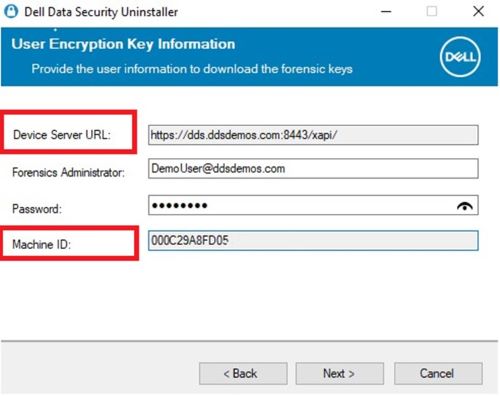
The Device Server URL and Machine ID are pulled through the registry when selecting Encryption Removal Agent - Download Keys from Server.
Warning: The next step is a Windows Registry edit:
- Back up the Registry before proceeding, reference How to Back Up and Restore the Registry in Windows
.
- Editing the Registry can cause the computer to become unresponsive on the next reboot.
- Contact Dell Data Security International Support Phone Numbers for assistance if you have concerns about performing this step.
To change these values, modify the following registry key at the following locations:
- Device Server URL:
HKLM\SYSTEM\CurrentControlSet\Services\CMGShield REG_SZ: ServletURL - Machine ID:
HKLM\SYSTEM\CurrentControlSet\Services\CMGSHIELD REG_SZ: MCID
해당 제품
Dell Encryption문서 속성
문서 번호: 000218564
문서 유형: How To
마지막 수정 시간: 15 7월 2026
버전: 7
다른 Dell 사용자에게 질문에 대한 답변 찾기
지원 서비스
디바이스에 지원 서비스가 적용되는지 확인하십시오.