No Power, No Display, or Alert About Undersized Power Adapter on OptiPlex Micro Form Factor
요약: This article provides information about OptiPlex 7010 micro form factor no power, no display, or displaying an alert about an undersized power adapter.
이 문서는 다음에 적용됩니다.
이 문서는 다음에 적용되지 않습니다.
이 문서는 특정 제품과 관련이 없습니다.
모든 제품 버전이 이 문서에 나와 있는 것은 아닙니다.
증상
Affected Platforms:
- OptiPlex Micro 7010
- OptiPlex Micro 7020
- OptiPlex Micro Plus 7020
Symptoms:
- No power
- No display
- A warning Message is displayed about an undersized power adapter.
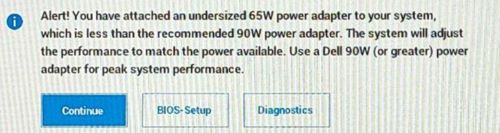
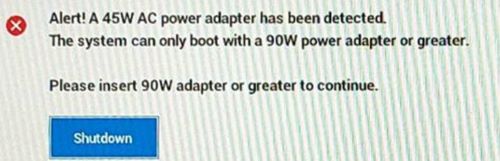
The user may encounter these symptoms when using a type-c AC adapter or a USB charger with a type-c cable configured with less current than the recommended 90W.
원인
An insufficient wattage adapter attached causes these alerts.
해결
The Dell engineering team is aware of this behavior, and this is working as designed when an insufficient wattage adapter is attached.
Note: Dell engineering team recommends using 90W or higher wattage power adapter or USB-C charger with a type-c cable that carries 90W or higher current on OptiPlex 7010 micro form factor.
- OptiPlex 7010 micro form factor offers a no adapter option on Dell.com.
- Customers use a type-c adapter or a USB charger with type-c cable configured as a power source, and they do not use the barrel AC adapter.
Note: If the customer purchased a non-Dell adapter configuration, it is their responsibility to source an AC adapter.
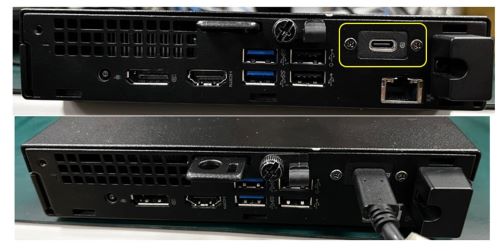
Verify AC adapter wattage:
- For a Dell AC adapter, the wattage information is on the label
- For a non-Dell AC adapter, have the customer check the label or the manufacturer documentation
해당 제품
OptiPlex Micro 7010, OptiPlex Micro 7020, OptiPlex Micro Plus 7020문서 속성
문서 번호: 000221342
문서 유형: Solution
마지막 수정 시간: 13 7월 2026
버전: 11
다른 Dell 사용자에게 질문에 대한 답변 찾기
지원 서비스
디바이스에 지원 서비스가 적용되는지 확인하십시오.