Dell APEX Cloud Platform for Microsoft Azure: 노드 복구는 Azure 2402 릴리스의 단일 노드 클러스터에 대해 지원되지 않습니다.
요약: Azure 2402 릴리스는 단일 노드 클러스터 노드 복구 작업을 지원하지 않으며, 노드에 장애가 발생하면 단일 노드 클러스터를 다시 배포해야 합니다.
이 문서는 다음에 적용됩니다.
이 문서는 다음에 적용되지 않습니다.
이 문서는 특정 제품과 관련이 없습니다.
모든 제품 버전이 이 문서에 나와 있는 것은 아닙니다.
증상
단일 노드 클러스터의 경우 노드에 장애가 발생하면 사용자가 Dell SolVe 절차 - 현장 교체 절차 ->> 클러스터 노드 교체 -> 단일 노드 클러스터에서 노드 복구 노드를 NIM 단계(용량 드라이브를 지우지 않음)한 다음 클러스터를 다시 배포해야 합니다.
그러나 노드가 Azure 2402 릴리스에서 실행되는 경우 클러스터 다시 배포가 실패합니다.
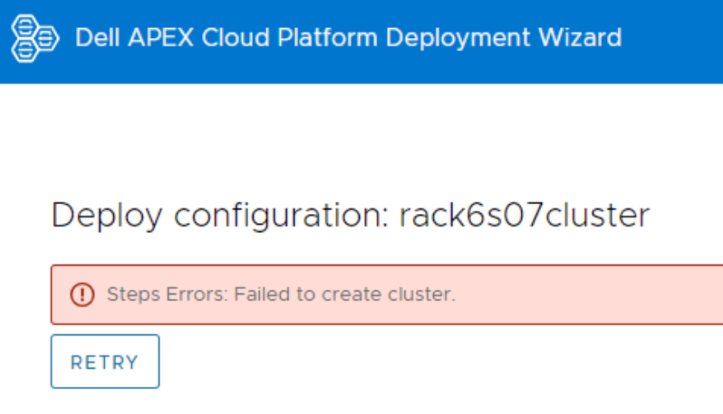
노드에 로그인하고 C:\CloudDeployment\Logs 아래에 CloudDeployment.xxx 로그 파일을 보면 다음에서 ECE가 실패했다고 보고됩니다. Test-AzStackHciExternalActiveDirectory입니다.
ECE failed at: Test-AzStackHciExternalActiveDirectory,
2024-03-12 08:13:36 Verbose  [EnvironmentValidator:ValidateExternalAD] Get-InprogressUpdateNugetStore failed. Update package nuget store was not specified in runtime parameters.
2024-03-12 08:13:36 Verbose  [EnvironmentValidator:ValidateExternalAD] EnvCheckerModuleBase: C:\Program Files\WindowsPowerShell\Modules\AzStackHci.EnvironmentChecker
2024-03-12 08:13:36 Verbose  [EnvironmentValidator:ValidateExternalAD] Gathering External Active Directory validation assets.
2024-03-12 08:13:36 Verbose  [EnvironmentValidator:ValidateExternalAD] Starting External Active Directory validation. Detail output can be found in D:\CloudContent\MASLogs\AzStackHciEnvironmentChecker*
2024-03-12 08:14:10 Warning  [EnvironmentValidator:ValidateExternalAD] Critical (blocking) ExternalAD failures found in validation. 1 Rules failed:
2024-03-12 08:14:10 Verbose  [EnvironmentValidator:ValidateExternalAD] Validator failed. ExternalAD requirements not met. Review output and remediate:
Rule:

HealthCheckSource  : Deployment\ExternalActiveDirectory\16be73a5
Name               : AzStackHci_ExternalActiveDirectory_Test_OrganizationalUnit_ExecutingAsDeploymentUser
DisplayName        : Test AD Organizational Unit - ExecutingAsDeploymentUser
Tags               : {}
Title              : Test AD Organizational Unit - ExecutingAsDeploymentUser
Status             : FAILURE
Severity           : CRITICAL
Description        : Tests that the specified organizational unit exists and contains the proper OUs
Remediation        : https://learn.microsoft.com/en-us/azure-stack/hci/deploy/deployment-tool-prerequisites
TargetResourceID   : Test_AD_OU_HCIH06S3-101
TargetResourceName : Test_AD_OU_HCIH06S3-101
TargetResourceType : ActiveDirectory
Timestamp          : 3/12/2024 8:14:10 AM


 AdditionalData:

Key   : Detail
Value : The ActiveDirectory user account 'lab30114.local\MGMT' is ineligible to be used as a deployment user: the user
        is missing the GenericAll permission to the organizational unit 'OU=OUH06S3,DC=lab30114,DC=local'

Key   : Status
Value : FAILURE

Key   : TimeStamp
Value : 03/12/2024 08:14:10

Key   : Resource
Value : ExecutingAsDeploymentUser

Key   : Source
Value : HCIH06S3-101


2024-03-12 08:14:10 Verbose  [EnvironmentValidator:ValidateExternalAD] at ParseResult, C:\NugetStore\AzStackHci.EnvironmentChecker.Deploy.1.2100.2599.333\content\Classes\EnvironmentValidator\EnvironmentValidator.psm1: line 857
at Test-AzStackHciExternalActiveDirectory, C:\Program Files\WindowsPowerShell\Modules\AzStackHci.EnvironmentChecker\AzStackHciExternalActiveDirectory\AzStackHciExternalActiveDirectory.psm1: line 60
at <ScriptBlock>, <No file>: line 1
at RunSingleValidator, C:\NugetStore\AzStackHci.EnvironmentChecker.Deploy.1.2100.2599.333\content\Classes\EnvironmentValidator\EnvironmentValidator.psm1: line 429
at ValidateExternalAD, C:\NugetStore\AzStackHci.EnvironmentChecker.Deploy.1.2100.2599.333\content\Classes\EnvironmentValidator\EnvironmentValidator.psm1: line 262
at <ScriptBlock>, C:\CloudDeployment\ECEngine\InvokeInterfaceInternal.psm1: line 127
at Invoke-EceInterfaceInternal, C:\CloudDeployment\ECEngine\InvokeInterfaceInternal.psm1: line 123
2024-03-12 08:14:10 Verbose  [EnvironmentValidator:ValidateExternalAD] ECE PowerShellHost Script End
원인
단일 노드 클러스터의 노드 복구는 Azure 2402 릴리스에서 지원되지 않습니다.
해결
단일 노드 클러스터의 경우 데이터를 정기적으로 백업하십시오.
ECE 오류가 발생하고 단일 노드 복구가 중단되면 Dell 지원 팀에 문의하여 클러스터를 다시 구축하십시오. 클러스터를 재구축한 후 데이터를 클러스터에 복원합니다.
ECE 오류가 발생하고 단일 노드 복구가 중단되면 Dell 지원 팀에 문의하여 클러스터를 다시 구축하십시오. 클러스터를 재구축한 후 데이터를 클러스터에 복원합니다.
해당 제품
APEX Cloud Platform for Microsoft Azure문서 속성
문서 번호: 000223387
문서 유형: Solution
마지막 수정 시간: 26 3월 2026
버전: 2
다른 Dell 사용자에게 질문에 대한 답변 찾기
지원 서비스
디바이스에 지원 서비스가 적용되는지 확인하십시오.