NVIDIA RTX Desktop Manager holder skrivebordet åbent
요약: Denne artikel indeholder oplysninger om det nyoprettede skrivebordsproblem for NVIDIA RTX Desktop Manager kan ikke lukkes.
이 문서는 다음에 적용됩니다.
이 문서는 다음에 적용되지 않습니다.
이 문서는 특정 제품과 관련이 없습니다.
모든 제품 버전이 이 문서에 나와 있는 것은 아닙니다.
증상
Dell-computere med dedikeret NVIDIA GPU kan opleve, at NVIDIA RTX Desktop Manager ikke kan lukke den nyoprettede stationære pc.
- Åbn NVIDIA RTX Desktop Manager, og klik på ENABLE RTX DESKTOP MANAGER™, mens programmet opretter Desktop 1 som standard.
- Klik på knappen nyt skrivebord for at oprette et andet skrivebord.
- Klik på X-ikonet i øverste højre hjørne af Desktop 2 , men find ud af, at det ikke kan lukkes.
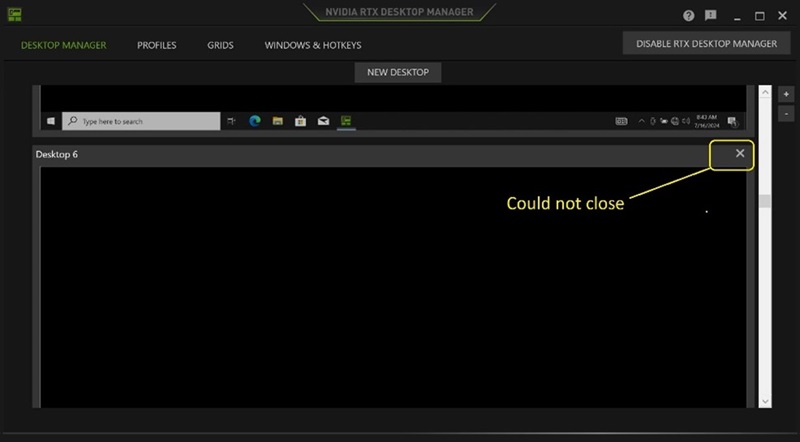
(Figur 1 - NVIDIA RTX Desktop Manager)
Berørte platforme:
- Precision 7780
- Precision 7680
- Precision 7770
- Precision 7670
- Precision 7560
- Precision 7760
- Precision 7550
- Precision 7750
- Precision 7540
- Precision 7740
- Precision 7530
- Precision 7730
- Precision 7520
- Precision 7720
- Precision 5480
- Precision 5490
- Latitude 3490
- Latitude 3480
- Latitude 3470
- Latitude 3550
- Latitude 3530
- Latitude 3520
원인
Ikke tilgængelig
해결
Opdatering af NVIDIA Graphic Driver til version 552.84 eller nyere på computeren løser problemet. For at downloade og installere driveren henvises til Sådan downloades og installeres Dell-drivere.
해당 제품
Dell Latitude 3480/3488, Latitude 3490, Latitude 3520, Latitude 3530, Latitude 3550, Latitude 3470, Precision 5480, Precision 5490, Precision 7520, Precision 7530, Precision 7540, Precision 7550, Precision 7560, Precision 7670, Precision 7680
, Precision 7720, Precision 7730, Precision 7740, Precision 7750, Precision 7760, Precision 7770, Precision 7780
...
문서 속성
문서 번호: 000227614
문서 유형: Solution
마지막 수정 시간: 21 5월 2026
버전: 3
다른 Dell 사용자에게 질문에 대한 답변 찾기
지원 서비스
디바이스에 지원 서비스가 적용되는지 확인하십시오.