NVIDIA RTX Desktop Manager mantiene aperto il desktop
요약: Questo articolo fornisce informazioni sul problema relativo al desktop appena creato di NVIDIA RTX Desktop Manager che non può essere chiuso.
이 문서는 다음에 적용됩니다.
이 문서는 다음에 적용되지 않습니다.
이 문서는 특정 제품과 관련이 없습니다.
모든 제품 버전이 이 문서에 나와 있는 것은 아닙니다.
증상
Nei computer Dell con GPU dedicata NVIDIA potrebbe verificarsi un problema in cui NVIDIA RTX Desktop Manager non riesce a chiudere il desktop appena creato.
- Aprire NVIDIA RTX Desktop Manager e cliccare su ENABLE RTX DESKTOP MANAGER, L'APPLICAZIONE CREA IL DESKTOP 1 COME IMPOSTAZIONE PREDEFINITA.
- Cliccare sul pulsante New Desktop per creare un secondo desktop.
- Fai clic sull'icona X nell'angolo in alto a destra di Desktop 2 ma scopri che non può essere chiuso.
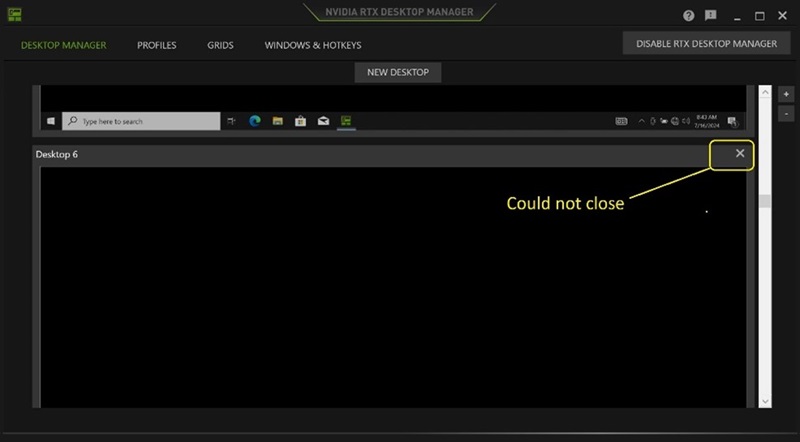
(Figura 1 . NVIDIA RTX Desktop Manager)
Piattaforme interessate:
- Precision 7780
- Precision 7680
- Precision 7770
- Precision 7670
- Precision 7560
- Precision 7760
- Precision 7550
- Precision 7750
- Precision 7540
- Precision 7740
- Precision 7530
- Precision 7730
- Precision 7520
- Precision 7720
- Precision 5480
- Precision 5490
- Latitude 3490
- Latitude 3480
- Latitude 3470
- Latitude 3550
- Latitude 3530
- Latitude 3520
원인
N/D
해결
L'aggiornamento dell'unità grafica NVIDIAR alla versione 552.84 o successiva sul computer risolve il problema. Per scaricare e installare il driver, consultare Come scaricare e installare i driver Dell.
해당 제품
Dell Latitude 3480/3488, Latitude 3490, Latitude 3520, Latitude 3530, Latitude 3550, Latitude 3470, Precision 5480, Precision 5490, Precision 7520, Precision 7530, Precision 7540, Precision 7550, Precision 7560, Precision 7670, Precision 7680
, Precision 7720, Precision 7730, Precision 7740, Precision 7750, Precision 7760, Precision 7770, Precision 7780
...
문서 속성
문서 번호: 000227614
문서 유형: Solution
마지막 수정 시간: 21 5월 2026
버전: 3
다른 Dell 사용자에게 질문에 대한 답변 찾기
지원 서비스
디바이스에 지원 서비스가 적용되는지 확인하십시오.