Cyber Recovery: TLS 프로토콜을 사용하여 인증서를 검색하지 못했습니다.
요약: Cyber Recovery 19.17로 업그레이드한 후 TLS(Transport Layer Security) 프로토콜을 활성화할 때 인증서를 확인하는 새로운 옵션이 있습니다. 이 문서에서는 TLS 프로토콜을 사용하여 인증서를 검색하지 못한 상황에 대해 설명합니다.
이 문서는 다음에 적용됩니다.
이 문서는 다음에 적용되지 않습니다.
이 문서는 특정 제품과 관련이 없습니다.
모든 제품 버전이 이 문서에 나와 있는 것은 아닙니다.
증상
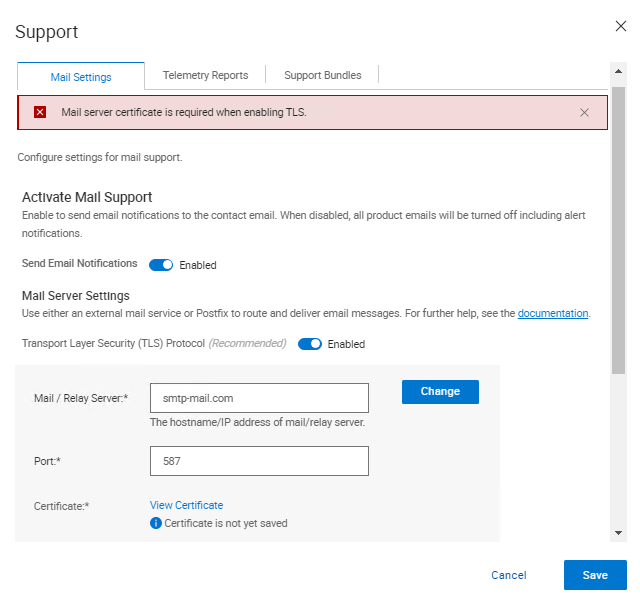
Cyber Recovery 19.17로 업그레이드한 후 TLS(Transport Layer Security) 프로토콜을 활성화할 때 인증서를 확인하는 새로운 옵션이 있습니다. 인증서를 확인할 때 Cyber Recovery UI에 다음 오류가 표시됩니다.
Mail server certificate is required when enabling TLS.
원인
Cyber Recovery 로그에서 다음 항목이 인쇄됩니다.
crcli.log에서:
[2024-10-03 11:49:03.273] [DEBUG] [crcli] [restapi_client.go:384 HandleRESTAPIResponse()] : Entering
[2024-10-03 11:49:03.273] [DEBUG] [crcli] [restapi_client.go:392 HandleRESTAPIResponse()] : REST status code :500
[2024-10-03 11:49:03.273] [ERROR] [crcli] [restapi_client.go:401 HandleRESTAPIResponse()] : Failed to retrieve mail server certificate : Failed to connect to mail server: dial tcp: lookup smtp-mail.com: i/o timeout
[2024-10-03 11:49:03.273] [DEBUG] [crcli] [restapi_client.go:402 HandleRESTAPIResponse()] : Exiting
[2024-10-03 11:49:03.273] [ERROR] [crcli] [libcli.go:150 CliErrorExit()] : Failed to retrieve mail server certificate : Failed to connect to mail server: dial tcp: lookup smtp-mail.com: i/o timeout
edge.log에서:
[2024-10-03 11:48:53.268] [DEBUG] [edge] [restapi_client.go:200 callRestApi()] : Perform request.Post path=https://notifications:9096/irapi/v8/notifications/retrieveEmailCert
[2024-10-03 11:49:03.272] [DEBUG] [edge] [restapi_client.go:209 callRestApi()] : status = 500 Internal Server Error
[2024-10-03 11:49:03.272] [DEBUG] [edge] [restapi_client.go:410 GetCRResponse()] : Entering
[2024-10-03 11:49:03.272] [DEBUG] [edge] [restapi_client.go:417 GetCRResponse()] : Exiting
[2024-10-03 11:49:03.272] [DEBUG] [edge] [restapi_client.go:210 callRestApi()] : Exiting
[2024-10-03 11:49:03.272] [DEBUG] [edge] [restapi_client.go:116 CallCRRESTAPI()] : Exiting
[2024-10-03 11:49:03.272] [DEBUG] [edge] [restapi_client.go:57 CallRESTAPIHeader()] : Exiting
[2024-10-03 11:49:03.272] [DEBUG] [edge] [restapi_client.go:384 HandleRESTAPIResponse()] : Entering
[2024-10-03 11:49:03.272] [DEBUG] [edge] [restapi_client.go:392 HandleRESTAPIResponse()] : REST status code :500
[2024-10-03 11:49:03.272] [ERROR] [edge] [restapi_client.go:401 HandleRESTAPIResponse()] : Failed to connect to mail server: dial tcp: lookup smtp-mail.com: i/o timeout
[2024-10-03 11:49:03.272] [DEBUG] [edge] [restapi_client.go:402 HandleRESTAPIResponse()] : Exiting
[2024-10-03 11:49:03.272] [DEBUG] [edge] [jsonerr.go:27 JSONError()] : Entering
[2024-10-03 11:49:03.272] [ERROR] [edge] [jsonerr.go:40 JSONError()] : 500 : Failed to connect to mail server: dial tcp: lookup smtp-mail.com: i/o timeout
[2024-10-03 11:49:03.272] [DEBUG] [edge] [jsonerr.go:44 JSONError()] : Exiting
[2024-10-03 11:49:03.272] [DEBUG] [edge] [notifications.go:560 RetrieveEmailCert()] : Exiting
[2024-10-03 11:49:03.272] [INFO] [edge] [restauth.go:111 func1()] : POST /cr/v8/notifications/retrieveEmailCert End RetrieveEmailCert Elapsed=10.005125439s
notifications.log에서:
[2024-10-03 11:48:53.270] [INFO] [notifications] [restauth.go:68 func1()] : POST /irapi/v8/notifications/retrieveEmailCert Start RetrieveEmailCert
[2024-10-03 11:48:53.270] [DEBUG] [notifications] [restauth.go:210 validateToken()] : Entering
[2024-10-03 11:48:53.270] [DEBUG] [notifications] [restauth.go:194 DecryptToken()] : Entering
[2024-10-03 11:48:53.270] [DEBUG] [notifications] [encoding.go:48 DecodeString()] : Entering
[2024-10-03 11:48:53.270] [DEBUG] [notifications] [encoding.go:56 DecodeString()] : Exiting
[2024-10-03 11:48:53.270] [DEBUG] [notifications] [crcrypto.go:558 DecryptCFB()] : Entering
[2024-10-03 11:48:53.270] [DEBUG] [notifications] [crcrypto.go:579 DecryptCFB()] : Exiting
[2024-10-03 11:48:53.270] [DEBUG] [notifications] [encoding.go:48 DecodeString()] : Entering
[2024-10-03 11:48:53.270] [DEBUG] [notifications] [encoding.go:56 DecodeString()] : Exiting
[2024-10-03 11:48:53.270] [DEBUG] [notifications] [crcrypto.go:112 GenHash()] : Entering
[2024-10-03 11:48:53.270] [DEBUG] [notifications] [crcrypto.go:118 GenHash()] : Exiting
[2024-10-03 11:48:53.270] [DEBUG] [notifications] [restauth.go:206 DecryptToken()] : Exiting
[2024-10-03 11:48:53.270] [DEBUG] [notifications] [restauth.go:268 ValidateTokenTime()] : Entering
[2024-10-03 11:48:53.270] [DEBUG] [notifications] [restauth.go:281 ValidateTokenTime()] : Exiting
[2024-10-03 11:48:53.270] [DEBUG] [notifications] [restauth.go:255 validateToken()] : Exiting
[2024-10-03 11:48:53.270] [DEBUG] [notifications] [notifications.go:283 RetrieveEmailCert()] : Entering
[2024-10-03 11:48:53.270] [DEBUG] [notifications] [notifications.go:175 ValidateMailServer()] : Entering
[2024-10-03 11:48:53.270] [DEBUG] [notifications] [notifications.go:201 ValidateMailServerURL()] : Entering
[2024-10-03 11:48:53.270] [DEBUG] [notifications] [notifications.go:210 ValidateMailServerURL()] : Exiting
[2024-10-03 11:48:53.270] [DEBUG] [notifications] [notifications.go:215 ValidateMailServerPort()] : Entering
[2024-10-03 11:48:53.270] [DEBUG] [notifications] [notifications.go:222 ValidateMailServerPort()] : Exiting
[2024-10-03 11:48:53.270] [DEBUG] [notifications] [notifications.go:196 ValidateMailServer()] : Exiting
[2024-10-03 11:48:53.270] [DEBUG] [notifications] [email.go:227 RetrieveEmailCert()] : Entering
[2024-10-03 11:48:53.270] [DEBUG] [notifications] [email.go:272 GetTLSConn()] : Entering
[2024-10-03 11:49:03.271] [DEBUG] [notifications] [email.go:283 GetTLSConn()] : Exiting
[2024-10-03 11:49:03.272] [ERROR] [notifications] [email.go:235 RetrieveEmailCert()] : Failed to connect to mail server: dial tcp: lookup smtp-mail.com: i/o timeout
[2024-10-03 11:49:03.272] [DEBUG] [notifications] [email.go:236 RetrieveEmailCert()] : Exiting
[2024-10-03 11:49:03.272] [ERROR] [notifications] [notifications.go:321 RetrieveEmailCert()] : Failed to connect to mail server: dial tcp: lookup smtp-mail.com: i/o timeout
[2024-10-03 11:49:03.272] [DEBUG] [notifications] [jsonerr.go:27 JSONError()] : Entering
[2024-10-03 11:49:03.272] [ERROR] [notifications] [jsonerr.go:40 JSONError()] : 500 : Failed to connect to mail server: dial tcp: lookup smtp-mail.com: i/o timeout
[2024-10-03 11:49:03.272] [DEBUG] [notifications] [jsonerr.go:44 JSONError()] : Exiting
[2024-10-03 11:49:03.272] [DEBUG] [notifications] [notifications.go:323 RetrieveEmailCert()] : Exiting
버전 19.17부터 Cyber Recovery는 TLS를 사용할 때 메일 서버 인증서를 확인하기 시작했습니다.
DNS(Domain Name System)가 아닌 환경에서는 환경 내에 DNS가 없기 때문에 Cyber Recovery에서 호스트 이름을 IP 주소로 확인할 수 없기 때문에 메일 서버를 DNS 이름으로 입력하지 못합니다.
IP 주소가 CR 내에서 Mail/Relay Server(메일/릴레이 서버) 필드로 사용되고 메일 서버에서 제공한 인증서에 인증서에 IP가 없는 경우, IP에 대해 인증서를 확인하므로 확인이 실패합니다.
이 작업을 수행하기 위한 몇 가지 해결 방법이 있습니다.
- 검증이 작동할 수 있도록 메일 서버에서 제공한 인증서에 IP 주소를 추가합니다.
- 에서 메일 서버 및 IP에 대한 항목을 추가합니다.
/etc/hosts알림 컨테이너에서 CR이 메일 서버를 성공적으로 확인하고 인증서 확인을 수행할 수 있도록 합니다.
해결
이 문제를 해결하기 위한 두 가지 옵션이 있습니다.
- 메일 서버가 FQDN(Fully Qualified Domain Name)을 사용하고 있으며 Cyber Recovery가 인증서를 가져오지 못했습니다.
- 볼트 환경에서 DNS 서버를 사용하고 있는지, 제대로 작동하는지 확인합니다.
- 자격 증명 모음에 DNS 서버가 없는 경우 다음 단계를 수행합니다.
- 알림 Docker에 대한 호스트 파일에 SMTP(Simple Mail Transfer Protocol) 서버 세부 정보를 입력합니다.
- SSH를 사용하여 Cyber Recovery에 연결합니다.
- 다음 명령을 실행합니다.
docker exec -it cr_notifications_1 bash - 텍스트 편집기로 파일을 엽니다.
/etc/hosts - SMTP 서버에 대한 항목을 IP, FQDN 및 짧은 이름으로 추가합니다.
- 파일을 저장합니다.
- 다음 명령을 실행하여 Docker 컨테이너를 종료합니다.
exit
- 항목에 입력하려면
/etc/hosts재부팅을 통해 파일이 유지되는 경우 다음을 수행합니다.- 한 줄 추가
cr-install-path>/etc/docker-compose-prod-<current-version>.yml추가하려는 IP의 경우/etc/hosts알림을: - 굵게 강조 표시된 새 줄에는 SMTP FQDN과 IP가 차례로 있어야 합니다.
SMTP.server.com:xxx.xxx.xxx.xxx
build: .image: ${registryName}/cr_notifications:${notificationsVersion}container_name: cr_notifications_1security_opt:- no-new-privileges:truehostname: notificationsexpose:- "9096"depends_on:- postgresqlcap_drop:- ALLenvironment:- LD_LIBRARY_PATH=/cr/lockbox/lib- CRHOSTNAME=${dockerHostFQDN}- ENABLE_TLS=${enableTLS}- ENABLE_POSTFIX=${enablePostfix}- GODEBUG=tlskyber=0extra_hosts:- dockerbridge:${dockerBridge}- ${dockerHostFQDN}:${dockerHost}- SMTP.server.com:xxx.xxx.xxx.xxx - 그리고 다음을 실행합니다.
'crsetup.sh – forcerecreate'실행 중인 작업이 없는 경우
- 한 줄 추가
- 알림 Docker에 대한 호스트 파일에 SMTP(Simple Mail Transfer Protocol) 서버 세부 정보를 입력합니다.
- SMTP에 IP 주소를 사용하고 Cyber Recovery에서 인증서를 가져오지 못합니다.
-
- 이 경우 사용 중인 IP 주소를 포함하도록 새 인증서를 생성해야 합니다.
또는
-
- IP를 사용하여 SMTP에 연결하는 대신 FQDN을 사용하여 인증서를 만든 경우 Cyber Recovery UI에서 FQDN을 사용합니다.
해당 제품
PowerProtect Cyber Recovery, Cyber Recovery Series문서 속성
문서 번호: 000242079
문서 유형: Solution
마지막 수정 시간: 07 1월 2026
버전: 3
다른 Dell 사용자에게 질문에 대한 답변 찾기
지원 서비스
디바이스에 지원 서비스가 적용되는지 확인하십시오.