PowerPath for Windows: Migration Enabler UMD 및 KMD 드라이버 컨텍스트 제거
요약: 클러스터 노드의 예기치 않은 물리적 재배포와 같은 외부 요구 사항으로 인해 PPME(PowerPath Migration Enabler) 마이그레이션을 중단하고 하나 이상의 호스트 시스템에서 PowerPath Migration Enabler UMD(User Mode Context) 및 KMD(Kernel Mode Context)를 강제 제거하거나 강제 구성 해제해야 할 수 있습니다. 이를 위한 수동 절차가 있습니다. PowerPath 7.2 이상에는 추가적인 절차적 보증을 제공하는 내부 powermig 명령이 포함되어 있습니다. ...
이 문서는 다음에 적용됩니다.
이 문서는 다음에 적용되지 않습니다.
이 문서는 특정 제품과 관련이 없습니다.
모든 제품 버전이 이 문서에 나와 있는 것은 아닙니다.
지침
Windows 7.2 이상용 PowerPath에는 드라이버 매개변수화에서 사용자 모드 컨텍스트와 커널 모드 컨텍스트를 한 명령으로 제거하는 내부 명령이 포함되어 있습니다. 명령을 실행한 후에는 재부팅해야 합니다.
STEP 1
UMD 및 KMD 컨텍스트를 제거하려면 다음을 실행합니다.
CMD C:\>powermig nodecleanup
Ensure that all options to recover, abort and cleanup existing migrations are tried before trying this nodeCleanup command. Also, a host reboot is needed to complete all the steps of this command properly. Do you still want to continue? [yes]/no:
질문에 'y'로 답하십시오. 명령은 다음과 같이 응답합니다.
NOTE: Host reboot is needed for the cleanup to take effect. Also, delete the backed up KMD registry keys (cleanup_*) and PPME\db.old folder before running the command again.
STEP 2
호스트를 재부팅합니다. 이것으로 핵심 개입 부분을 마칩니다. 이 시점에서 클러스터를 다시 가져올 수 있습니다.
STEP 3
OPER는 nodecleanup 명령은 제어 구조를 방해가 되지 않도록 이동할 뿐입니다. 삭제되지 않습니다. 재부팅 후 이름이 바뀐 UMD 및 KMD 구조를 제거해야 합니다. 이것은 온라인으로 할 수 있습니다. 두 번째 재부팅은 필요하지 않습니다.
-
UMD 컨텍스트 제거
보낸 사람 C:\Program Files\EMC\PPME제거 db.old.
C:\Program Files\EMC\PPME>dir
Volume in drive C has no label.
Volume Serial Number is 6A65-4A7A
Directory of C:\Program Files\EMC\PPME
12/11/2024 12:31 <DIR> .
12/11/2024 12:31 <DIR> ..
12/11/2024 13:13 <DIR> db
12/11/2024 12:31 <DIR> db.old <- Remove this directory
0 File(s) 0 bytes
4 Dir(s) 47,120,658,432 bytes free
-
KMD 컨텍스트 제거
그런 다음 HKEY_LOCAL_MACHINE\SYSTEM\CurrentControlSet\Control\EmcPowerPath\KMD_0포함되어 HKEY_LOCAL_MACHINE\SYSTEM\CurrentControlSet\Control\EmcPowerPath\KMD_1 각각, 모두 삭제 "cleanup_*" 키를 누릅니다.
예
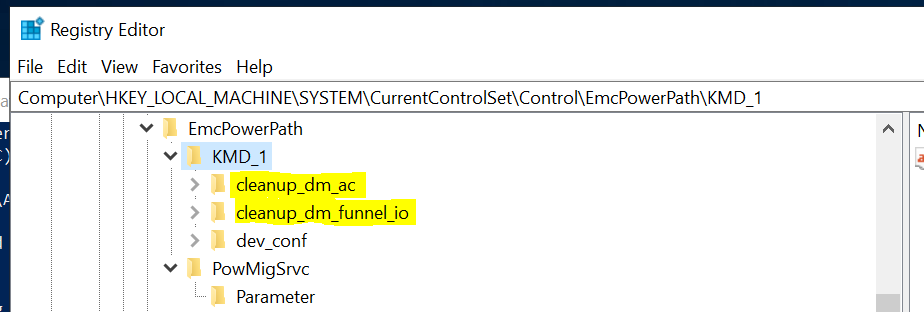
비고
- OPER는
nodecleanup명령은 드라이버 컨텍스트만 처리합니다. PPME 클러스터 리소스를 제거해야 합니다. - 제거하기 전에 UMD 및 KMD 콘텐츠를 다른 곳에 저장해야 할 수 있습니다.
- 이 명령은 긴급 상황에서 절차적 보증을 제공하기 위한 것입니다. 결과에 대해 확신할 수 없는 경우 먼저 Dell 기술 지원 부서에 문의하여 다른 옵션을 논의하십시오.
- 재부팅 후 서버를 재부팅해야 합니다 .
nodecleanup작업.
예상 오류 메시지
Powermig nodecleanupUMD 컨텍스트 백업이 제거되지 않았기 때문에 두 번째 실행 시 가 실행되지 않습니다.
를 실행할 때 nodecleanup 명령을 두 번 실행했지만 UMD 컨텍스트를 제거하지 않은 경우 명령이 실패하고 PPME error(119): UMD DB cleanup failed.
예
PS C:\> powermig nodecleanup
Ensure all options to recover, abort and cleanup existing migrations are tried before trying this nodeCleanup command. Also, a host reboot is needed to complete all the steps of this command properly. Do you still want to continue? [yes]/no: y
PPME error(119): UMD DB cleanup failed
수정 사항
db.old 여전히 존재합니다. 위의 3-1단계를 실행합니다.
Powermig nodecleanupKMD 컨텍스트 백업이 제거되지 않았기 때문에 두 번째 실행 시 가 실행되지 않습니다.
명령을 두 번째로 실행하고 KMD 컨텍스트를 제거하지 않으면 명령이 실패하고 PPME error(118): KMD Registry cleanup failed.
예
C:\Program Files\EMC\PPME>powermig nodecleanup
Ensure all options to recover, abort and cleanup existing migrations are tried before trying this nodeCleanup command. Also, a host reboot is needed to complete all the steps of this command properly. Do you still want to continue? [yes]/no: y
PPME error(118): KMD Registry cleanup failed
수정 사항
의 정리 값 KMD* 여전히 존재합니다. 위의 3-2단계를 실행합니다.
문서 속성
문서 번호: 000247668
문서 유형: How To
마지막 수정 시간: 15 7월 2026
버전: 2
다른 Dell 사용자에게 질문에 대한 답변 찾기
지원 서비스
디바이스에 지원 서비스가 적용되는지 확인하십시오.