Using Command Line to Set Microphone Mute Unmutes the Dell P3424WEB Display Speaker
요약: Learn why using command line (CLI) to set microphone mute for the display unmutes the display speaker.
이 문서는 다음에 적용됩니다.
이 문서는 다음에 적용되지 않습니다.
이 문서는 특정 제품과 관련이 없습니다.
모든 제품 버전이 이 문서에 나와 있는 것은 아닙니다.
증상
The display speaker may be unmuted when using Dell Display and Peripheral Manager for macOS (DDPM Mac) command line to set the display microphone to mute. The issue occurs after running the /Microphone mute command line.
Before running the /Microphone mute command line, the On-Screen Display (OSD) for the P3424WEB shows below:
- Speaker: Mute
- Microphone: Unmute
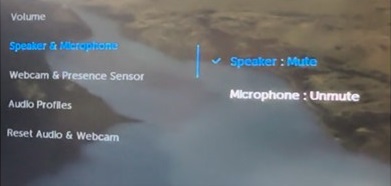
After running the /Microphone mute command line, the OSD for the P3424WEB shows below:
- Speaker: Unmute
- Microphone: Mute
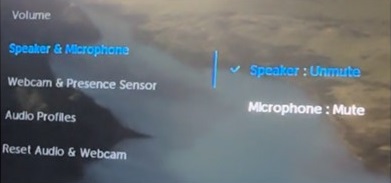
Affected Monitor:
- Dell P3424WEB
Affected Software:
- Dell Display and Peripheral Manager for macOS Version 1.3.2 and later
원인
This issue is caused by the display firmware. The display firmware does not interact properly with the CLI settings configured through DDPM on macOS.
해결
Always set the Microphone and Speaker mute/unmute status in pair.
- When setting the microphone mute and the speaker unmute:
- Set the microphone mute by DDPM CLI Command:
./DDPM /Microphone mute - Set the speaker unmute by DDPM CLI Command:
./DDPM /Speaker unmute
- Set the microphone mute by DDPM CLI Command:
- When setting the microphone mute and the speaker mute:
- Set the microphone mute by DDPM CLI Command:
./DDPM /Microphone mute - Set the speaker mute by DDPM CLI Command:
./DDPM /Speaker mute
- Set the microphone mute by DDPM CLI Command:
해당 제품
Dell Display and Peripheral Manager, Dell P3424WEB문서 속성
문서 번호: 000263750
문서 유형: Solution
마지막 수정 시간: 24 7월 2026
버전: 7
다른 Dell 사용자에게 질문에 대한 답변 찾기
지원 서비스
디바이스에 지원 서비스가 적용되는지 확인하십시오.