Dell Command Update AMDX Template Upload Fails in Microsoft Intune
요약: This article provides information about failure occurring while uploading Dell Command | Update (DCU) .ADMX template to Microsoft Intune.
이 문서는 다음에 적용됩니다.
이 문서는 다음에 적용되지 않습니다.
이 문서는 특정 제품과 관련이 없습니다.
모든 제품 버전이 이 문서에 나와 있는 것은 아닙니다.
증상
Affected Products:
- Dell Command | Update
Status shows Upload failed when attempting to import the Dell Command | Update ADMX template to Microsoft Intune.
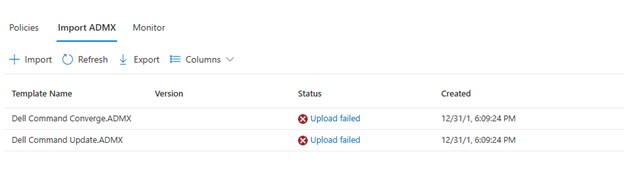
Clicking Upload failed, displays:
ADMX file: Dell Command Update.ADMX
State: failed
Last modified date: xx/xx/xxxx
Error Details: ADMX file referenced not found NamespaceMissing:Dell.Policies. Please upload it first.
원인
The base Dell.ADMX and Dell.ADML template files must be uploaded first before any application specific AMDX can be uploaded.
해결
The ADMX templates can be extracted from the Dell Command | Update installation package. Upload the Dell.ADMX and Dell.ADML files first. Then uploading the Dell Command Update.ADMX and Dell Command Update.ADML completes successfully.
Note: For more information about how to extract the templates from the installation package, reference How To Access .AMDX and .ADML Files for Use with Dell Command Update.
해당 제품
Dell Command | Update문서 속성
문서 번호: 000290019
문서 유형: Solution
마지막 수정 시간: 15 7월 2026
버전: 5
다른 Dell 사용자에게 질문에 대한 답변 찾기
지원 서비스
디바이스에 지원 서비스가 적용되는지 확인하십시오.