L'upload del modello AMDX di Dell Command Update non riesce in Microsoft Intune
요약: Questo articolo fornisce informazioni sull'errore che si verifica durante il caricamento di Dell Command | Aggiornamento (DCU) . Modello ADMX in Microsoft Intune.
이 문서는 다음에 적용됩니다.
이 문서는 다음에 적용되지 않습니다.
이 문서는 특정 제품과 관련이 없습니다.
모든 제품 버전이 이 문서에 나와 있는 것은 아닙니다.
증상
Prodotti interessati:
- Dell Command | Update
Lo stato indica Upload failed quando si tenta di importare Dell Command | Update Modello ADMX in Microsoft Intune.
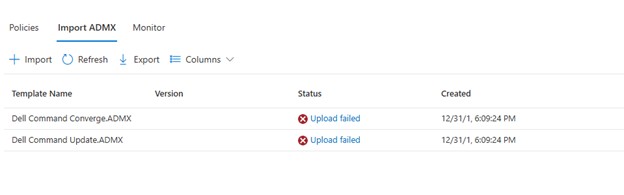
Cliccando su Upload failed, viene visualizzato:
ADMX file: Dell Command Update.ADMX
State: failed
Last modified date: xx/xx/xxxx
Error Details: ADMX file referenced not found NamespaceMissing:Dell.Policies. Please upload it first.
원인
La base Dell.ADMX e Dell.ADML I file modello devono essere caricati prima di poter caricare qualsiasi AMDX specifico dell'applicazione.
해결
I modelli ADMX possono essere estratti dalla directory Dell Command | Update pacchetto di installazione. Carica il file Dell.ADMX e Dell.ADML prima i file. Quindi, caricando il file Dell Command Update.ADMX e Dell Command Update.ADML Viene completato correttamente.
Nota: Per ulteriori informazioni su come estrarre i modelli dal pacchetto di installazione, consultare Come accedere a . AMDX e . File ADML da utilizzare con Dell Command Update.
해당 제품
Dell Command | Update문서 속성
문서 번호: 000290019
문서 유형: Solution
마지막 수정 시간: 15 7월 2026
버전: 5
다른 Dell 사용자에게 질문에 대한 답변 찾기
지원 서비스
디바이스에 지원 서비스가 적용되는지 확인하십시오.