Warning Message to Connect Battery and AC Adapter Before Updating Dock Firmware
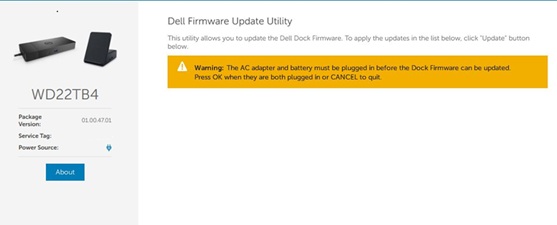
요약: During a dock firmware update, a message occurs stating "Warning: The AC adapter and battery must be plugged in before the Dock Firmware can be updated. Press OK when they are both plugged in or CANCEL to quit". ...
이 문서는 다음에 적용됩니다.
이 문서는 다음에 적용되지 않습니다.
이 문서는 특정 제품과 관련이 없습니다.
모든 제품 버전이 이 문서에 나와 있는 것은 아닙니다.
증상
"Warning: The AC adapter and battery must be plugged in before the Dock Firmware can be updated. Press OK when they are both plugged in or CANCEL to quit" occurs during a dock firmware update.
Affected Platforms:
- Dell Thunderbolt Dock - WD19TBS
- Dell Thunderbolt Dock - WD22TB4
- OptiPlex 3090 Ultra
- OptiPlex 7090 Ultra
원인
Dell Firmware Update (DFU) version 5 removed support for System Management BIOS (SMBIOS). As a result, computers without a battery installed may be incorrectly detected, because the firmware can no longer read accurate hardware information from SMBIOS.
해결
Note: Before starting the update, perform the following:
- Back up all personal data. For more information, refer to Back Up and Recovery.
- Connect the AC adapter.
Updating the Dell Dock WD19/WD22TB4 Firmware Update Utility to version 01.01.01.01,01.01.11.01 or later on the dock resolves the issue. To download and install the firmware, refer to the Driver Update Guide.
해당 제품
Dell Thunderbolt Dock – WD19TBS, OptiPlex 3090 Ultra, OptiPlex 7090 Ultra, Dell Thunderbolt Dock – WD22TB4문서 속성
문서 번호: 000330971
문서 유형: Solution
마지막 수정 시간: 16 7월 2026
버전: 6
다른 Dell 사용자에게 질문에 대한 답변 찾기
지원 서비스
디바이스에 지원 서비스가 적용되는지 확인하십시오.