NetWorker: HTTP 400 또는 403 오류와 함께 AUTHC 연결 실패
요약: AUTHC(NetWorker Authentication Service)에 대한 연결이 실패합니다. 보고된 오류는 HTTP 400(잘못된 요청) 또는 HTTP 403(사용할 수 없음)입니다
이 문서는 다음에 적용됩니다.
이 문서는 다음에 적용되지 않습니다.
이 문서는 특정 제품과 관련이 없습니다.
모든 제품 버전이 이 문서에 나와 있는 것은 아닙니다.
증상
The NetWorker nsrlogin HTTP 400 또는 403에서 명령이 실패합니다.
nsrlogin -u administrator
130136:nsrlogin: Please enter password:
117849:nsrlogin: Authentication library error: CONNECT tunnel failed, response 403
Server Message : Make sure that server is running
또는
nsrlogin -u Administrator
130136:nsrlogin: Please enter password:
117849:nsrlogin: Authentication library error: CONNECT tunnel failed, response 400
Server Message : Make sure that server is running
NetWorker 인증 및 인증 서비스에 연결하려는 다른 시도도 비슷한 오류로 인해 실패합니다.
nsrauthtrust -H NETWORKER_SERVER_NAME -P 9090
125927:nsrauthtrust: Failed to retrieve certificate: CONNECT tunnel failed, response 403
NMC(NetWorker Management Console) 및 NWUI(NetWorker Web User Interface) 업그레이드(Windows) 및 업그레이드 후 스크립트(Linux)는 AUTHC 포트의 연결 실패를 보고합니다.
원인
이 문제는 NetWorker 외부에서 발생합니다. The NetWorker nsrlogin 또한 환경에 HTTPS 프록시가 구성되어 있기 때문에 명령에서 "Connect Tunnel Failed"를 보고했습니다. 이는 다음을 사용하여 확인할 수 있습니다. curl 명령어로 확인할 수 있습니다.
curl https://NETWORKER_SERVER_ADDRESS:9090
curl -v https://NETWORKER_SERVER_ADDRESS:9090
* Rebuilt URL to: https://NETWORKER_SERVER_ADDRESS:9090/
* Uses proxy env variable no_proxy == 'HTTP_PROXY_HOSTNAME'
* Uses proxy env variable https_proxy == 'http://HTTP_PROXY_HOSTNAME:8080'
*   Trying HTTP_PROXY_IP...
* TCP_NODELAY set
* Connected to HTTP_PROXY_HOSTNAME (HTTP_PROXY_IP) port 8080 (#0)
* allocate connect buffer!
* Establish HTTP proxy tunnel to NETWORKER_SERVER_ADDRESS:9090
> CONNECT NETWORKER_SERVER_ADDRESS:9090 HTTP/1.1
> Host: NETWORKER_SERVER_ADDRESS:9090
> User-Agent: curl/7.61.1
> Proxy-Connection: Keep-Alive

< HTTP/1.1 403 Forbidden
< Server: squid/3.5.20
< Mime-Version: 1.0
< Date: Thu, 03 Jul 2025 15:36:25 GMT
< Content-Type: text/html;charset=utf-8
< Content-Length: 3548
< X-Squid-Error: ERR_ACCESS_DENIED 0
< Vary: Accept-Language
< X-Cache: MISS from HTTP_PROXY_HOSTNAME
< X-Cache-Lookup: NONE from HTTP_PROXY_HOSTNAME:8080
< Via: 1.1 HTTP_PROXY_HOSTNAME (squid/3.5.20)
< Proxy-Connection: Keep-Alive
* Received HTTP code 403 from proxy after CONNECT
* Closing connection 0
* Curl: (56) Received HTTP code 403 from proxy after CONNECT
또는
curl -v https://NETWORKER_SERVER_ADDRESS:9090
* Uses proxy env variable https_proxy == 'http://HTTP_PROXY_HOSTNAME:443'
*   Trying HTTP_PROXY_IP:443...
* Connected to HTTP_PROXY_HOSTNAME (HTTP_PROXY_IP) port 443 (#0)
* allocate connect buffer!
* Establish HTTP proxy tunnel to NETWORKER_SERVER_ADDRESS:9090
> CONNECT NETWORKER_SERVER_ADDRESS:9090 HTTP/1.1
> Host: NETWORKER_SERVER_ADDRESS:9090
> User-Agent: curl/7.76.1
> Proxy-Connection: Keep-Alive
>
< HTTP/1.1 400 Bad Request
< Server: openresty
< Date: Thu, 03 Jul 2025 14:11:12 GMT
< Content-Type: text/html
< Content-Length: 154
< Connection: close
<
* Received HTTP code 400 from proxy after CONNECT
* CONNECT phase completed!
* Closing connection 0
반환되는 특정 오류는 사용된 특정 프록시 공급업체 및 구성에 따라 달라질 수 있습니다. 공통점은 AUTHC(NetWorker Authentication) 포트(기본값 9090)에 대한 통신이 HTTPS 프록시 호스트를 통해 리디렉션된다는 것입니다. 반환된 오류는 HTTP 4xx 오류입니다. 400(잘못된 요청) 또는 403(사용할 수 없음)입니다.
해결
포트 9090의 인증 트래픽에 대한 HTTPS 프록시 사용은 지원되는 구성으로 명시적으로 문서화되거나 테스트되지 않습니다. NetWorker 구성 요소에서는 일반적으로 서비스 간의 직접적인 통신이 필요하며, 특히 인증을 위해서는 통신이 필요합니다.
NetWorker Server에서 HTTP/HTTPS 프록시 구성을 제거합니다. 또한 NetWorker Server의 포트 9090과 통신하는 모든 NetWorker 호스트에서 이를 제거해야 합니다. 자세한 내용은 다음을 참조하십시오. NetWorker 프로세스 및 포트
NetWorker Server에서 다음을 실행합니다.
unset https_proxy
unset http_proxy
참고: 변수 이름을 NetWorker Server에서 사용되는 HTTPS 프록시 변수로 바꿉니다. 변수는
curl 연결 출력. 변수를 식별할 수 없는 경우 시스템 관리자에게 문의하거나 프록시 공급업체 설명서를 참조하십시오. HTTPS 프록시 요청을 비활성화하려면 추가 변경이 필요할 수 있습니다. 이 구성은 NetWorker 소프트웨어 또는 구성의 외부에 있습니다.
변수가 설정 해제되면 다음을 시도하십시오. nsrlogin 다시. 성공하면 다음을 실행합니다. nsrlogout파일의 무결성을 확인합니다.
[admin@lnx-srvr01 root]$ nsrlogin -u Administrator
130136:nsrlogin: Please enter password:
Authentication succeeded

[admin@lnx-srvr01 root]$ nsrlogout
이는 NetWorker AUTHC 서비스와의 통신이 정상적으로 작동하고 있음을 나타냅니다. NetWorker 인증 또는 포트 9090을 통한 통신과 관련된 다른 프로세스는 성공할 것으로 예상됩니다.
추가 정보
이 unset command는 현재 셸 세션에 대한 변수만 설정 해제합니다. 시스템 또는 프로파일 변수로 설정된 경우 터미널을 열거나 시스템을 재부팅하거나 새 셸 세션을 시작할 때 자동으로 로드됩니다. 변수가 다음 세션 또는 재부팅 시에 로드되지 않도록 하려면 다음 작업을 수행해야 합니다.
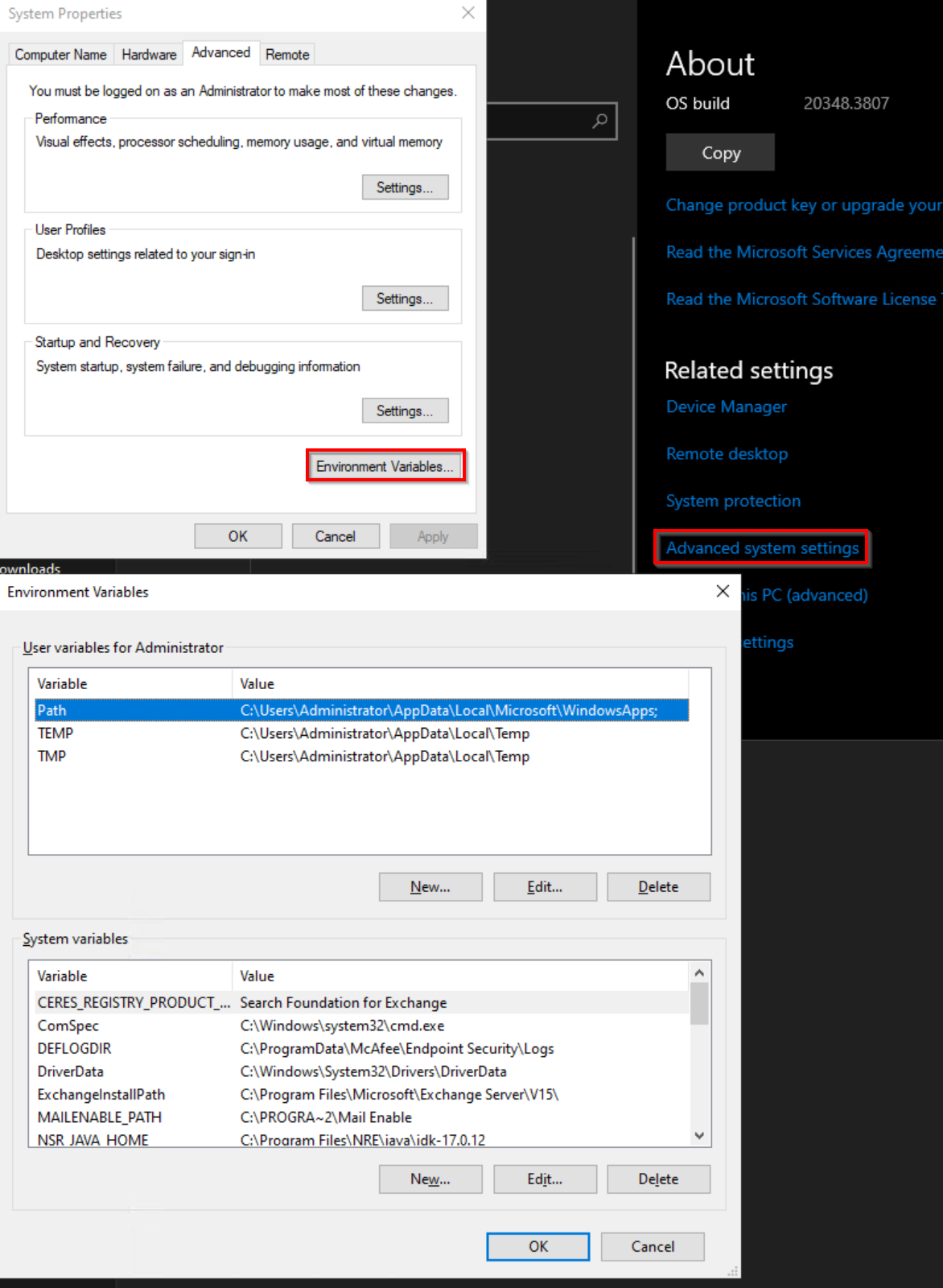
Windows: SYSTEM 또는 USER 변수를 확인하고 HTTP/HTTPS 프록시 호스트를 정의하는 데 사용되는 모든 변수를 제거합니다.
Linux: 다음 파일에서 HTTP/HTTPS 변수 설정이 있는지 확인하고 제거합니다.
- ~/.Bashrc
- ~/.bash_profile
- ~/.프로필
- /etc/environment
- /etc/프로필
- /etc/profile.d/*.sh
해당 제품
NetWorker제품
NetWorker Family문서 속성
문서 번호: 000340491
문서 유형: Solution
마지막 수정 시간: 04 6월 2026
버전: 3
다른 Dell 사용자에게 질문에 대한 답변 찾기
지원 서비스
디바이스에 지원 서비스가 적용되는지 확인하십시오.