Windows Hello에서 지문 인식기용 ControlVault를 사용하고 있는지 확인하는 방법
요약: Windows Hello에서 지문 인식기용 ControlVault를 사용하고 있는지 확인하는 방법
이 문서는 다음에 적용됩니다.
이 문서는 다음에 적용되지 않습니다.
이 문서는 특정 제품과 관련이 없습니다.
모든 제품 버전이 이 문서에 나와 있는 것은 아닙니다.
지침
- 먼저 시스템에 ControlVault가 있는지 확인하는 방법에 설명된 프로세스를 사용하여 시스템에 ControlVault가 있는지 확인합니다.
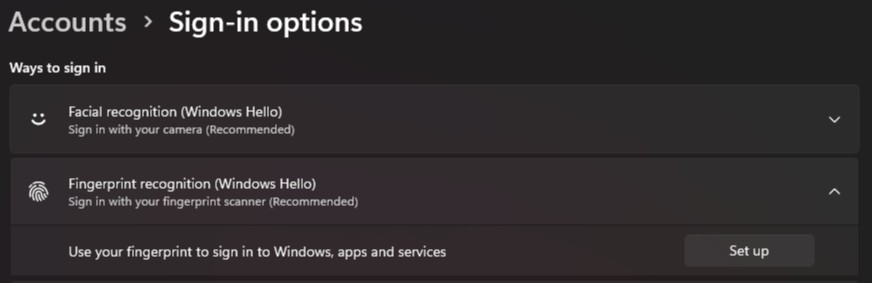
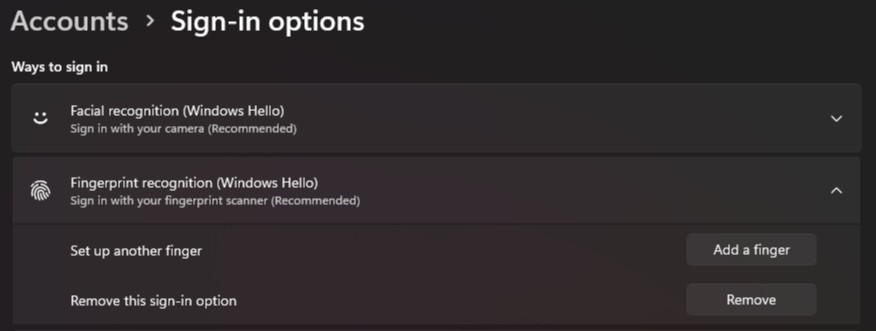
- Windows에서 Settings를 시작하고 Accounts를 클릭한 다음 Sign-in options를 클릭합니다.
- 지문 인식(Windows Hello)에서 "설정" 버튼이 표시되면 디바이스에 등록된 지문 정보가 없는 것입니다
- 지문 인식(Windows Hello)에 "손가락 추가" 버튼이 표시되면 디바이스에 지문 정보가 등록되어 있는 것입니다
해당 제품
Dell Pro Max 14 MC14250, Dell Pro Max 16 MC16250, Dell Pro 13 Plus PB13250, Dell Pro 14 Plus PB14250, Dell Pro 16 Plus PB16250, Dell Pro Rugged 13 RA13250, Dell Pro Rugged 14 RB14250, Latitude 7030 Rugged Extreme Tablet, Latitude 7200 2-in-1
, Latitude 7210 2-in-1, Latitude 7220EX Rugged Extreme Tablet, Latitude 7220 Rugged Extreme Tablet, Latitude 7230 Rugged Extreme Tablet, Latitude 5300 2-in-1, Latitude 5300, Latitude 5310 2-in-1, Latitude 5310, Latitude 5320, Latitude 5330, Latitude 5340, Latitude 5350, Latitude 7300, Latitude 7310, Latitude 7320, Latitude 7320 Detachable, Latitude 7330, Latitude 7330 Rugged Extreme, Latitude 7340, Latitude 7350, Latitude 7350 Detachable, Latitude 9330, Latitude 5400, Latitude 5401, Latitude 5410, Latitude 5411, Latitude 5421, Latitude 5430 Rugged, Latitude 5431, Latitude 5440, Latitude 5450, Latitude 7400 2-in-1, Latitude 7400, Latitude 7410, Latitude 7420, Latitude 7430, Latitude 7440, Latitude 7450, Latitude 9410, Latitude 9420, Latitude 9430, Latitude 9440 2-in-1, Latitude 9450 2-in-1, Latitude 5500, Latitude 5501, Latitude 5510, Latitude 5511, Latitude 5520, Latitude 5521, Latitude 5530, Latitude 5531, Latitude 5540, Latitude 5550, Latitude 7520, Latitude 7530, Latitude 9510, Latitude 9520, Latitude 7640, Latitude 7650, Latitude 5420, Latitude 5430, Precision 3470, Precision 3480, Precision 3490, Precision 5470, Precision 5480, Precision 5490, Precision 3540, Precision 3541, Precision 3550, Precision 3551, Precision 3560, Precision 3561, Precision 3570, Precision 3571, Precision 3580, Precision 3581, Precision 3590, Mobile Precision 3591, Precision 7540, Precision 7550, Precision 7560, Precision 5680, Mobile Precision 5690, Precision 7670, Precision 7680, Precision 7740, Precision 7750, Precision 7760, Precision 7770, Precision 7780
...
문서 속성
문서 번호: 000353977
문서 유형: How To
마지막 수정 시간: 07 8월 2025
버전: 1
다른 Dell 사용자에게 질문에 대한 답변 찾기
지원 서비스
디바이스에 지원 서비스가 적용되는지 확인하십시오.