Data Domain: How to change the sync alert threshold
요약: This article explains how to change the sync alert threshold using the command line. By default, the sync alert threshold is set to 24 hours. However, based on specific requirements, it may need to be adjusted for a particular mtree to prevent the error: “Sync-as-of time is more than 24 hours ago.” ...
이 문서는 다음에 적용됩니다.
이 문서는 다음에 적용되지 않습니다.
이 문서는 특정 제품과 관련이 없습니다.
모든 제품 버전이 이 문서에 나와 있는 것은 아닙니다.
지침
- Use SSH to connect to the PowerProtect Data Domain with the admin privilege.
- Run the "replication option show" command to check the sync alert threshold.
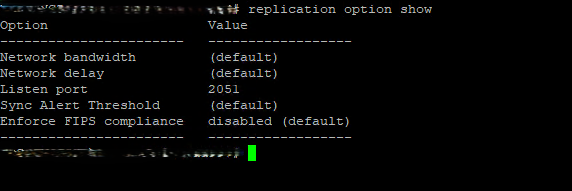
- To change the default value to different hours we need to use command "replication option set default-sync-alert-threshold <value>"
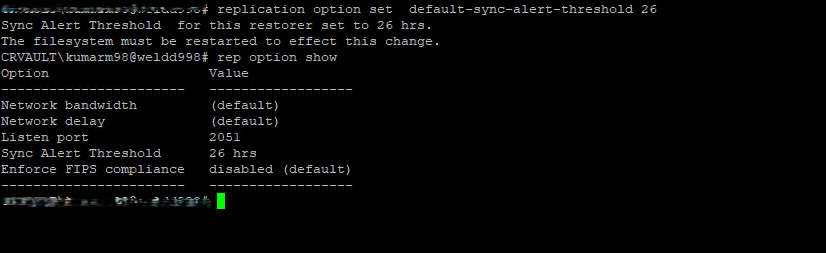
- The filesystem must be restarted to effect this change.
filesys restart
해당 제품
Data Domain문서 속성
문서 번호: 000462922
문서 유형: How To
마지막 수정 시간: 11 5월 2026
버전: 1
다른 Dell 사용자에게 질문에 대한 답변 찾기
지원 서비스
디바이스에 지원 서비스가 적용되는지 확인하십시오.