PowerEdge 17th Generation Servers with Delta Power Supplies may not show correctly in iDRAC UI and SEL logging after AC cycle
요약: PowerEdge 17th Generation Servers with Delta Power Supplies may not show correctly in iDRAC UI and SEL logging after AC cycle.
이 문서는 다음에 적용됩니다.
이 문서는 다음에 적용되지 않습니다.
이 문서는 특정 제품과 관련이 없습니다.
모든 제품 버전이 이 문서에 나와 있는 것은 아닙니다.
증상
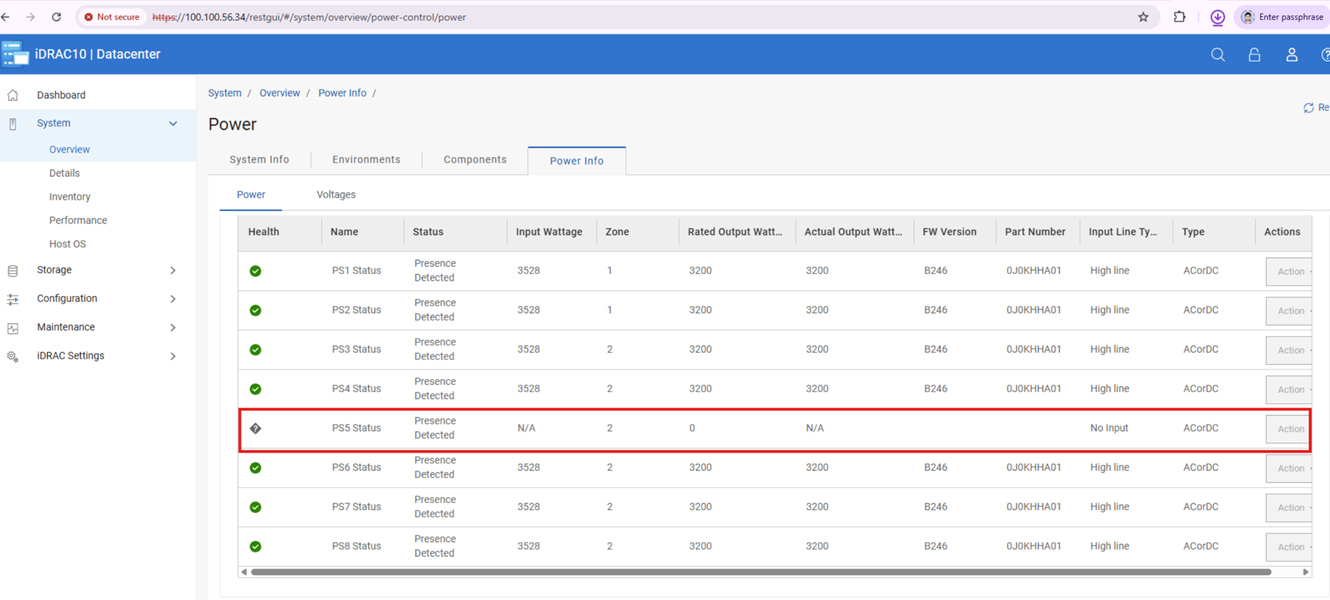
Post-AC cycle affected Delta 17G Power Supplies may function but display blank iDRAC telemetry, firmware, and Dell Part numbers of fields. However, performing another AC or virtual AC cycle after this state occurs triggers incorrect configuration or capacity mismatch errors in the SEL.
원인
After an AC or virtual AC cycle, iDRAC UI may miss power supply info and SEL may log PSU configuration or capacity mismatches (PWR2265/PWR2267/UEFI0059).
We identified that is Power Supplies limitation caused the loss of communication in a corner case, leading to the bus hang.
해결
Do not replace any hardware, this issue is not a hardware failure and can be resolved with Power Supply firmware updates.
Note: If a PSU mismatch occurs, unplug AC power and reseat the PSU after 2 minutes. Once remediated, update PSU firmware in line with the following information.
The following chart lists the Dell Part Numbers (DPN) and Firmware Version required to resolve this issue.
| Vendor | Wattage | Dell Part Number | Firmware Version |
| Delta | 3200 W | JNF12 | 1916 |
| J0KHH | BC46 | ||
| Y9NXM | C021 | ||
| 2400 W | 9KK0M | BC2B | |
| 1800 W | GF1GT | 192A | |
| 1500 W | GRD17 | BC31 | |
| DM12N | BC36 | ||
| 1400 W | 8HCRH | BC28 | |
| 1100 W | KMJFC | BC35 | |
| 49FWD | BC2C | ||
| 800 W | 8YNWG | BC2D | |
| R98X5 | BC2E |
The above firmware versions are available on each system model’s download page from the Dell Support site.
해당 제품
Rack Servers, XE Servers, XR Servers문서 속성
문서 번호: 000471893
문서 유형: Solution
마지막 수정 시간: 05 6월 2026
버전: 1
다른 Dell 사용자에게 질문에 대한 답변 찾기
지원 서비스
디바이스에 지원 서비스가 적용되는지 확인하십시오.