PowerStore: Orphaned Snapshots Detected
요약: This article describes the PowerStore "Detected orphan snapshots" alert.
이 문서는 다음에 적용됩니다.
이 문서는 다음에 적용되지 않습니다.
이 문서는 특정 제품과 관련이 없습니다.
모든 제품 버전이 이 문서에 나와 있는 것은 아닙니다.
증상
PowerStore raises the alert 0x03700103 for:
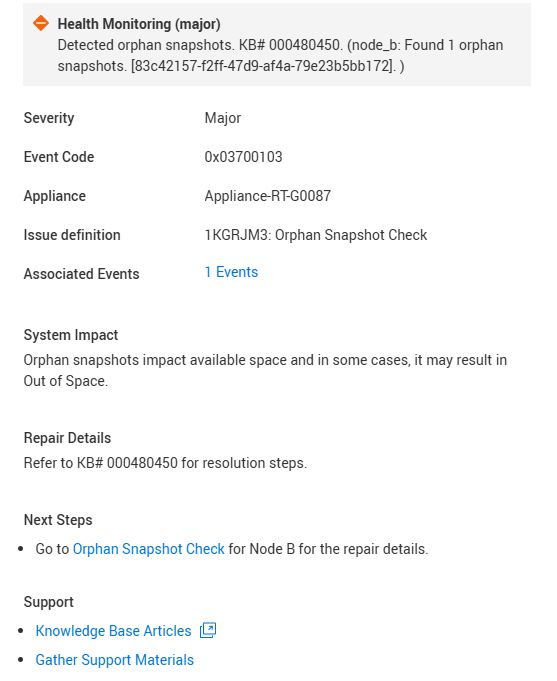
Figure 1. Health Check Alert
"Detected orphan snapshots. KB# 000480450."원인
In certain scenarios, snapshots may continue to exist in the Data Path (DP) after their corresponding Control Path (CP) objects have been removed or were never created. These are referred to as orphan snapshots. Without a corresponding CP object, these snapshots remain in the Data Path indefinitely and are never deleted. Such orphan snapshots take space and may result in an Out of Space (OOS) scenario.
Known scenarios leading to orphan snapshots:
- Dual Data Path panic during snapshot creation — A snapshot object is created in DP, but the corresponding CP command fails without rolling back the DP snapshot.
- Communication failure between local and remote sites (Metro configurations) — Metro recovery snapshots are created in DP, but their corresponding CP objects are not created due to inter-site communication issues. These DP snapshots are then never deleted.
해결
This check does not support Auto-Repair. Deleting snapshots is a sensitive operation and requires explicit customer approval to mitigate the risk of removing important data.
Contact Technical Support to determine the best course of action. Mention this KB article ID to expedite processing.
추가 정보
See KB article PowerStore: Landing Page for RxDefinitions Issues for more information about the health check mechanism, the RxDefinitions package, and a complete list of RxDefinitions alerts.
해당 제품
PowerStore문서 속성
문서 번호: 000480450
문서 유형: Solution
마지막 수정 시간: 30 7월 2026
버전: 4
다른 Dell 사용자에게 질문에 대한 답변 찾기
지원 서비스
디바이스에 지원 서비스가 적용되는지 확인하십시오.