PowerScale: 감사 시스템 중단
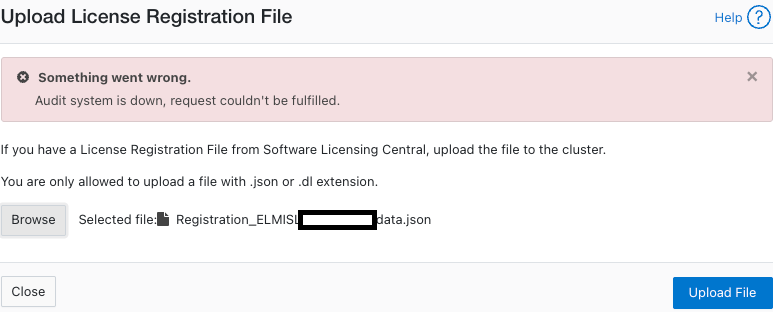
요약: 라이선스를 활성화하려고 할 때 "Audit system is down, request could not be fulfilled"라는 오류 메시지가 나타납니다(오프라인 또는 레거시 모드).
이 문서는 다음에 적용됩니다.
이 문서는 다음에 적용되지 않습니다.
이 문서는 특정 제품과 관련이 없습니다.
모든 제품 버전이 이 문서에 나와 있는 것은 아닙니다.
증상
메시지 오류 :
powerscale-3:  2026-06-03T15:34:28.375440-07:00 <3.3> powerscale3(id20) isi_papi_d[64129]: Cannot deliver audit event to the audit daemon. Event payload size (72521) + format length is greater than allowed size (65525)
powerscale-3:  2026-06-03T15:37:33.008372-07:00 <3.3> powerscale-3(id20) isi_papi_d[65089]: Cannot deliver audit event to the audit daemon. Event payload size (72521) + format length is greater than allowed size (65525)
powerscale-3:  2026-06-03T16:18:41.035297-07:00 <3.3> powerscale-3(id20)  isi_papi_d[50492]: STACK Audit system is down, request couldn't be fulfilled.     from --- (---:0):      isi_exception::isi_exception(int, char const*, __va_list_tag*) (OFFSET:134)     api_exception::api_exception(api_error_code, char const*, ...) (OFFSET:146)     uri_manager::execute_request(request&, response&, bool, bool, bool, bool, bool, bool) (OFFSET:2181)
UI에서 다음을 수행합니다.
원인
페이로드 크기가 제한을 초과하는 코드 결함입니다.
해결
엔지니어링 팀에서 이 문제를 인지하고 있으며 수정 작업을 진행 중입니다.
해결 방법:
- 구성 감사가 활성화되었는지 확인합니다.
powerscale-3# isi audit settings global view
     Protocol Auditing Enabled: Yes
                 Audited Zones: -
               CEE Server URIs:
                      Hostname:
       Config Auditing Enabled: Yes  <<<<<<<<<<<<<<<<<<<<<<<<<<<
         Config Syslog Enabled: No
         Config Syslog Servers: -
     Config Syslog TLS Enabled: No
  Config Syslog Certificate ID:
       Protocol Syslog Servers: -
   Protocol Syslog TLS Enabled: No
Protocol Syslog Certificate ID:
         System Syslog Enabled: No
         System Syslog Servers: -
     System Syslog TLS Enabled: No
  System Syslog Certificate ID:
          Auto Purging Enabled: No
              Retention Period: 180
       System Auditing Enabled: No
powerscale-3#
참고: 아니요로 설정된 경우 관련된 다른 문제가 있습니다. Dell Technologies 지원 부서에 문의하십시오.
- 구성 감사를 일시적으로 비활성화로 설정합니다.
powerscale-3# isi audit settings global modify --config-auditing-enabled=false
- 라이선스를 다시 적용한 다음 사용하도록 설정합니다.
powerscale-3# isi audit settings global modify --config-auditing-enabled=true
문서 속성
문서 번호: 000486487
문서 유형: Solution
마지막 수정 시간: 08 7월 2026
버전: 1
다른 Dell 사용자에게 질문에 대한 답변 찾기
지원 서비스
디바이스에 지원 서비스가 적용되는지 확인하십시오.