Dell AIOps Plugin fails to upload inventory data - transfer failed because services are busy.
요약: AIOps tenant portal is missing or showing old inventory data for a managed device. Reviewing the transfer log from the Dell AIOps plugin page within the OpenManage Enterprise console shows the inventory transfer log as failed. The status message shows 'Data transfer failed because the services are busy.' ...
이 문서는 다음에 적용됩니다.
이 문서는 다음에 적용되지 않습니다.
이 문서는 특정 제품과 관련이 없습니다.
모든 제품 버전이 이 문서에 나와 있는 것은 아닙니다.
증상
Managed devices within the AIOps tenant portal shows no or incomplete inventory data when managed through the OpenManage Enterprise connector.
Reviewing the transfer log status from within the Dell AIOps plugin Transfer Log page shows the inventory logs in a failed state. All other transfer logs (Health and Alerts) have completed successfully.

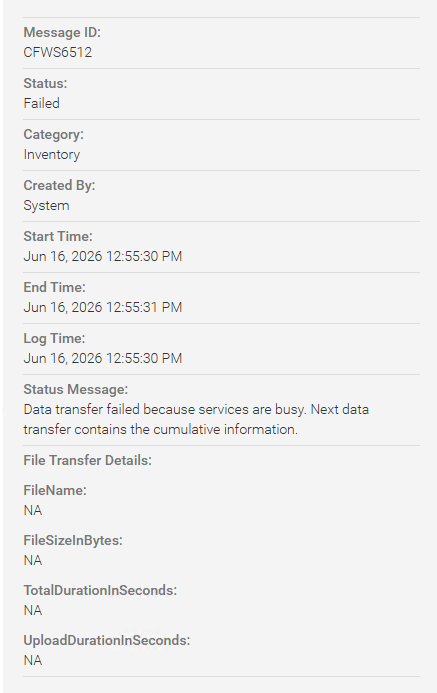
Downloading and extracting the console log bundle (Monitor - Troubleshoot - Logs) shows the following error in the data forwarding service log (ConsoleLogs-xxxxxxxxxxxxxxxx\dataforwardingservice\):
[WARN ] 2026-05-07 02:19:26.226 [RxCachedThreadScheduler-7887] - getDeviceInventoryChangesetAsJson: Time taken to get data from core.device_inventory_get_inventory_changeset_as_json : 823 ms.

[ERROR] 2026-05-07 02:19:26.226 [RxCachedThreadScheduler-7887] - InventoryVerticle:INVENTORY: processChangeSetData: Cause:io.reactivex.exceptions.CompositeException: 2 exceptions occurred. .

[ERROR] 2026-05-07 02:19:26.226 [RxCachedThreadScheduler-7887] - InventoryVerticle: processForwarding: Failed.Cause:
Exception states an invalid input syntax for timestamp:
Caused by: io.vertx.pgclient.PgException: { "message": "invalid input syntax for type timestamp: \"\"", "severity": "ERROR", "code": "22007", "where": "SQL statement \"with\n        _pre_group_input_arrays(device_id, inventory_types, identifier, inventory_time, sync_type) as

.

PL/pgSQL function device_inventory_get_inventory_changeset_as_json(integer[],character varying[],character varying[],timestamp without time zone[],integer[],integer[]) line 162 at SQL statement", "file": "datetime.c", "line": "3755", "routine": "DateTimeParseError" }
원인
For some managed 17G devices running iDRAC firmware 1.30.10.xx, the inventory data being returned was incomplete. This leads to unexpected results when the AIOps plugin would request inventory data.
Some incomplete inventory data includes, but is not limited to:
- Memory missing vendor information.
- BOSS NVME firmware version and manufacturer date missing.
- Kiokia NVMe drives manufacture date missing.
- QLogic FC card missing part and serial number information as well as vendor and description information.
- Network functions and transceiver data missing.
해결
Dell recommends updating the 17G iDRAC firmware to the latest release, version 1.30.20.10 or higher. After updating the firmware, the device inventory data will be updated, and the AIOps inventory logs will transfer successfully.
해당 제품
OpenManage Enterprise Dell AIOps문서 속성
문서 번호: 000487640
문서 유형: Solution
마지막 수정 시간: 14 7월 2026
버전: 1
다른 Dell 사용자에게 질문에 대한 답변 찾기
지원 서비스
디바이스에 지원 서비스가 적용되는지 확인하십시오.