iDRAC Platform Firmware Updates/Rollback Failures When Partition is Near Capacity
요약: Dell PowerEdge server firmware updates that leverage iDRAC partitions for staging will fail when the iDRAC partition is near capacity.
이 문서는 다음에 적용됩니다.
이 문서는 다음에 적용되지 않습니다.
이 문서는 특정 제품과 관련이 없습니다.
모든 제품 버전이 이 문서에 나와 있는 것은 아닙니다.
증상
When the iDRAC or Lifecycle Controller (LC) is used to update server firmware (FW) , a copy of the current FW is retained for rollback purposes. The new firmware package is then staged on the iDRAC partition and extracted to perform the update. Since the iDRAC/Lifecycle Controller has limited storage space, it may not have enough available capacity for both the previous and new firmware images. The Lifecycle Log may record any of the following warning events: RED032, RED008, RED096.
Firmware Update Lifecycle Log Examples:
2023-10-03 07:45:19 RED032 Reached maximum size limit allowed for storing firmware images. Deleted all rollback firmware images.
2023-10-03 08:13:11 RED008 Unable to extract payloads from Update Package.
2023-10-03 08:12:59 RED096 iDRAC flash storage has reached its upper limits. Rollback will no longer be supported for this component.
Note: When a RED032 is recorded, Rollback action will no longer be possible. The rollback version will be listed as 'NULL' in the Rollback page of the Lifecycle Controller GUIs. The iDRAC GUI will not list the impacted component within the iDRAC Rollback page.
Firmware Update Lifecycle Log Examples:
2023-10-03 07:45:19 RED032 Reached maximum size limit allowed for storing firmware images. Deleted all rollback firmware images.
Log Sequence Number:
46547
Detailed Description:
The rollback firmware images previously stored were deleted to provide space for storing the firmware images for the requested operation. All the rollback firmware images are deleted.
Recommended Action:
No response action is required.
46547
Detailed Description:
The rollback firmware images previously stored were deleted to provide space for storing the firmware images for the requested operation. All the rollback firmware images are deleted.
Recommended Action:
No response action is required.
2023-10-03 08:13:11 RED008 Unable to extract payloads from Update Package.
Log Sequence Number:
46553
Detailed Description:
The firmware payloads in the Update Package cannot be extracted. This may be because the file is not valid or the security signature cannot be verified.
Recommended Action:
Re-acquire the Update Package from the service provider.
46553
Detailed Description:
The firmware payloads in the Update Package cannot be extracted. This may be because the file is not valid or the security signature cannot be verified.
Recommended Action:
Re-acquire the Update Package from the service provider.
2023-10-03 08:12:59 RED096 iDRAC flash storage has reached its upper limits. Rollback will no longer be supported for this component.
Log Sequence Number:
46551
Detailed Description:
The maximum iDRAC storage space allocated for storing firmware image files is reached. The firmware image of the earlier version that was stored for a rollback operation is now deleted.
Recommended Action:
No response action is required.
46551
Detailed Description:
The maximum iDRAC storage space allocated for storing firmware image files is reached. The firmware image of the earlier version that was stored for a rollback operation is now deleted.
Recommended Action:
No response action is required.
Note: When a RED032 is recorded, Rollback action will no longer be possible. The rollback version will be listed as 'NULL' in the Rollback page of the Lifecycle Controller GUIs. The iDRAC GUI will not list the impacted component within the iDRAC Rollback page.
원인
The iDRAC retains two firmware version images for devices that support rollback feature (BIOS, Network Controllers, iDRAC, PERC, Backplanes, DPU). As firmware image files continue to grow in size, the static partition on the iDRAC controller can run out of capacity to stage multiple image files. When the partition is low on space, this will lead to firmware update/rollback operations to fail.
해결
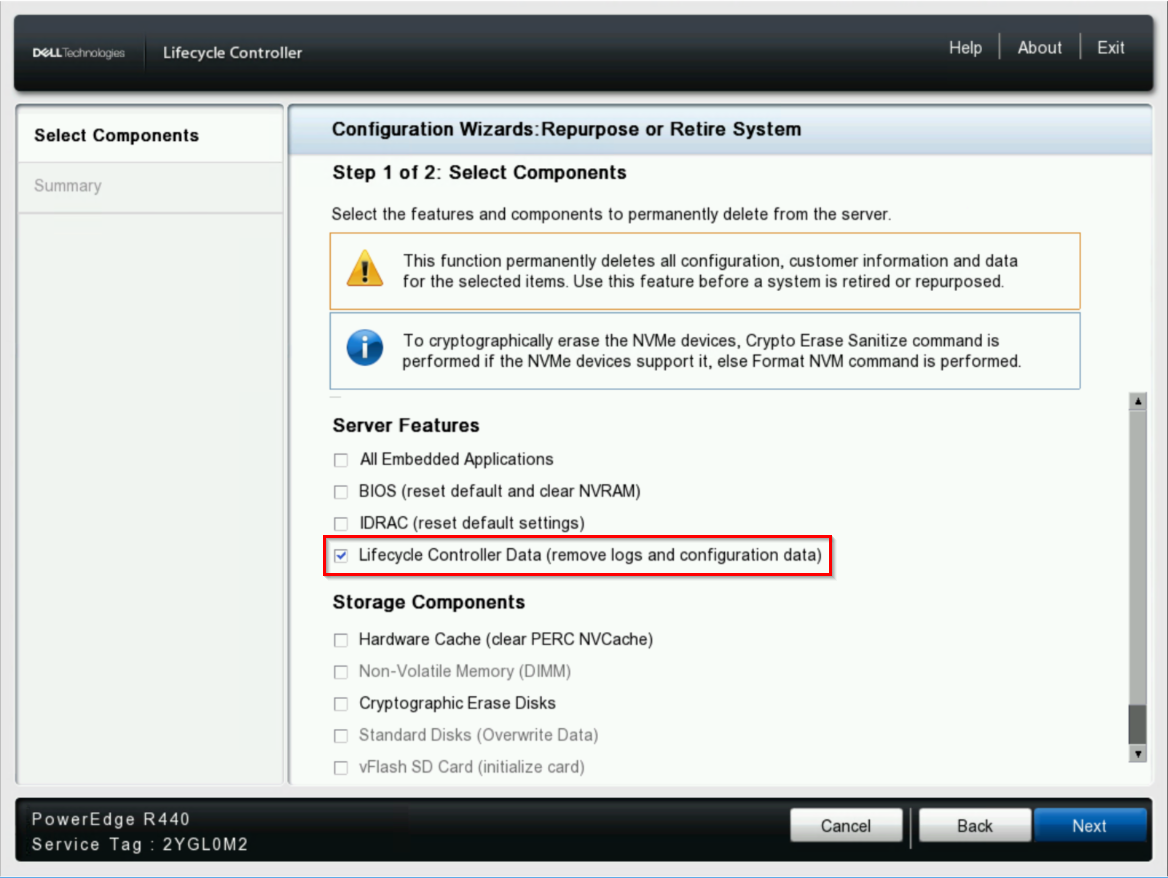
While improvements in later iDRAC9 firmware versions (7.00.30.00) include improvements in managing this iDRAC partition, this behavior is a limitation in the partition size. In order to free up capacity on the partition, manually deleting rollback images may be required. To free up space on the Lifecycle Controller partition, running a system erase of the lcdata will delete all rollback images.
Lifecycle Controller Repurpose or Retire Wizard Example:
System Erase RACADM Example:
SystemErase Redfish API Example:
iDRAC9 Redfish API | Dell Technologies Developer
Note: Running a system erase operation of the lcdata will delete the Lifecycle Log from the iDRAC in addition to ALL stored firmware images. Rollback images will only be populated on partition as additional firmware updates are performed.
Lifecycle Controller Repurpose or Retire Wizard Example:
System Erase RACADM Example:
racadm>>racadm systemerase lcdata
RAC1061: SystemErase operation initiated successfully.
Check the job status by running the RACADM command "racadm jobqueue view -i JID_963398489564"
RAC1061: SystemErase operation initiated successfully.
Check the job status by running the RACADM command "racadm jobqueue view -i JID_963398489564"
SystemErase Redfish API Example:
POST …/redfish/v1/Managers/{ManagerId}/Oem/Dell/DellLCService/Actions/DellLCService.SystemErase
Payload = lcdata
Payload = lcdata
iDRAC9 Redfish API | Dell Technologies Developer
Note: Running a system erase operation of the lcdata will delete the Lifecycle Log from the iDRAC in addition to ALL stored firmware images. Rollback images will only be populated on partition as additional firmware updates are performed.
해당 제품
iDRAC8, iDRAC9, iDRAC10 - 1.10.xx Series, iDRAC10 - 1.20.xx Series, iDRAC10 - 1.30.xx Series, iDRAC8 with Lifecycle Controller version 2.81.81.81, iDRAC8 with Lifecycle Controller version 2.82.82.82
, iDRAC8 with Lifecycle Controller version 2.83.83.83, iDRAC8 with Lifecycle Controller version 2.84.84.84, iDRAC8 with Lifecycle Controller version 2.85.85.85, iDRAC9 - 3.0x Series, iDRAC9 - 3.1x Series, iDRAC9 - 3.2x Series, iDRAC9 - 3.3x Series, iDRAC9 - 3.4x Series, iDRAC9 - 4.xx Series, iDRAC9 - 5.xx Series, iDRAC9 - 6.xx Series, iDRAC9 - 7.xx Series
...
문서 속성
문서 번호: 000491465
문서 유형: Solution
마지막 수정 시간: 22 7월 2026
버전: 2
다른 Dell 사용자에게 질문에 대한 답변 찾기
지원 서비스
디바이스에 지원 서비스가 적용되는지 확인하십시오.