NetWorker: Client can override settings that does not apply to schedule if the level is set to skip at action level
Samenvatting: The action property "Client Can Override" has been set but does not apply if the action schedule is set to skip.
Dit artikel is van toepassing op
Dit artikel is niet van toepassing op
Dit artikel is niet gebonden aan een specifiek product.
Niet alle productversies worden in dit artikel vermeld.
Symptomen
The Policy->Workflow->Action contains a client override option. Client override is enabled, showing "Client Can Override."

When Client Can Override is enabled, the Client resource values for Schedule, Pool, Retention policy, and Storage Node attributes override the equivalent Action resource attributes.
Oorzaak
NetWorker is working by design. If the NetWorker policy action schedule is set to Skip backup level, the Client can Override option is not honored.
Oplossing
For NetWorker to consider the Client Can Override option, change the action schedule to a different level.
If the client should be skipped, define the skip level schedule at client properties.
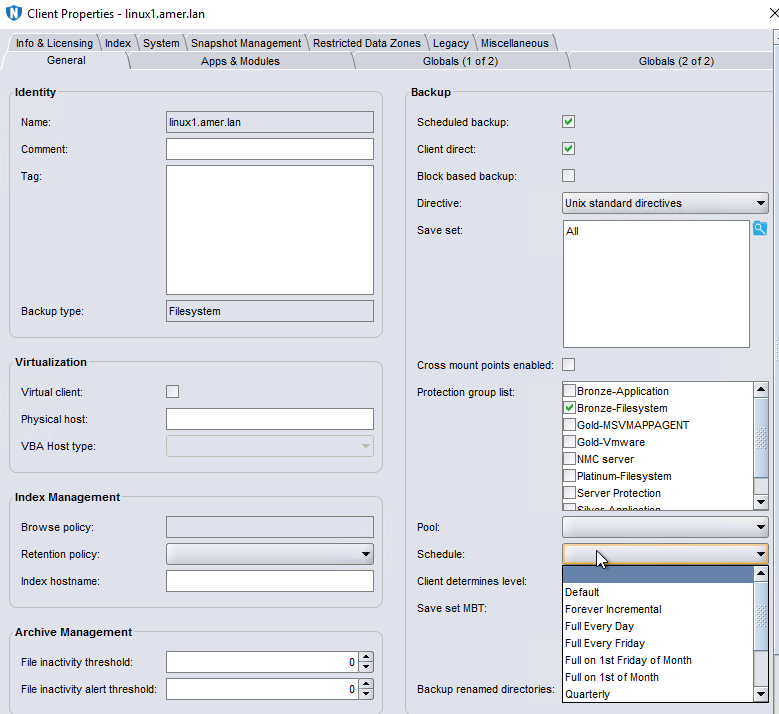
There are some default schedules defined. Custom schedules can be created under Protection->Schedules. Once created the scheduled is listed as an option in the Schedule drop-down in the client properties.
Extra informatie
Client Overrides and scheduling is detailed further in the NetWorker Administration Guide, available through: https://www.dell.com/support/home/product-support/product/networker/docs
Getroffen producten
NetWorkerProducten
NetWorker Family, NetWorker SeriesArtikeleigenschappen
Artikelnummer: 000032150
Artikeltype: Solution
Laatst aangepast: 14 mrt. 2025
Versie: 4
Vind antwoorden op uw vragen via andere Dell gebruikers
Support Services
Controleer of uw apparaat wordt gedekt door Support Services.