Ustalanie wersji instalatora Master Installer programu Dell Data Security
Samenvatting: Dowiedz się, jak zidentyfikować wersję instalatora głównego Dell Data Security (dawniej Dell Data Protection), wykonując poniższe instrukcje krok po kroku.
Dit artikel is van toepassing op
Dit artikel is niet van toepassing op
Dit artikel is niet gebonden aan een specifiek product.
Niet alle productversies worden in dit artikel vermeld.
Instructies
Uwaga:
- Od maja 2022 r. oprogramowanie Dell Endpoint Security Suite Enterprise osiągnęło koniec konserwacji. Ten produkt i związane z nim artykuły nie są już aktualizowane przez Dell.
- Od stycznia 2019 r. oprogramowanie Dell Endpoint Security Suite Pro osiągnęło koniec konserwacji. Ten produkt i związane z nim artykuły nie są już aktualizowane przez Dell.
- Aby uzyskać więcej informacji, zapoznaj się z artykułem Zasady dotyczące cyklu życia produktu (koniec wsparcia technicznego i koniec przydatności do użycia) dla programu Dell Data Security. Jeśli masz pytania dotyczące innych artykułów, skontaktuj się z działem sprzedaży lub napisz wiadomość na adres endpointsecurity@dell.com.
- Aby uzyskać dodatkowe informacje na temat obecnych produktów, zapoznaj się z artykułem Endpoint Security.
Numer wersji instalatora Master Installer programu Dell Data Security (dawniej Dell Data Protection) można wykorzystać do:
- Identyfikować znane problemy.
- Zrozumieć zmiany przepływu pracy.
- Weryfikować wymagania systemowe.
Dotyczy produktów:
- Dell Encryption Enterprise
- Dell Data Protection | Enterprise Edition
- Dell Encryption Personal
- Dell Data Protection | Personal Edition
- Dell Endpoint Security Suite Enterprise
- Dell Endpoint Security Suite
Dotyczy systemów operacyjnych:
- Windows
- Przed ustaleniem wersji należy pobrać [MASTER INSTALLER].
- Nazwa produktu [MASTER INSTALLER] różni się w zależności od aplikacji:
DDSSetup.exedla Dell Encryption EnterpriseDDSSetup.exedla Dell Encryption PersonalDDSSuite.exedla rozwiązania Dell Endpoint Security Suite EnterpriseDDSSuite.exedla Dell Endpoint Security SuiteDDPSetup.exedla Dell Data Protection | Wersja EnterpriseDDPSetup.exedla Dell Data Protection | Wersja osobistaDDPSuite.exedla Dell Data Protection | Pakiet zabezpieczeń punktów końcowychDDPSuite.exedla Dell Data Protection | Endpoint Security Suite Enterprise
Uwaga: Aby uzyskać informacje na temat pobierania DDSSetup.exe lub DDPSetup.exe, zapoznaj się z artykułem Pobieranie oprogramowania Dell Encryption Enterprise lub Dell Encryption Personal.
- Kliknij plik [MASTER INSTALLER] prawym przyciskiem myszy, a następnie wybierz opcję Właściwości.

- Kliknij kartę Szczegóły.

- Zapisz informację znajdującą się w polu Wersja produktu.
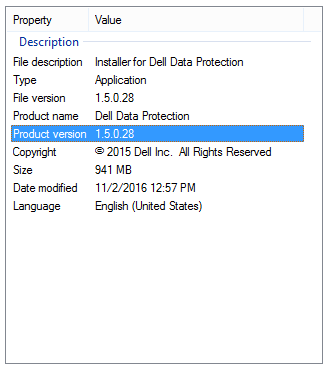 Uwaga: Wersja produktu Twojego klienta może różnić się od wersji widocznej na powyższym zrzucie ekranu.
Aby skontaktować się z pomocą techniczną, przejdź do sekcji Numery telefonów międzynarodowej pomocy technicznej Dell Data Security.
Przejdź do TechDirect, aby wygenerować zgłoszenie online do pomocy technicznej.
Aby uzyskać dodatkowe informacje i zasoby, dołącz do Forum społeczności Dell Security.
Extra informatie
Video's
Getroffen producten
Dell Encryption, Dell Endpoint Security Suite Pro, Dell Endpoint Security Suite EnterpriseArtikeleigenschappen
Artikelnummer: 000124917
Artikeltype: How To
Laatst aangepast: 12 mrt. 2025
Versie: 11
Vind antwoorden op uw vragen via andere Dell gebruikers
Support Services
Controleer of uw apparaat wordt gedekt door Support Services.