Dell Encryption External Media 버전을 확인하려면 어떻게 해야 합니까?
Samenvatting: Dell Encryption External Media 및 Dell Data Protection External Media Edition의 버전을 식별하는 방법에 대해 알아보십시오.
Dit artikel is van toepassing op
Dit artikel is niet van toepassing op
Dit artikel is niet gebonden aan een specifiek product.
Niet alle productversies worden in dit artikel vermeld.
Instructies
참고:
- 2021년 2월부터 Mac용 Dell Encryption Enterprise에 대한 유지 보수가 종료됩니다. 이 제품 및 관련 문서는 더 이상 Dell에서 업데이트하지 않습니다. 자세한 내용은 Dell Data Security의 제품 수명주기(지원 종료 및 EOL(End Of Life)) 정책을 참조하십시오. 다른 문서에 대한 질문이 있는 경우 영업 팀에 문의하거나 endpointsecurity@dell.com으로 문의하십시오.
- 최신 제품에 대한 자세한 내용은 엔드포인트 보안을 참조하십시오.
외장형 스토리지를 보호하는 데 사용된 Dell Encryption External Media(이전 Dell Data Protection | External Media Edition)의 버전을 알아야 합니다.
- 알려진 문제 식별
- UI 차이점 확인
- 워크플로 변경 이해
- 시스템 요구 사항 확인
영향을 받는 제품:
- Dell Encryption External Media
- Dell Data Protection | External Media Edition
영향을 받는 운영 체제:
- Windows
- Mac
Windows 및 Mac 바이너리는 Dell Encryption External Media로 보호되는 외장형 스토리지에 추가됩니다. 버전을 확인하려면 해당 플랫폼 탭을 클릭하여 자세한 내용을 확인하십시오.
Windows
- Windows 컴퓨터에 로그인합니다.
- 보호된 미디어의 위치로 이동합니다.
- 마우스 오른쪽 버튼 클릭
AccessEncryptedFiles.exe. 마우스 오른쪽 버튼을 클릭한 후 Properties를 선택합니다.
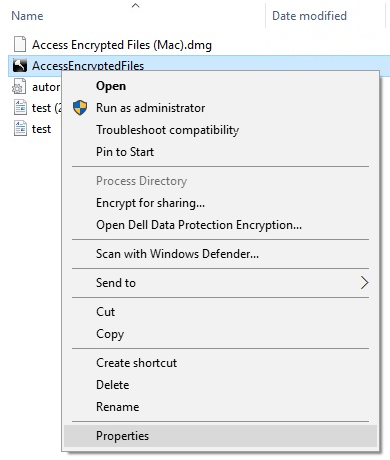
- 세부 정보 탭을 클릭합니다.

- 제품 버전을 기록합니다.
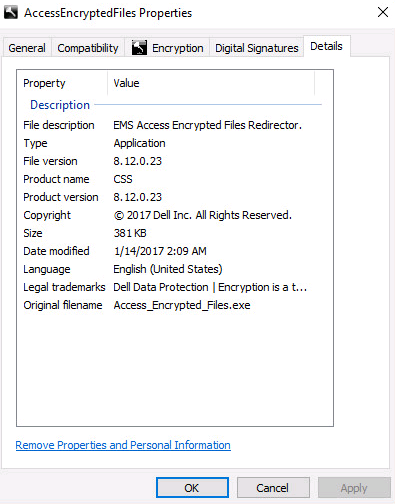 참고:
참고:- 제품 버전은 위의 스크린샷과 다를 수 있습니다.
- Dell Encryption External Media와 호환되는 Windows 운영 체제에 대한 자세한 내용은 다음을 참조하십시오.
Mac
- Mac 컴퓨터에 로그인합니다.
- 보호된 미디어의 위치로 이동합니다.
- 두 번 클릭
AccessEncryptedFiles.dmg. 이렇게 하면 디스크 이미지가 마운트됩니다.
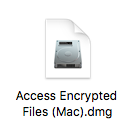
디바이스가 EMS 서비스를 통해 이미 인증한 경우 AccessEncryptedFiles.dmg가 표시되지 않습니다. 문제를 해결하려면 외부 미디어를 다시 장착한 다음 인증 요청 프롬프트를 취소합니다. - AccessEncryptionExternalMedia를 마우스 오른쪽 버튼으로 클릭한 다음 Get Info를 선택합니다.
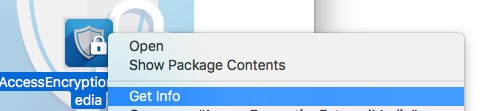 제품의 이전 버전에서는 AccessEncryptionExternaledia 대신 AccessDellExternalMediaShield가 표시됩니다.
 - General을 확장하고 Version을 기록합니다. 이 예에서 8.17.0이 버전입니다.
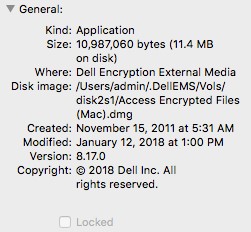 참고:
참고:- 클라이언트 버전이 위의 스크린샷과 다를 수 있습니다.
- Dell Encryption External Media와 호환되는 Windows 운영 체제에 대한 자세한 내용은 다음을 참조하십시오.
Extra informatie
Video's
Getroffen producten
Dell EncryptionArtikeleigenschappen
Artikelnummer: 000124924
Artikeltype: How To
Laatst aangepast: 05 aug. 2026
Versie: 18
Vind antwoorden op uw vragen via andere Dell gebruikers
Support Services
Controleer of uw apparaat wordt gedekt door Support Services.