Latitude 3510: Guia de teclas de função do teclado
Samenvatting: O guia a seguir lista os atalhos de teclado disponíveis e suas respectivas funções no notebook Dell Latitude 3510.
Dit artikel is van toepassing op
Dit artikel is niet van toepassing op
Dit artikel is niet gebonden aan een specifiek product.
Niet alle productversies worden in dit artikel vermeld.
Symptomen
Funções das teclas de atalhos de teclado
A tabela abaixo é uma lista das funções das teclas de atalho de combinação disponíveis no notebook Latitude 3510
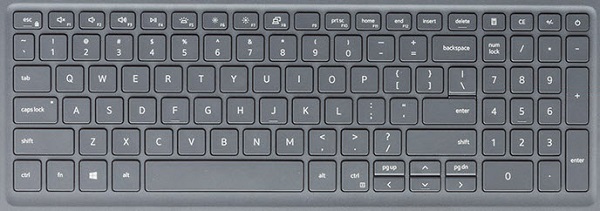
| Teclas | Comportamento principal | Comportamento secundário (Fn + tecla) |
|---|---|---|
| Fn + Esc | Esc |
Alternar o bloqueio da tecla Fn |
| Fn + F1 |
Silenciar o áudio |
F1 |
| Fn + F2 |
Diminuir o volume |
F2 |
| Fn + F3 |
Aumentar o volume |
F3 |
| Fn + F4 |
Silenciar o microfone |
F4 |
| Fn + F5 |
Ligar/desligar luz de fundo do teclado |
F5 |
| Fn + F6 |
Diminuir brilho |
F6 |
| Fn + F7 |
Aumentar brilho |
F7 |
| Fn + F8 |
Alternar para o monitor externo |
F8 |
| Fn + F10 |
Print screen |
F10 |
| Fn + F11 |
Home |
F11 |
| Fn + F12 |
End(Sair) |
F12 |
| Fn + Ctrl |
Abrir o menu de aplicativos |
-- |
Nota: A funcionalidade da luz de fundo do teclado depende de ter um teclado compatível com a luz de fundo instalado no notebook.
Oorzaak
Não aplicável.
Oplossing
 Acesse a nossa base de conhecimento sobre teclado para obter mais recursos e informações.
 Para obter mais artigos e informações visite a nossa página de suporte do touchpad.
 Mais artigos e informações também podem ser encontrados em nossa página de suporte do mouse.
Getroffen producten
Latitude 3510Artikeleigenschappen
Artikelnummer: 000129906
Artikeltype: Solution
Laatst aangepast: 19 apr. 2026
Versie: 8
Vind antwoorden op uw vragen via andere Dell gebruikers
Support Services
Controleer of uw apparaat wordt gedekt door Support Services.