Dell Data Securityアンインストーラーをダウンロードする方法
Samenvatting: 次の手順に従って、Dell Data Securityアンインストーラーをダウンロードする方法について説明します。
Dit artikel is van toepassing op
Dit artikel is niet van toepassing op
Dit artikel is niet gebonden aan een specifiek product.
Niet alle productversies worden in dit artikel vermeld.
Instructies
注:
- 「対象製品」に記載されている製品は、アクティブな状態ではない場合があります。製品のサポートに関する最新情報については、「Dell Data Securityに関する製品ライフサイクル(サポート終了/ライフサイクル終了)」を参照してください。代替記事に関する質問がある場合は、担当のセールス チームに連絡するか、またはendpointsecurity@dell.comにお問い合わせください。
- 現在の製品に関する追加情報については、Endpoint Securityを参照してください。
Dell Data Securityアンインストーラーは、リストされているWindows Dell Data Security(旧Dell Data Protection)の影響を受けた製品について、合理的な削除方法を提供します。この記事では、これらの製品のDell Data Securityアンインストーラーを入手する手順について説明します。
対象製品:
- Dell Encryption Enterprise
- Dell Data Protection | Enterprise Edition
- Dell Encryption Personal
- Dell Data Protection | Personal Edition
- Dell Encryption External Media
- Dell Data Protection | External Media Edition
- Dell Data Guardian
- Dell Encryption Enterprise Self-Encrypting Drive Manager
- Dell BitLocker Manager
- デルのフル ディスク暗号化
- Dell Data Protection | Secure Lifecycle
- Dell Data Protection | Cloud Edition
- Dell Endpoint Security Suite Enterprise
- Dell Endpoint Security Suite Pro
- Dell Threat Defense
- Dell Data Protection | Server Encryption
- Dell Data Protection | Security Tools
影響を受けるバージョン:
- v8.0.X以降
対象オペレーティング システム:
- Windows
- Webブラウザーで、https://www.dell.com/support/homeにアクセスします。
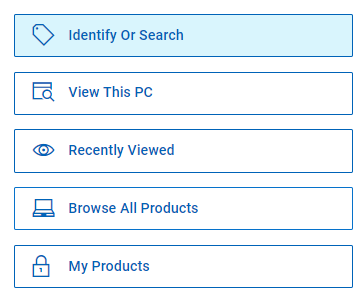
- [すべての製品を参照]をクリックします。
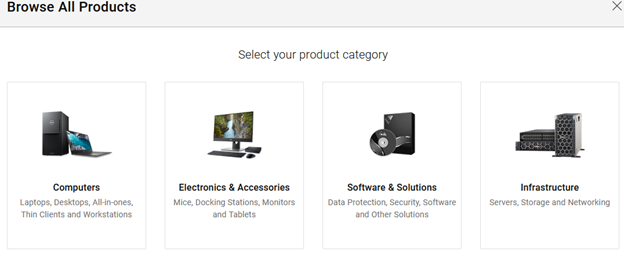
- [ソフトウェアおよびソリューション]をクリックします。
- [Security](セキュリティ)をクリックします。

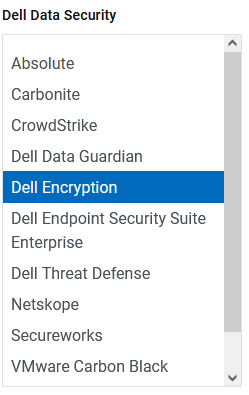
- [Dell Data Security]をクリックします。

- [Dell Encryption]をクリックします。
- [Select This Product]をクリックします。
![[Select This Product]](https://supportkb.dell.com/img/ka0Do0000005wFaIAI/ka0Do0000005wFaIAI_ja_6.jpeg)
- ドライバーおよびダウンロードをクリックします。

- [オペレーティング システム]ドロップダウンから、[Windows 7 [X-bit]]、[Windows 8 [X-bit]]、[Windows 8.1 [X-bit]]、[Windows 10 [X-bit]]、[Windows 11]のいずれかを選択します。

- [Dell Data Securityアンインストーラー]の右側にある[ダウンロード]をクリックします。
 リリース日は、上記のスクリーンショットと異なる場合があります。
Getroffen producten
Dell Data Guardian, Dell Encryption, Dell Threat Defense, Dell Endpoint Security Suite Pro, Dell Endpoint Security Suite EnterpriseArtikeleigenschappen
Artikelnummer: 000130754
Artikeltype: How To
Laatst aangepast: 05 aug. 2026
Versie: 15
Vind antwoorden op uw vragen via andere Dell gebruikers
Support Services
Controleer of uw apparaat wordt gedekt door Support Services.