Windowsでサイレント インストールを使用してNetWorkerクライアントおよびNetWorker拡張クライアント ソフトウェアをインストールする方法
Samenvatting: このKBでは、Windowsシステムでコマンド ラインからNetWorkerクライアントおよび拡張クライアント パッケージをインストールする手順について説明します。
Dit artikel is van toepassing op
Dit artikel is niet van toepassing op
Dit artikel is niet gebonden aan een specifiek product.
Niet alle productversies worden in dit artikel vermeld.
Instructies
- オンライン サポートWebサイト(https://www.dell.com/support/home/product-support/product/networker/drivers)からNetWorkerソフトウェア パッケージをダウンロードします。
- Windowsクライアント システムから、管理コマンド プロンプトを開き、インストール バイナリーが存在するパスに cdを使用して移動します。
ディレクトリー コンテンツの例:
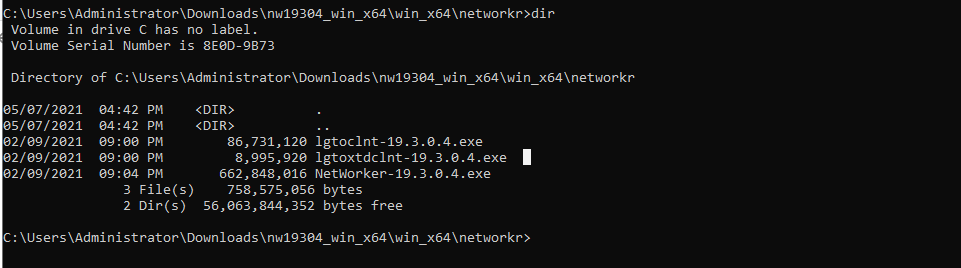
- 次のコマンドを実行します。
lgtoclnt-x.x.x.x.exe /v /s /q ConfigureFirewall=1 StartServices=1 /norestart
- /s /qは、すべてのUI出力を抑制します。
- /vは冗長モードを有効にします。
- /norestartは、インストールが完了した後に再起動を抑制します(インストールで再起動が必要な場合)。
Example:

- [プログラムと機能]に、インストールされたクライアント パッケージが表示されます。

サイレント オプションを使用したNetWorker拡張クライアントのインストール:
- 次のコマンドを実行します。
lgtoxtdclnt-x.x.x.x.exe /v /s /q ConfigureFirewall=1 StartServices=1 /norestart
Example:

- [プログラムと機能]に、インストールされた拡張クライアント パッケージが表示されます。

- NetWorkerクライアント サービスは、インストール後に自動的に再起動するはずです。
net stop nsrexecd /y && net start nsrexecd
Getroffen producten
NetWorkerArtikeleigenschappen
Artikelnummer: 000192023
Artikeltype: How To
Laatst aangepast: 14 jan. 2026
Versie: 5
Vind antwoorden op uw vragen via andere Dell gebruikers
Support Services
Controleer of uw apparaat wordt gedekt door Support Services.