如何檢查電腦中的處理器
Samenvatting: 瞭解如何檢查 Dell 電腦中的處理器。請遵循 Windows 和 Linux 的簡單步驟,檢查處理器的世代和型號。
Dit artikel is van toepassing op
Dit artikel is niet van toepassing op
Dit artikel is niet gebonden aan een specifiek product.
Niet alle productversies worden in dit artikel vermeld.
Instructies
處理器 (又稱為 CPU) 是否來自 Intel、AMD 或 Qualcomm,這些指示都會引導您完成識別處理器的程序。
識別處理器可能十分重要,原因有很多,例如:
- 識別已知問題
- 瞭解工作流變更
- 驗證相容的解決方案
瞭解如何在 Windows 或 Linux 上識別您的處理器 (Intel、AMD 或 Qualcomm)。按一下適當的選項,以取得如何檢查電腦中處理器的指示。
Windows
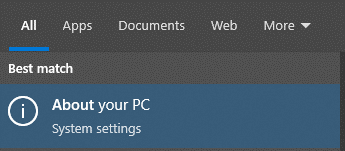
- 按一下開始按鈕。

- 輸入
about,然後按兩下 關於你的電腦。
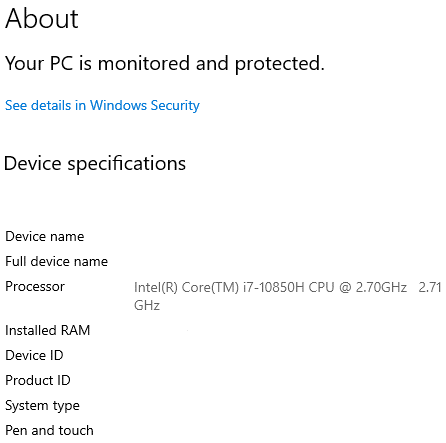
- 找出 處理器 規格,以識別電腦使用的處理器。
 注意:
注意:- 在此範例影像中,「 處理器 」值為
Intel(R) Core(TM) i7-10850H CPU @ 2.70GHz 2.71 GHz。可使用10緊接著i7-表示處理器為第 10 代處理器。 - 如需 Intel 處理器的詳細資訊,請前往 Intel 產品規格
。找到頁面右上角的搜索欄位,鍵入英特爾處理器的型號,然後在搜尋結果中選擇它。處理器代碼名稱可在 Essentials 下的資訊中找到。
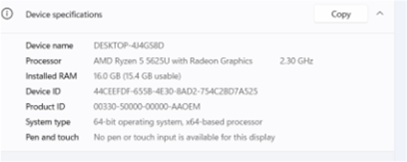 注意:在此範例影像中,「 處理器 」值為
AMD Ryzen 5 5625U with Radeon Graphics 2.30 GHz。第一個數字 (5) 引領5625U表示處理器為第五代處理器。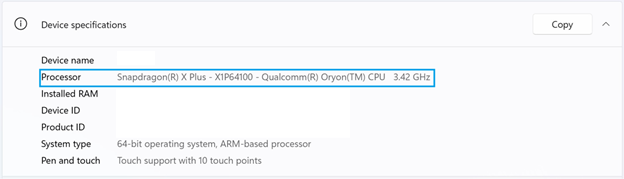 注意:在此範例影像中,「 處理器 」值為
Snapdragon(R) X Plus - X1P64100 - Qualcomm(R) Oryon(TM) CPU 3.42GHz。 - 在此範例影像中,「 處理器 」值為
Linux
- 按下「CTRL+ALT+T」以開啟終端機。
- 輸入
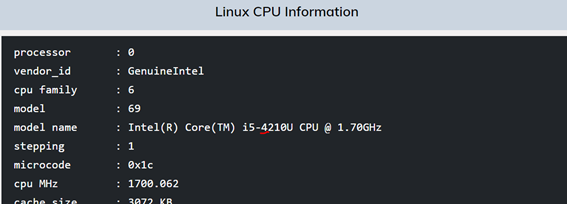
/proc/cpuinfo然後按下 Enter 鍵。 - 找出 型號名稱 值以識別電腦中使用的處理器。
 注意:
注意:- 在此範例影像中, 模型名稱 值為
Intel(R) Core(TM) i5-4210U CPU @ 1.70GHz。可使用4緊接著i5-表示處理器為第四代處理器。 - 如需 Intel 處理器的詳細資訊,請前往 Intel 產品規格
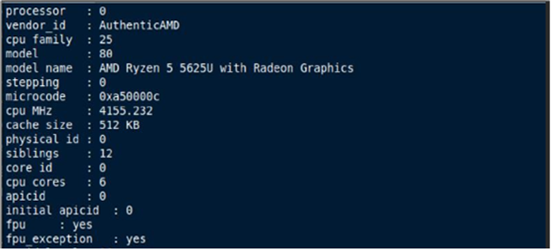 注意:在此範例影像中, 模型名稱 值為
AMD Ryzen 5 5625U with Radeon Graphics。第一個數字 (5) 引領5625U表示處理器為第五代處理器。 - 在此範例影像中, 模型名稱 值為
Getroffen producten
Chromebox, Alienware, Dell All-in-One, Dell Pro All-in-One, Dell Pro Max Micro, Dell Pro Max Slim, Dell Pro Max Tower, Dell Pro Micro, Dell Pro Slim, Dell Pro Tower, Dell Slim, Dell Tower, Inspiron, Legacy Inspiron Models, Legacy Desktop Models
, OptiPlex, Vostro, XPS, Legacy XPS Models, G Series, Chromebook, G Series, Alienware, Dell Plus, Dell Pro, Dell Pro Max, Dell Pro Plus, Dell Pro Premium, Inspiron, Latitude, Dell Pro Rugged, Vostro, XPS, Legacy Laptop Models, Fixed Workstations, Mobile Workstations, Dell Pro Max Micro XE FCM2250
...
Artikeleigenschappen
Artikelnummer: 000204117
Artikeltype: How To
Laatst aangepast: 15 mei 2026
Versie: 10
Vind antwoorden op uw vragen via andere Dell gebruikers
Support Services
Controleer of uw apparaat wordt gedekt door Support Services.