如何启动 Windows 中的 Microsoft Copilot
Samenvatting: 本文介绍了如何使用键盘、快捷键或 Windows 和 Microsoft Edge 内的按钮来启动 Windows 中的 Microsoft Copilot。
Dit artikel is van toepassing op
Dit artikel is niet van toepassing op
Dit artikel is niet gebonden aan een specifiek product.
Niet alle productversies worden in dit artikel vermeld.
Instructies
受影响的操作系统:
- Windows 11
- Windows 10
- Windows 中的 Microsoft Copilot 在中华人民共和国 (PRC) 不可用
- 回顾是一项 NPU 驱动的功能,仅在 Microsoft Copilot+ PC 上可用
- 在可用的情况下,用户也可以禁用 Windows 中的 Microsoft Copilot 和回顾功能,这会导致 Microsoft Copilot 键表现出不同的行为
- 该层次结构适用于安装了 Windows 11 的所有计算机
- 使用“Windows 更新”在安装了 Windows 10 的非 Copilot+ PC 上启用 Microsoft Copilot 键 — 待公布 (TBA)
Windows 中的 Microsoft Copilot 可通过多种方式启动。
| 启动 Microsoft Copilot | 键盘快捷键、图标或按键 |
|---|---|
| Windows 键 + C |  |
| Windows 任务栏 |  |
| Microsoft Edge |  |
| Microsoft Copilot 键 |  |
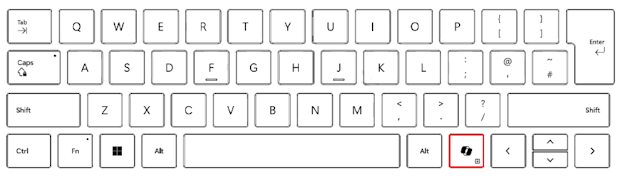
提醒:自 2024 年春季起,新上市的 Windows 11 设备将采用全新的键盘布局,并配备用于启动 Windows 中的 Microsoft Copilot 的专用键。该按键将替换右侧 Alt 键旁边的菜单键。按键位置可能因某些区域布局而异。
已知行为
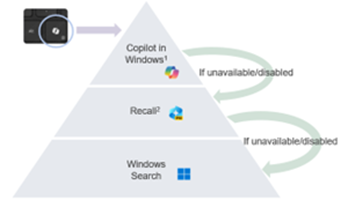
在 Microsoft Copilot+ PC 上,按 Microsoft Copilot 键将:
- 启动 Windows 中的 Microsoft Copilot。
- 如果 Microsoft Copilot 不可用或已禁用,则按下该按键将启动“回顾”功能。
- 如果“回顾”功能不可用或已禁用,则按下该按键将启动 Windows 搜索
按住 Microsoft Copilot 键可启动语音听写功能:
这允许用户向 Windows 中的 Microsoft Copilot 提问,或通过语音命令进行多轮交互。该此功能将在未来的某个时间点启用。
Extra informatie

Artikeleigenschappen
Artikelnummer: 000221081
Artikeltype: How To
Laatst aangepast: 19 mei 2026
Versie: 9
Vind antwoorden op uw vragen via andere Dell gebruikers
Support Services
Controleer of uw apparaat wordt gedekt door Support Services.