如何解压 Dell Client Device Manager
Samenvatting: 本文提供有关如何解压 Dell Client Device Manager (DCDM) 的信息。
Dit artikel is van toepassing op
Dit artikel is niet van toepassing op
Dit artikel is niet gebonden aan een specifiek product.
Niet alle productversies worden in dit artikel vermeld.
Instructies
有多个选项可用于从 .cab 文件中提取内容:Windows 资源管理器、命令行或任何支持 .cab 文件的第三方归档应用程序。
注意: 由于第三方应用程序可供广泛使用,因此未提供任何示例。
使用 Windows 资源管理器:
- 从下载 Dell Client Device Manager 的文件夹中,右键单击 cab 文件,然后选择使用 Windows 资源管理器打开>。
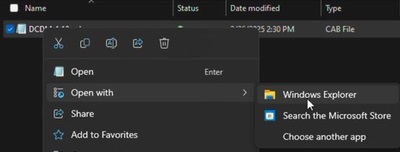 注意: 有关下载 Dell Client Device Manager 的信息,请参阅 如何下载 Dell Client Device Manager。
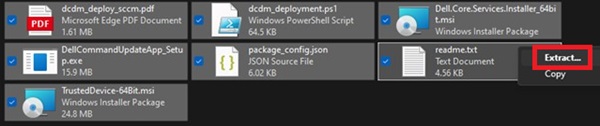
 - 选择所有文件,右键单击,然后单击 解压缩。
- 使用选择目标窗口转到要将内容解压到的位置,然后单击 解压 按钮。
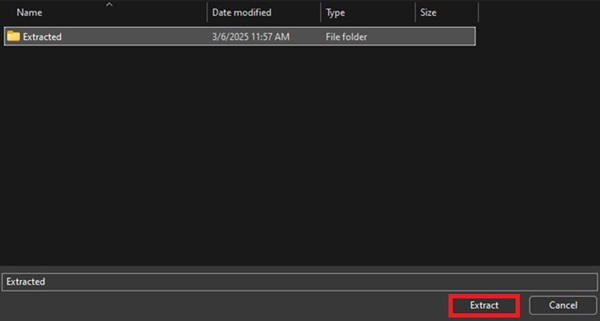 注意:使用 Windows 资源管理器提取机柜文件时,文件夹结构丢失,并且 DCDM_Deployment.ps1 脚本无法按设计工作。如果您打算使用提供的 PowerShell 脚本部署 DCDM,则必须创建一个名为 Installers 的新文件夹,然后将 Dell.Core.Services.Installer_64bit.msi、DellCommandUpdateApp_Setup.exe 和 TrustedDevice-64Bit.msi 移到其中。
使用命令行:
- 打开命令提示符并将目录焦点设置为下载 cab 文件的文件夹。
 注意: 有关下载 Dell Client Device Manager 的信息,请参阅 如何下载 Dell Client Device Manager。
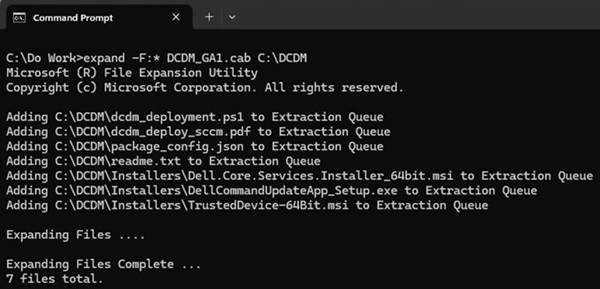
 - 键入以下命令:
expand -F:* cabfile_path existing_destination_folder
cabfile_path 是 Dell Client Device Manager cab 文件的名称,existing_destination_folder是要解压内容的文件夹的完整路径。
Getroffen producten
Dell Client Device ManagerArtikeleigenschappen
Artikelnummer: 000299313
Artikeltype: How To
Laatst aangepast: 03 sep. 2026
Versie: 3
Vind antwoorden op uw vragen via andere Dell gebruikers
Support Services
Controleer of uw apparaat wordt gedekt door Support Services.