ECS: Jak zakázat službu transformace Transformsvc
Samenvatting: Transformsvc lze použít pro proces migrace z Centera na Content Address Storage (CAS) v ECS. Byly nalezeny případy, kdy po dokončení migrace nebyla zakázána. Tento článek znalostní databáze popisuje, jak zakázat Transformsvc. ...
Dit artikel is van toepassing op
Dit artikel is niet van toepassing op
Dit artikel is niet gebonden aan een specifiek product.
Niet alle productversies worden in dit artikel vermeld.
Instructies
Ověřte, že Transformsvc . Pokud 'Transformsvc enabled' se zobrazí jako "False", není vyžadována žádná další akce. V tomto příkladu je nastavena na hodnotu True.
# svc_node services status
svc_node v1.2.19 (svc_tools v2.25.0)                 Started 2025-10-09 11:15:52

Node r1n1:
    Transformsvc enabled: True

    Services running:
        fabric-agent

        blobsvc        (96597)  Started: 2025-10-03 09:41:35      cm             (29921)  Started: 2025-10-01 09:56:10
        coordinatorsvc (14197)  Started: 2025-09-01 09:11:54      dataheadsvc    (29795)  Started: 2025-10-01 09:56:09
        dm             (124970) Started: 2025-09-08 20:47:45      dtquery        (17963)  Started: 2025-09-01 09:13:02
        ecsportalsvc   (14353)  Started: 2025-09-01 09:11:54      eventsvc       (14326)  Started: 2025-09-01 09:11:54
        georeceiver    (14328)  Started: 2025-09-01 09:11:54      metering       (14320)  Started: 2025-09-01 09:11:54
        nginx          (19072)  Started: 2025-09-01 09:13:38      objcontrolsvc  (53652)  Started: 2025-10-09 01:04:16
        resourcesvc    (66887)  Started: 2025-09-02 12:17:50      rm             (60137)  Started: 2025-09-05 10:09:05
        sr             (14315)  Started: 2025-09-01 09:11:54      ssm            (14294)  Started: 2025-09-01 09:11:54
        stat           (36257)  Started: 2025-09-24 00:53:27      storageserver  (14291)  Started: 2025-09-01 09:11:54
        vnest          (14200)  Started: 2025-09-01 09:11:54

    Services not running:
        <none>
[...]
Před zakázáním ověřte, jestli transformace spouští probíhající migraci:
# svc_cas transformation status

v2.15.0)                 Started 2025-08-07 09:22:43

 Transformation Id                  urn:Transformation:Centera:4838df96-xxxx
 Transformation Current Phase       Reconciliation

 Enumeration                        Succeeded
 Indexing                           Succeeded
 Migration                          Succeeded
 PreCheck                           Succeeded
 Reconciliation                     Succeeded

 Namespace                          centera_xxxx
 Rg                                 urn:storageos:ReplicationGroupInfo:57796d33-6106-44fc-a343-eb826ef6xxxx:global
 Access_IP                          x.x.x.x
 Management_IP                      x.x.x.x

 Source_ID                          default/xxx
 Source_ID                          default/xxx

 Total Objects                      61561962
 Total Bytes                        13169033319403
 Total Bytes Migrated               13169033230680
 Total Objects Migrated             61561962
 Total Mismatch                     0
# svc_cas transformation progress
svc_cas v1.0.1 (svc_tools v2.15.0)                 Started 2024-08-07 09:23:09

 Transformation Id                  urn:Transformation:Centera:4838df96-1dd2-11b2-8dc8-c9a50c86cfba
 Transformation Current Phase       Reconciliation

 Tasks Succeeded                    615995
 Tasks Failed                       0
 Tasks Pending                      0
Z výše uvedeného je migrace CAS dokončena. Pokud úlohy stále čekají na vyřízení, počkejte na úspěch všech úloh a teprve poté zakažte možnost
Přihlaste se do grafického uživatelského rozhraní jako uživatel "root". Poté stiskněte klávesy:
Ctrl + Alt + Shift + MZobrazí se nová položka nabídky:
Manage -> MigrationZde můžete deaktivovat Transformsvc následovně:
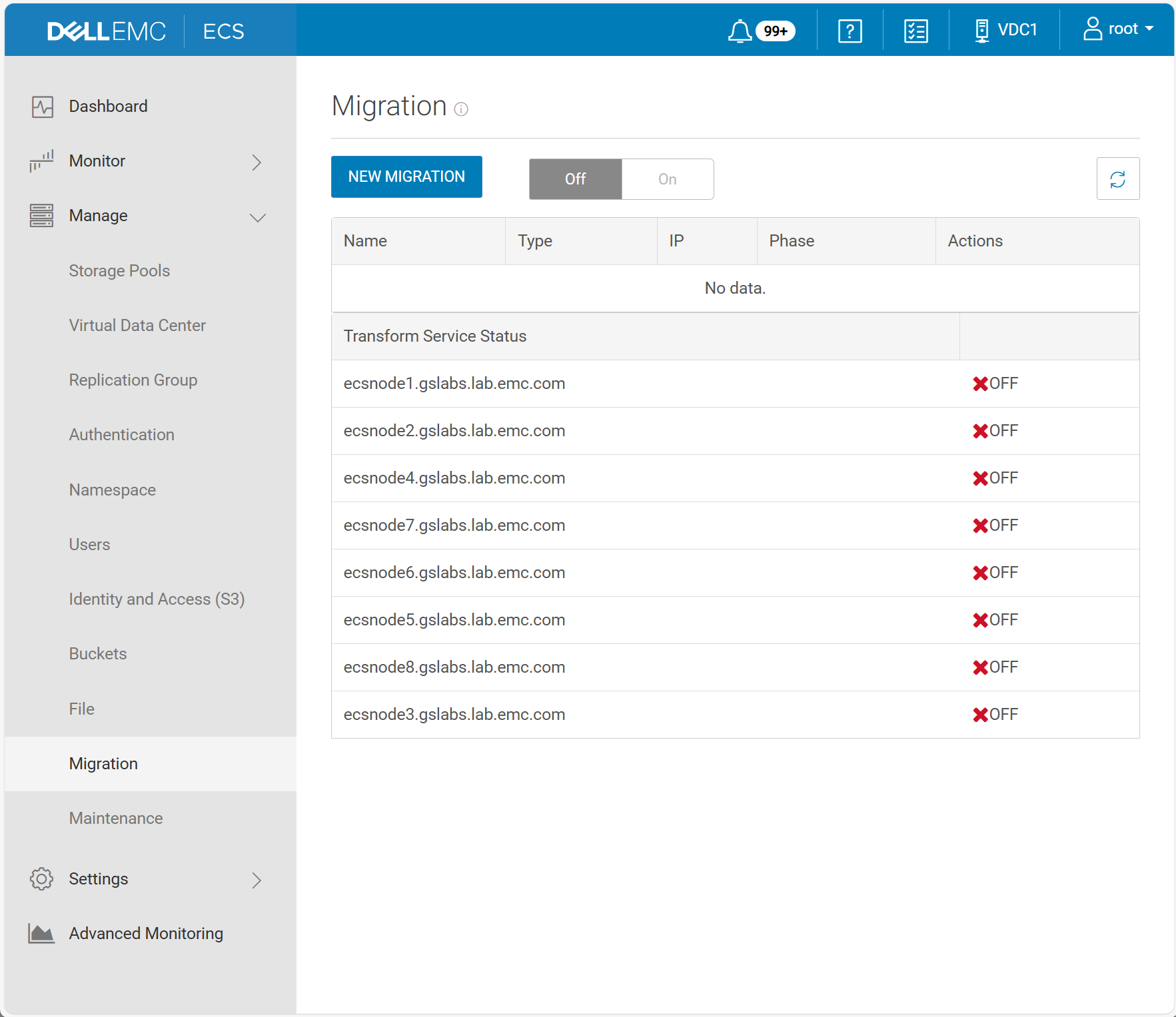
Extra informatie
Pokud nelze deaktivovat transformsvc z grafického uživatelského rozhraní spusťte následující příkazy. Tím se nastaví 'Transformsvc enabled' na 'False'. Poznámka: to vyžaduje uživatelské heslo uživatele root GUI
Příkaz:
#svc_rest_cmd -u root -p <p/w> POST -xml -d '<service_control_param><action>stop</action></service_control_param>' -H "Content-Type: application/xml" /object/transformation/status
#svc_node info all | egrep 'Node at rack|Transformsvc enabled'
Příklad:
admin@Node1:~> svc_rest_cmd -u root -p ChangeMe POST -xml -d '<service_control_param><action>stop</action></service_control_param>' -H "Content-Type: application/xml" /object/transformation/status
svc_rest_cmd 1.0.17

<?xml version="1.0" encoding="UTF-8" standalone="yes"?>
<transform_service_status>
  <data_node_status_list>
    <data_node>Node1</data_node>
    <service_name>TransformSvc</service_name>
    <status>OFF</status>
  </data_node_status_list>
  <data_node_status_list>
    <data_node>Node2</data_node>
    <service_name>TransformSvc</service_name>
    <status>OFF</status>
  </data_node_status_list>
  <data_node_status_list>
    <data_node>Node3</data_node>
    <service_name>TransformSvc</service_name>
    <status>OFF</status>
  </data_node_status_list>
  <data_node_status_list>
    <data_node>Node4</data_node>
    <service_name>TransformSvc</service_name>
    <status>OFF</status>
  </data_node_status_list>
  <data_node_status_list>
    <data_node>Node5</data_node>
    <service_name>TransformSvc</service_name>
    <status>OFF</status>
  </data_node_status_list>
admin@Node1:~> svc_node info all | egrep 'Node at rack|Transformsvc enabled'
Node at rack 1, node 1 (r1n1):
    Transformsvc enabled: False
Node at rack 1, node 2 (r1n2):
    Transformsvc enabled: False
Node at rack 1, node 3 (r1n3):
    Transformsvc enabled: False
Node at rack 1, node 4 (r1n4):
    Transformsvc enabled: False
Node at rack 1, node 5 (r1n5):
    Transformsvc enabled: False
Getroffen producten
ECS, ECS Appliance Hardware Gen3 EX5000, ECS Appliance, ECS Appliance Gen 3, ECS Appliance Hardware Gen3 EX300, ECS Appliance Hardware Gen3 EX3000, ECS Appliance Hardware Gen3 EX500, ECS Appliance Hardware Gen3 EXF900, ECS Appliance Hardware Series
, ECS Appliance Software with Encryption, ECS Appliance Software without Encryption
...
Artikeleigenschappen
Artikelnummer: 000379360
Artikeltype: How To
Laatst aangepast: 21 mei 2026
Versie: 3
Vind antwoorden op uw vragen via andere Dell gebruikers
Support Services
Controleer of uw apparaat wordt gedekt door Support Services.